Gemini Usage Limits: One 15-Message Chat = 43 Short Prompts
Google sells Gemini by a compute budget, not a prompt count. We logged 83 API calls to see what each prompt type uses: a long chat, a 100-page file, thinking, and what the API free tier and paid tiers show.
By Duy Lam Le, written with AI7 min read
Why trust this: every result, number and screenshot comes from a real run on our own accounts, not from the AI. How we test
Google gives Gemini no daily prompt count. Its usage limits are a compute budget that refreshes every 5 hours, so we measured what spends it: on the Gemini API, one 15-message chat cost as much as 43 one-line prompts, and a 100-page file cost 19 of them the first time we asked about it.
Gemini counts compute, not prompts
Google has explained its own limits this way: "Gemini Apps have compute-based usage limits", weighted by "the complexity of your prompt, the models and features you use, and the length of your chat". The allowance refreshes every 5 hours until you hit a weekly cap, and Google publishes no size for either. That is why no one can promise you a number of prompts per day: the same budget buys many short questions or a few heavy ones.
So Gemini plans do not buy you prompts; they buy a bigger budget. Google lists AI Plus at 2x the limits you get without a plan, AI Pro at 4x, and AI Ultra at 5x or 20x AI Pro depending on the subscription, so the largest Ultra tier holds 80 times the free allowance. "How many prompts does Pro get?" therefore has no published answer beyond "4 times whatever the free plan gets". The context window grows with the plan too: 32k tokens without a plan, 128k on Plus, and 1 million on Pro and Ultra. For students weighing the two middle tiers, our Gemini for students Pro vs Plus comparison goes through the difference.
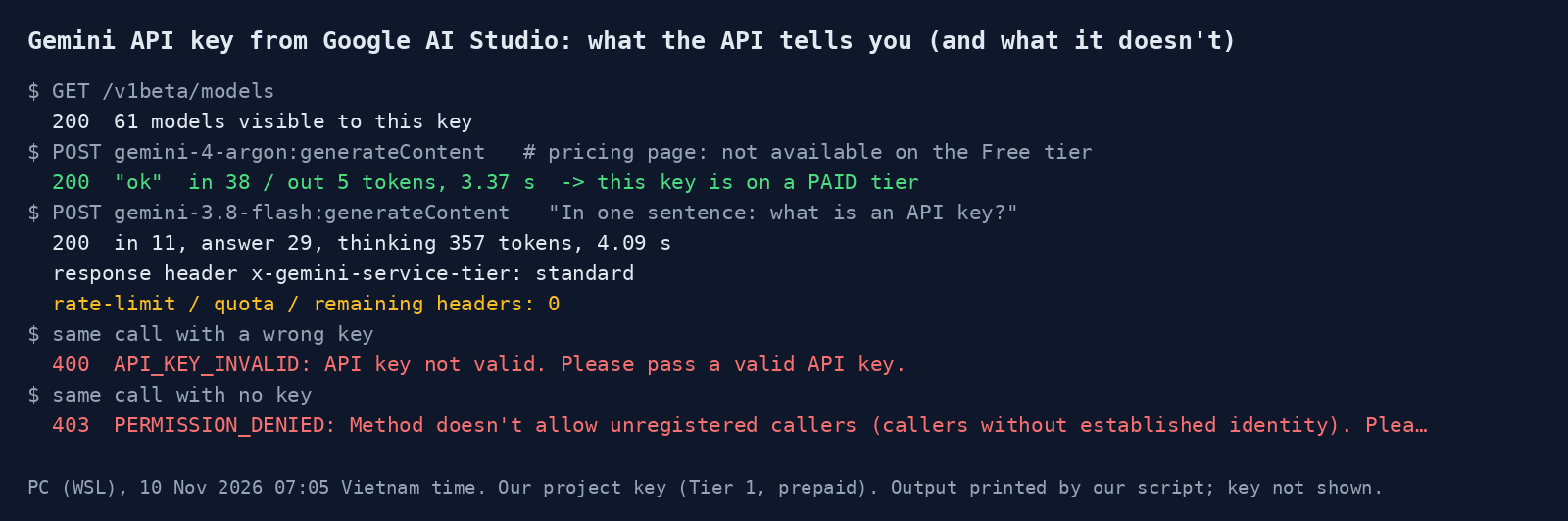
The app shows how close you are to the limit, but not what each prompt took from it. The Gemini API does: every response reports its input tokens, the part of the input served from cache, the answer, and the thinking tokens, which are the reasoning the model writes before answering and which Google bills as output. Google also says AI credits, which AI Pro and Ultra subscribers can buy, "are deducted based on standard API pricing for the specific model and complexity of request", so API token prices are the closest public yardstick for what the app counts.
We ran 83 API calls on 26 November 2026 with gemini-3.8-flash, priced at Google's list rate of $0.75 per million input tokens and $3.75 per million output tokens, valid through 31 December 2026. One short prompt is the unit for every comparison below.
A one-line prompt is mostly thinking you never see
That unit is the lightest case in Google's own examples, "Write a subject line for my email", to which we added a detail: "Write a subject line for my email moving our team meeting to Thursday." It is 15 input tokens. Across three runs the model wrote a median 149 tokens of answer and 325 tokens of thinking before it, so 69% of what it produced was reasoning we never saw as text. At list price that prompt cost $0.0018.
A prompt that needs real reasoning costs more for the same reason. A train-timetable puzzle of 102 tokens drew a median 1,203 thinking tokens for a 38-token answer and cost 2.6 short prompts. Hard questions draw down the budget faster even when the reply is one line. Our earlier Gemini 4 Hydrogen test pointed the same way: that model kept thinking even at its lowest thinking level.
A long chat re-reads itself on every message
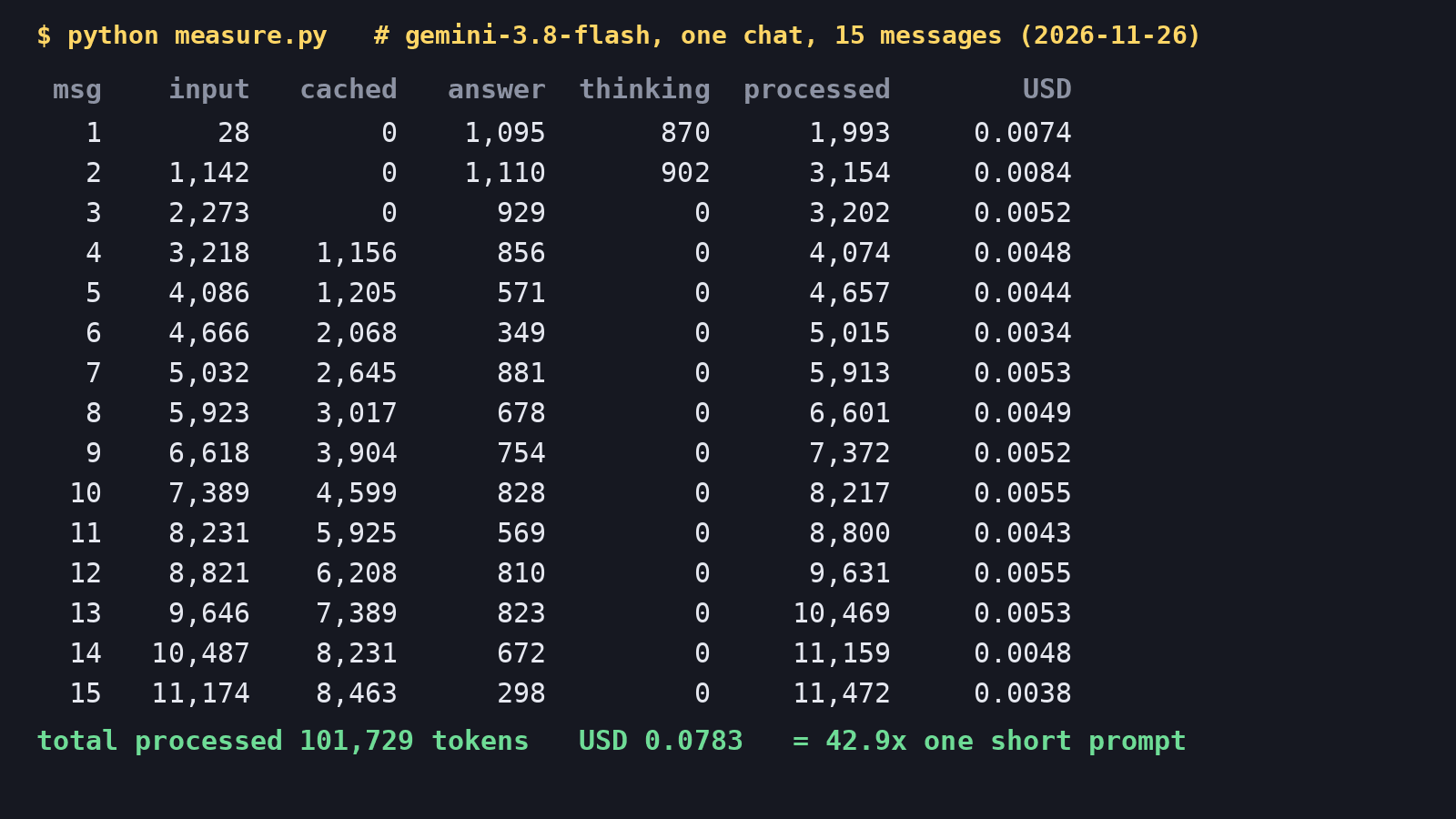
Thinking explains why one prompt costs what it does; chat length explains why a session drains the budget. To answer a follow-up, Gemini reads the whole conversation again. We held a 15-message chat planning a team offsite, and the input grew from 28 tokens on message 1 to 11,174 on message 15, about 400 times as much, for a 298-token reply. Counting the reply, the tokens processed per message rose 5.8 times.
Added up, the chat processed 101,729 tokens and cost $0.0783, or 43 short prompts. The bill did not climb with the token count, though. Google's automatic cache served 62% of the input at a tenth of the input price ($0.075 per million), and the model stopped thinking after message 2, so the last five messages cost 0.78 times the first five. Whether the app's meter discounts re-read history the same way, Google does not say. It does list chat length as a factor and advises "Start a new chat when you move to a new topic", and the input column above shows why.
A 100-page file costs 19 short prompts the first time
A file works like a long chat arriving in one message: Gemini has to read all of it before answering. We gave the model the first 30,000 words of Pride and Prejudice from Project Gutenberg, about 100 printed pages at 300 words a page, which came to 37,592 input tokens, and asked one question about it. That first question cost $0.0350.
Asking the same question about the same text again cost $0.0106, or 5.8 short prompts, because the cache served 35,538 of the 37,592 tokens. We measured that discount on the API only. If the app gives a similar one, ask everything you need from a file in one sitting rather than uploading it again in a new chat later. Note the size too: at 37,592 tokens this file is larger than the 32k context window Google lists for users without a plan.
The API has hard limits but no meter in the response
Gemini limits on the API, including the Gemini free tier, work differently from the app. They are counted in requests per minute, tokens per minute and requests per day, and Google states they "are applied per project, not per API key"; daily quotas reset at midnight Pacific time. A project moves from Free to Tier 1 when it links billing, to Tier 2 after $100 paid plus 3 days, and to Tier 3 after $1,000 plus 30 days. On the Free tier, Google's price page lists input and output for gemini-3.8-flash as free of charge and marks the data as used to improve its products; on paid tiers it is not.
Paid tiers can also carry a spend limit, depending on billing history: $10 per rolling 10 minutes on Tier 1, which answers with the same 429 RESOURCE_EXHAUSTED error as a rate limit. For most models the docs page does not print the per-model numbers; your own project's limits are on the rate-limit page in AI Studio.
Our project is Tier 1 on prepaid billing. We fired 60 short calls at once and all 60 returned HTTP 200 within 8.23 seconds, so Tier 1 allows at least 60 requests a minute for gemini-3.8-flash. None of our 83 responses carried a rate-limit header; the only tier-related header was x-gemini-service-tier: standard. You learn you have hit a limit from the HTTP 429 error itself, not from a countdown. Billing is a limit of its own as well: when our prepaid balance reached zero on 16 November, the same key returned HTTP 402 until we topped it up. To compare how OpenAI and Anthropic set their API rate limits, our AI model pricing and rate limits table has them side by side.
What this test cannot tell you
These numbers come from the API, not the app. The app picks models for you, and Google does not publish how it weights cached tokens, thinking or features when it debits your 5-hour budget, so treat our ratios as a guide to direction, not exact app arithmetic. We measured one model, one chat, one file and one run of each; a chat that keeps thinking on every message, or a file asked about hours later after the cache has expired, would cost more. Deep Research, image, music and video generation, which Google rates as high-cost, were not part of the test.
How to check Gemini usage limits and make them last
To check Gemini usage limits in the app, open gemini.google.com and go to Settings, then Usage Limits. The app also warns you near the cap and tells you when it refreshes. Without a plan, the choice at the cap is to wait for the refresh or upgrade; with a paid plan, Google says you can keep going on Flash-Lite.
Two habits follow from our log: start a new chat for each new topic, and put all your questions about a file in one message. Google also rates Deep Research and media generation as high-cost, so keep them for when you need them. We would try these before upgrading, because a fresh chat costs nothing and clears the history every reply has to re-read. For how Claude meters the same kind of budget, see our Claude Code usage limits breakdown.
How we ran it: 26 Nov 2026, direct calls to the Gemini API generateContent endpoint with our own Tier 1 prepaid key; model gemini-3.8-flash, default settings; prompts and test material in English. Costs are tokens times Google's list price (cached input at $0.075 per million), not a Google invoice; the 83 calls came to about $0.15. An AI assistant helped write the text and the script; every number comes from our own API log.