Google AI Studio API Key: Free Tier Limits and the Catch
How to get a Gemini API key in Google AI Studio, which models the free tier covers, why Google shows your limits only inside AI Studio, and what our paid key revealed: no quota headers and 348 thinking tokens for a one-line answer.
By the RanThis team, written with AI10 min read
Why trust this: every result, number and screenshot comes from a real run on our own accounts, not from the AI. How we test
A Google AI Studio API key is free, and the free tier runs Gemini 3.8 Flash, Flash-Lite and the TTS models at no cost. The catch: Google shows free-tier limits only inside AI Studio. Gemini 4 Argon, Omni video and all Nano Banana image models are paid-only. And free-tier prompts may be used to improve Google's products, with human reviewers.
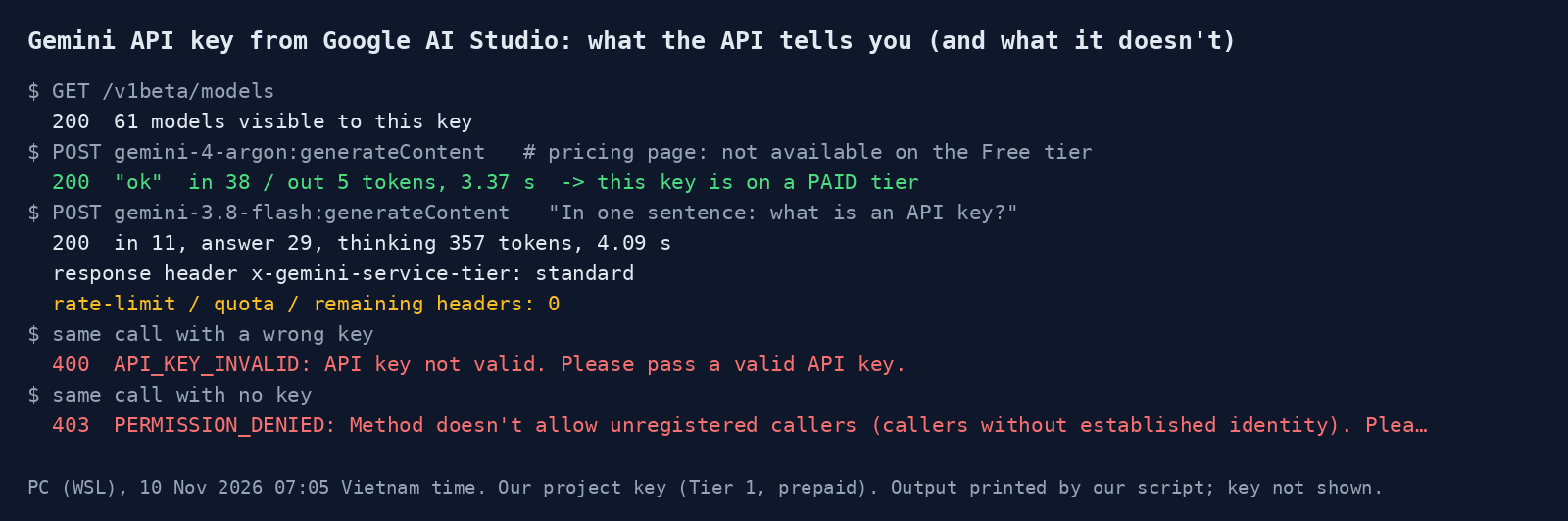
We checked this on 10 November 2026 with the API key our own project already uses. That key is on a paid tier, so it cannot tell us free-tier limits. It did show what the API reports back to you: no remaining-quota headers at all. All free-tier limits below are quoted from Google's own docs.
At a glance
Key results
- Our key is paid, and the API proves it. A call to
gemini-4-argonreturned 200 with "ok". Google's pricing page says "Gemini 4 Argon is not available on the Free tier", so a successful Argon call means the project has billing. - The response does not tell you how much quota is left. A normal
gemini-3.8-flashcall returned one tier header,x-gemini-service-tier: standard, and zero rate-limit, quota or remaining headers. You find out you hit a limit when you get a 429. - Limits are per project, not per key. The rate limits page says so directly, so creating more keys in the same project does not give you more requests.
- A one-sentence answer cost 348 thinking tokens. Across 3 runs, Gemini 3.8 Flash wrote about 30 tokens of answer and 348 tokens of thinking on average, in 4.87 seconds. With
thinkingLevel: "low"it used 0 thinking tokens and took 2.44 seconds. - The free tier trades your data for the price. Google's terms say unpaid quota content is used "to provide, improve, and develop Google products" and that "human reviewers may read, annotate, and process your API input and output".
Hands-on test
Setup
- Date: 10 November 2026, 07:02 to 07:06 Vietnam time.
- Machine: Windows 11 PC, Ubuntu under WSL, Python with
httpx, calling the REST endpointgenerativelanguage.googleapis.com/v1betadirectly. - Key: an existing API key from our Google AI Studio project. The project has a billing account with prepaid credit (added in October 2026), so it is on Tier 1, a paid tier. We did not create a new free-tier project for this test.
- Calls: one
models.list, one Argon call, four Flash calls (one with our default settings plus three repeats), three Flash calls withthinkingLevel: "low", one call with a wrong key and one with no key, plus two Google Search grounded calls to see which pages already answer this question. Total cost under 0.02 USD. - Docs: we downloaded the Markdown versions of Google's rate limits, pricing, billing, API key, verification and terms pages on 10 November 2026 and quote them as written.
How to get a Gemini API key in Google AI Studio
Google's API key page describes the steps. New users do not need to set anything up: "Google AI Studio automatically creates a default Google Cloud project and API key after you accept the Terms of Service."
- Sign in at aistudio.google.com with a Google account and accept the terms.
- Open Get API key (the API Keys page). New accounts already have a default project and key there.
- To add a key, click Create API key and pick a project. Keys made since 28 May 2026 are "authorization keys" by default, tied to a service account.
- Put the key in the
GEMINI_API_KEYenvironment variable. The client libraries pick it up on their own; ifGOOGLE_API_KEYis also set, that one wins. - Keep it on a server. Google's page says not to hardcode keys in web or mobile apps, because "Keys compiled in client-side code can be extracted by users."
Two errors are common in the first hour, and we reproduced both. A mistyped key returns 400 API_KEY_INVALID with "API key not valid. Please pass a valid API key." A request with no key returns 403 PERMISSION_DENIED with "Method doesn't allow unregistered callers". A third one appears on some new projects: Google's verification page says extra projects, or projects created outside AI Studio, may need a phone check before the free tier works, and until then they return 403 with FREE_TIER_VERIFICATION_REQUIRED. The check is a QR code you scan with an Android phone or iPhone. Making a new key does not get around it: "Creating a new API key in the same unverified project does not bypass verification."
What the free tier includes
The pricing page sums up the free tier in four lines: "Limited access to certain models", "Free input & output tokens", "Google AI Studio access" and "Content used to improve our products". We read the Free Tier column of each model's price table on the same page:
Some tools also stay on the paid side. For Gemini 3.8 Flash, the free column lists Grounding with Google Search and Grounding with Google Maps as "Not available", and Computer use is "Not available" on the free tier in the tools table. Code execution, URL context and File search are free of charge. On a paid key, Google Search grounding for Gemini 3 and newer comes with "5,000 free search requests per month", then 14 USD per 1,000.
The pricing page also lists Batch API, Context caching and "Higher rate limits" as Paid features. If your plan needs an image model, a video model or Argon, the free tier is only for testing the code around it.
The limits: where to find them
The rate limits page says limits are measured as requests per minute (RPM), input tokens per minute (TPM) and requests per day (RPD), and that "Requests per day (RPD) quotas reset at midnight Pacific time." For the free tier it gives no table. In its words: "Rate limits depend on a variety of factors (such as your usage tier) and can be viewed in Google AI Studio." The only model with numbers on the page is Omni Flash, and its Free row reads "Not supported".
So the answer to "how many requests do I get for free?" is on the Rate Limit page inside AI Studio, for your own project. Figures in blog posts and forum threads go stale; Google also writes "Specified rate limits are not guaranteed and actual capacity may vary."
Our paid key cannot show free-tier numbers, but it does show how you will learn about a limit. The API sent back no headers about remaining quota, so your code should catch 429 RESOURCE_EXHAUSTED and retry later. For comparison, on Tier 1 we did hit one limit in October 2026: gemini-3.8-flash-tts stopped us at 100 requests per day. That is a paid-tier figure, not a free one.
Free vs paid: what $5 changes
The billing page says that moving to the paid tier means "linking a billing account and prepaying to add a minimum of $5". Once you have a billing account, the rate limits page lists these tiers:
Three things about prepay from the billing page are worth knowing before you add a card. Unused credits "expire after 12 months and are non-refundable". When the balance hits $0, "all API keys in all projects linked to that billing account will stop working simultaneously" and requests fail with HTTP 402. That happened to us at the end of October 2026, and calls failed until we topped up. And the paid tier does not fall back to free: the API "will only serve requests if you have a positive Prepay credit balance".
The other change is data. For paid services, the terms say Google "doesn't use your prompts … or responses to improve our products". For unpaid quota, the terms say: "Do not submit sensitive, confidential, or personal information to the Unpaid Services." There is also a regional rule: you may use "only Paid Services when making API Clients available to users in the European Economic Area, Switzerland, or the United Kingdom."
Save tokens with thinking level
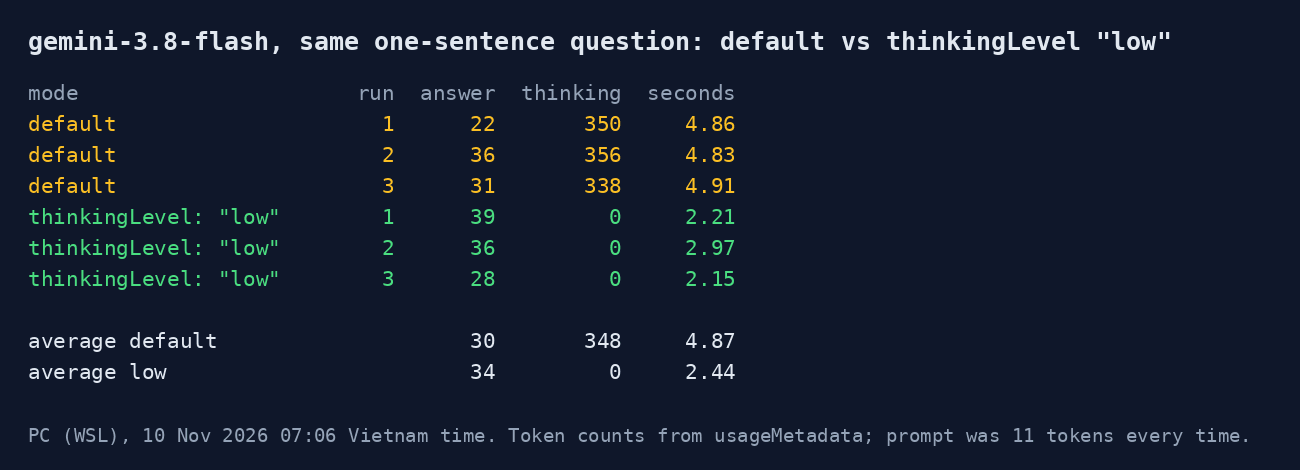
Gemini 3.8 Flash thinks before it answers unless you tell it not to. We asked "In one sentence: what is an API key?" three times with default settings and three times with generationConfig.thinkingConfig.thinkingLevel set to "low". Default runs spent 338 to 356 thinking tokens on a 22 to 36 token answer. Low runs spent 0 and returned answers of similar length, about twice as fast.
On a paid key this is money: the pricing page bills output "including thinking tokens", so at the current 3.75 USD per million output tokens our default call cost about 0.0015 USD and the low one about 0.00014 USD, roughly 10 times less. On the free tier the tokens cost nothing, but the faster answer is still worth having for short, simple tasks. Keep the default for reasoning, code and long documents.
What worked
What worked
- Getting a key takes minutes, and new accounts get a project and key automatically.
- The free tier covers the models most people start with: 3.8 Flash, Flash-Lite, TTS and embeddings.
- Error messages are clear: wrong key and missing key give different codes and plain-English messages.
thinkingLevel: "low"cut thinking tokens from about 348 to 0 on simple prompts.
Where it fell short
What didn't work
- No published free-tier RPD table: you have to open AI Studio to see your own limits.
- No quota headers in API responses, so you only learn about limits from a 429.
- Argon, Omni video, Nano Banana images, Lyria, Search grounding and Batch need a paid key.
- Free-tier prompts can be read by human reviewers, which rules it out for client or personal data.
Our verdict
Start on the free tier if you are learning the API or building a prototype with Flash, Flash-Lite or TTS, and send it only text you would be happy to have reviewed. Move to the paid tier with the $5 minimum the moment you touch real user data, serve users in the EEA, Switzerland or the UK, or need Argon, images, video or grounding. Whichever tier you are on, check your real limits on AI Studio's Rate Limit page instead of trusting a number from a blog, catch 429s in code, and set thinkingLevel to "low" for short tasks. If you are weighing the Gemini app plans instead of the API, that is a different product with different limits: see Gemini for students, Pro vs Plus. For a paid-only model in action, see our Gemini Omni 1.2 Flash test.
FAQ
Is a Google AI Studio API key free?
Yes. Creating a key costs nothing, and new accounts get a default project and key automatically. Calls on the free tier are "Free of charge" for models such as Gemini 3.8 Flash and Flash-Lite. Paid-only models like Gemini 4 Argon need a billing account with at least $5 of prepaid credit.
How many requests does the Gemini API free tier allow?
Google does not publish a free-tier table. Its rate limits page says your limits "can be viewed in Google AI Studio", on the Rate Limit page for your project. Limits apply per project, not per key, and daily quotas reset at midnight Pacific time.
Does Google use my free-tier prompts for training?
Google's terms say content sent to unpaid services is used "to provide, improve, and develop Google products and services and machine learning technologies", and that human reviewers may read it. On the paid tier, Google says it does not use prompts or responses to improve its products. Users in the EEA, Switzerland and the UK get the paid-tier data terms even on free quota.
Why does my new Gemini API key return 403?
A missing key returns 403 PERMISSION_DENIED. On some new projects, the 403 is FREE_TIER_VERIFICATION_REQUIRED: the project needs a phone QR verification before it can use the free tier, or a billing account instead. A new key in the same project does not skip the check.
Sources
- Google AI Studio docs – Rate limits: usage tiers, per-project limits, where to view them (read 10 Nov 2026)
Vendor document
- Google AI Studio docs – Gemini Developer API pricing: Free vs Paid tier per model (read 10 Nov 2026)
Vendor document
- Google AI Studio docs – Using Gemini API keys (read 10 Nov 2026)
Vendor document
- Google AI Studio docs – Billing: Prepay, $5 minimum, 402 at zero balance (read 10 Nov 2026)
Vendor document
- Google AI Studio docs – Project and account verification for the free tier (read 10 Nov 2026)
Vendor document
- Gemini API Additional Terms of Service – Unpaid vs Paid Services data use (read 10 Nov 2026)
Vendor document