OpenAI Prompt Caching Not Working? A Timestamp Cost Us 25%
We sent 249 requests to GPT-6 Luna and GPT-6.2 Sol. The default cached 99.7% of a 4,600-token prompt; one timestamp line at the top cached 0% and cost 25% more than no cache.
By Duy Lam Le, written with AI12 min read
Why trust this: every result, number and screenshot comes from a real run on our own accounts, not from the AI. How we test
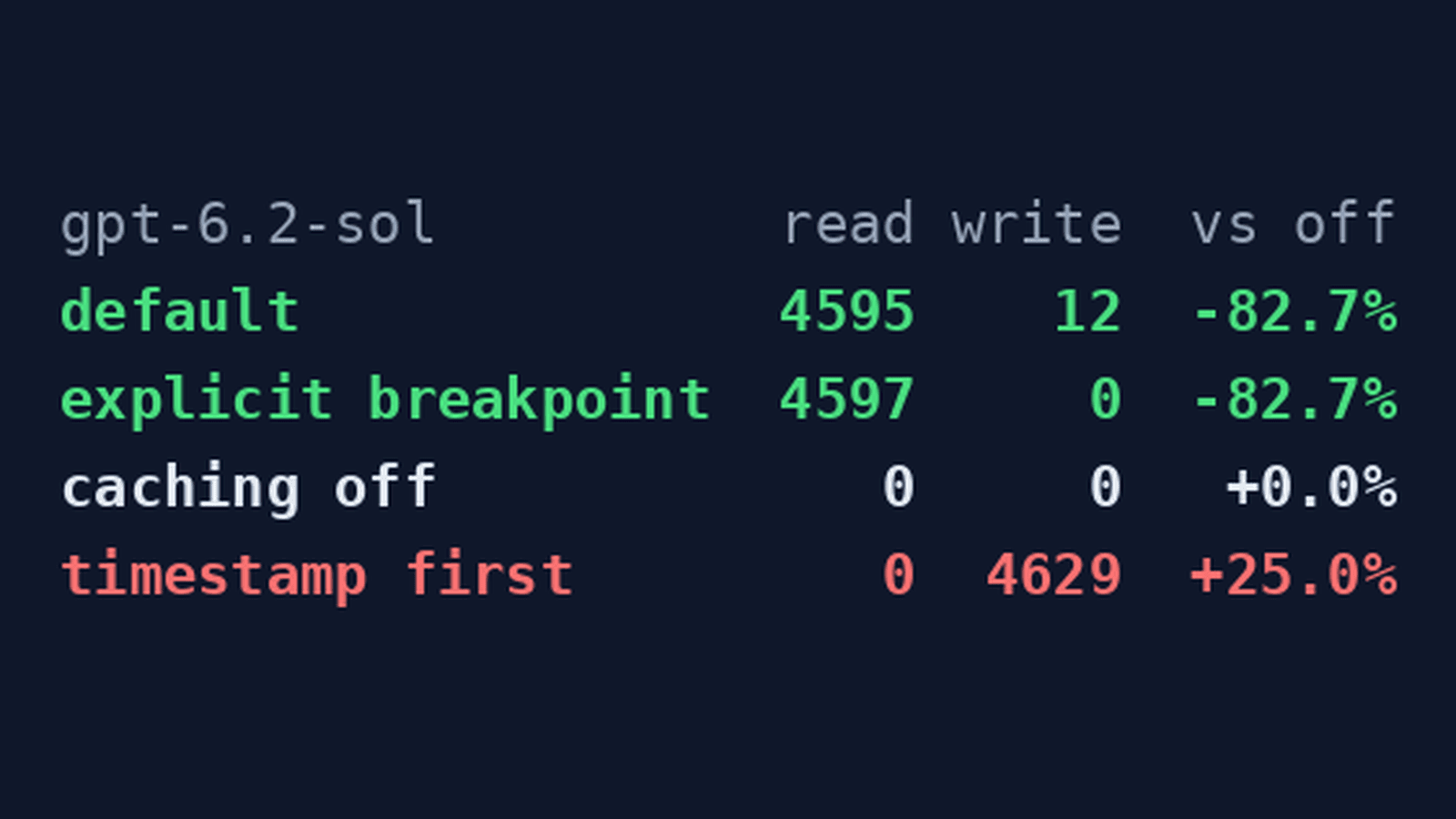
If OpenAI prompt caching is not working, look at the top of your prompt first. In our test, one timestamp line before a 4,600-token handbook cut cached tokens from 4,594 to 0 on every request, and input cost 25% more than with no caching. Without the timestamp, the default settings cached 99.7% of the input from the second request on.
At a glance
Key results
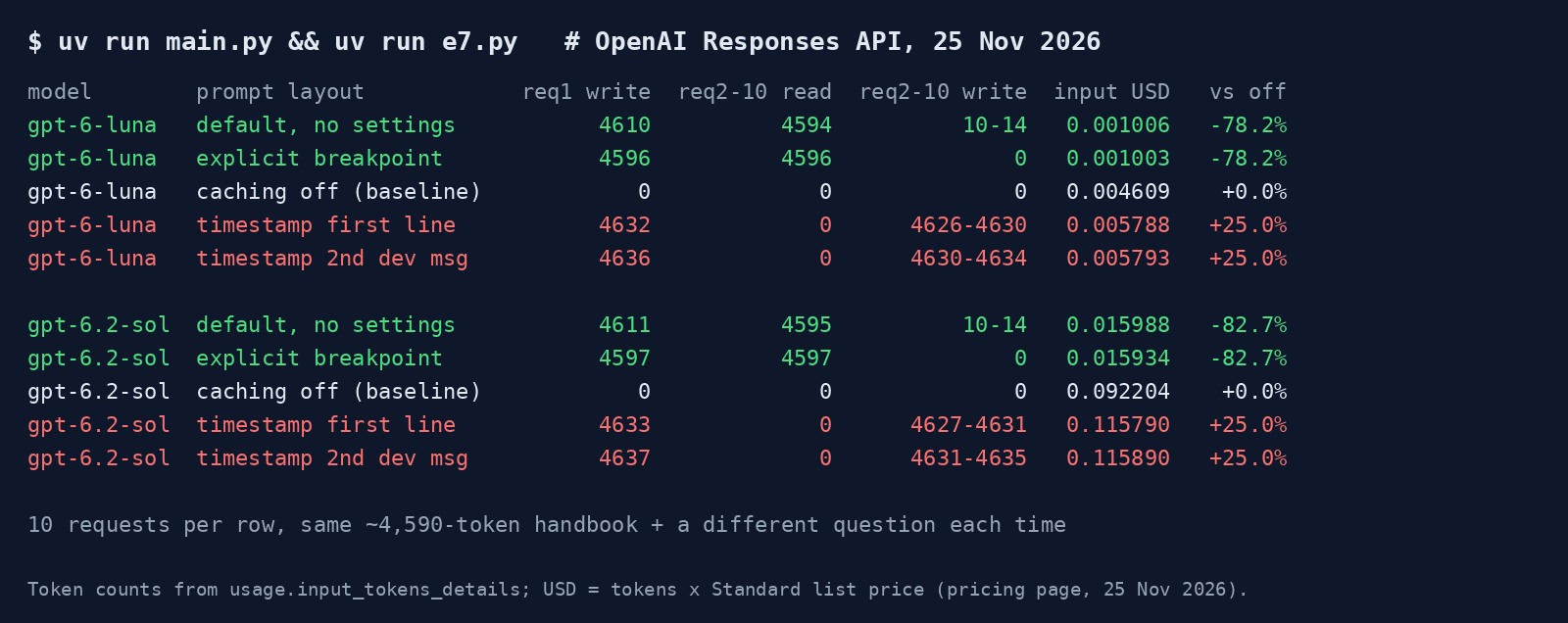
- The default works. On GPT-6 Luna and GPT-6.2 Sol, requests 2 to 10 each read 4,594 or 4,595 tokens from the cache out of about 4,609. Input cost fell 78.2% on Luna and 82.7% on Sol against the same 10 requests with caching switched off.
- A timestamp at the top cost 25% more than no cache. With "Current time: …" as the first line, or as a second developer message, 0 tokens were read on all 10 requests, and every request paid the 1.25× cache-write rate on about 4,630 tokens.
- Under about 1,000 tokens, nothing happens. A 920-token prompt wrote and read 0 tokens. A 1,067-token prompt wrote 1,048 and read 1,048 the next time.
- Five requests at once still shared one write. We sent 5 requests with a new prefix in parallel: 1 wrote the cache, the other 4 read it.
- Speed was a coin toss. On a 38,500-token prompt, cached requests started streaming no faster on Luna (median 1.72 s against 1.62 s) and faster on Sol (1.56 s against 2.63 s), with wide spreads on both.
- The 30-minute cache ended at 30 minutes. A prefix left alone for 10 minutes was still read (4,588 tokens). After 31 minutes it was gone in all 3 checks on both models, and the next request paid the 1.25× write again. The 12-hour lifetime was still read at 31 minutes.
Hands-on test
Setup
- Models:
gpt-6-luna(reasoning effortnone) andgpt-6.2-sol(effortlow, its lowest setting), Responses API, Standard processing, 25 November 2026, from one API key. - The prompt: a synthetic support handbook we generated for the test: a returns policy plus a table of 150 made-up products, about 4,590 tokens, sent as a developer message. Each request then asked one different short question as the user message, such as "What is the price of NW-1017?".
- Ten requests per layout, one after another, each layout with its own fresh handbook so no run could reuse another run's cache.
- What we logged:
input_tokens,cached_tokens,cache_write_tokensand its 30-minute and 12-hour parts, latency, and the request ID. Costs are those token counts times the Standard prices on OpenAI's pricing page on 25 November 2026. Our whole test, 249 requests, cost about 1.50 USD at those prices. - Docs: the official prompt caching guide and pricing page, read on 25 November 2026.
How OpenAI prompt caching works now
The guide says "Prompt caching is enabled by default for supported OpenAI models." It saves the model's work on the unchanged beginning of a prompt, the prefix, and reuses it when the next request starts the same way. Two things changed with GPT-5.6 and later models, and both matter for the bill:
- Writing to the cache now costs extra. In the guide's words: "cache writes cost 1.25× the standard, uncached input-token rate for the default 30-minute lifetime." A 12-hour lifetime costs 2.5×.
- Reading is cheap. Reads cost 0.1× the input rate on most models, and 0.05× on GPT-6.2 Sol and three others.
So caching only pays when the same prefix comes back. If it never comes back, you pay 25% more than without caching. That is what happened in our timestamp test.
OpenAI prompt caching example: what the default did
Our base case was the simplest app: the same handbook as a developer message, then a new question each time, and no caching settings at all.
The first request wrote the whole prompt. From the second request on, the handbook was read from the cache and only the new question, 10 to 14 tokens, was written. We also tried three other layouts: the handbook as a plain string instead of a content block, prompt_cache_options.mode set to implicit on purpose, and an explicit breakpoint after the handbook. All three gave the same 78.2% and 82.7% savings. The explicit breakpoint was the only one that wrote 0 tokens after the first request, because nothing after the breakpoint is written.
One surprise: the guide warns that with only the default breakpoint, a static developer message followed by a changing user message "does not make the shorter shared prefix reusable". In our runs it did, on both models and both message formats. We would still add the explicit breakpoint, since it costs nothing and does not depend on that behavior.
OpenAI prompt caching not working: the timestamp trap
Many apps put the date or time at the top of the instructions. We tried two versions on the same handbook:
- Timestamp first:
Current time: <UTC time to the microsecond>as the first line of the developer message. - Timestamp in a second developer message, right after the handbook.
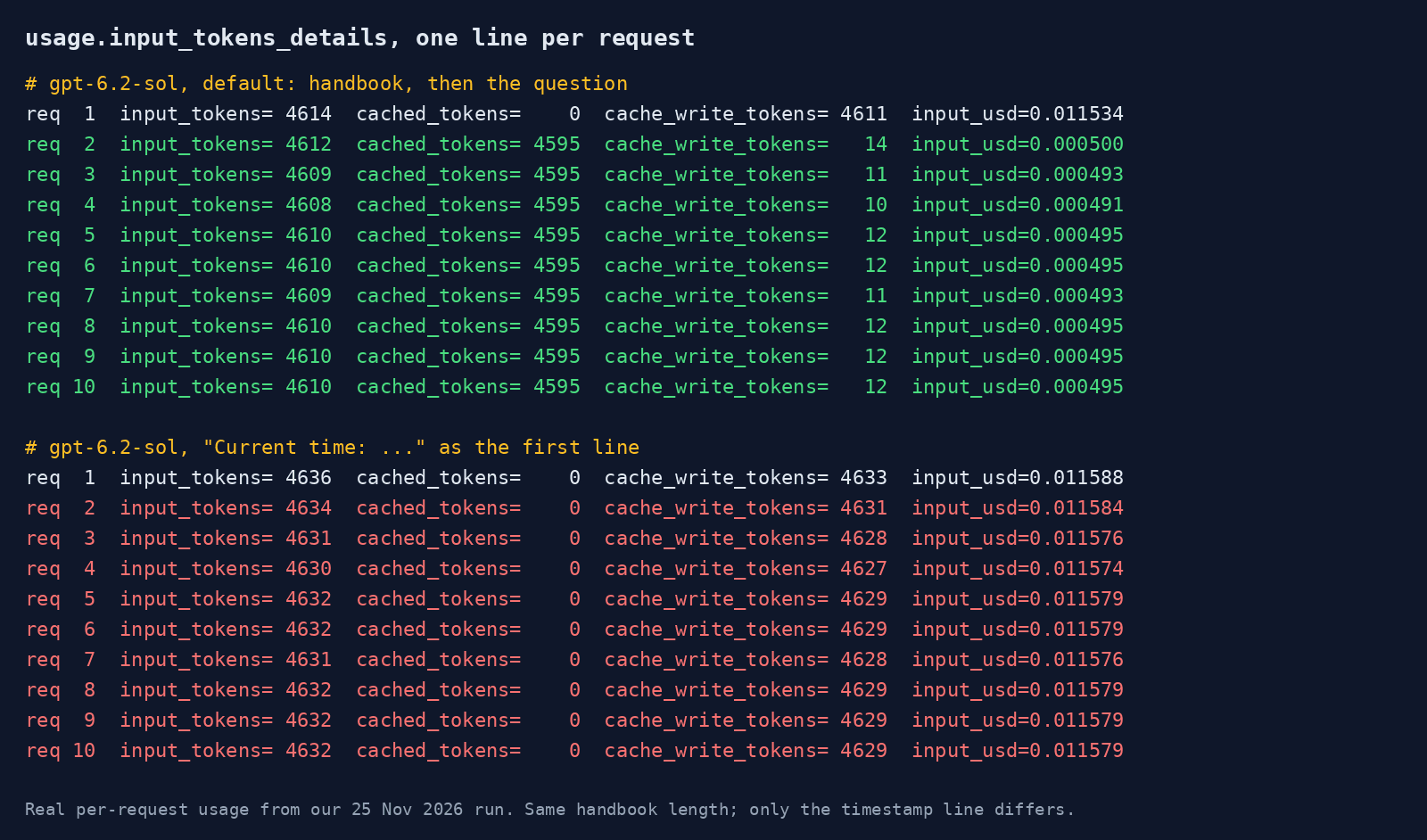
The first result is what you would expect: a prefix that changes on every request can never match. The second one is easier to miss. The guide tells you to move dynamic content "into later conversation messages", but a second developer message straight after the first does not count as later. Implicit mode looks up "the endpoint of the initial consecutive block of developer messages", and with the timestamp inside that block, the block ends after the timestamp.
Three fixes, cheapest first:
- Put the time in the user message, after the handbook.
- Or put a user or assistant message between the handbook and the timestamp.
- Or mark the end of the handbook with
"prompt_cache_breakpoint": {"mode": "explicit"}and set"prompt_cache_options": {"mode": "explicit"}, so everything after the breakpoint is never written.
The same rule catches user names, session IDs and anything else that changes and sits above your long, stable text. If your AI model pricing plan assumes the 90% cached-input discount, check your logs for cached_tokens: 0 before you trust it.
Too short to cache: the 1,024-token floor
The guide puts the minimum at 1,024 tokens for GPT-5.6 and later. We cut the handbook down and sent each size twice on Luna with an explicit breakpoint:
Below the floor nothing was written, so a short prompt costs no write fee, and it also gets no discount. The guide has a formula for when padding a short prefix up to 1,024 tokens with useful, stable text pays off: across 10 requests, a prefix of at least 221 tokens; with many more requests, the line moves down toward about 102.
OpenAI prompt caching pricing: 1,000 requests
We took the average token counts from our runs and priced 1,000 requests of the same shape, with the cache kept warm:
Input only, at the Standard prices on 25 November 2026: Luna 0.10 USD per million input tokens, 0.01 cached, 0.125 for a 30-minute write; Sol 2.00, 0.10 and 2.50. Sol's 0.05× read rate is why it saves more in percent. If you are choosing between Sol and the bigger model, our GPT-6.2 Sol vs Astra test measured both on the same task.
These prices were read on 25 November 2026. We will re-read the pricing page and re-run the 10-request default test on 25 December 2026, and update this table if anything changed.
OpenAI prompt caching TTL: what lasted past 30 minutes
We wrote 4,588-token prefixes, left each one alone, and sent exactly one more request after a set wait. Each check had its own prefix, so no check could refresh another one's cache. We ran this twice; the first run was cut short after the 31-minute checks.
The guide says "OpenAI may retain entries longer than the requested minimum". In our run it did not: one minute past the 30-minute minimum, the cache was gone in all 3 checks. The "12h" prefixes, written the same way, were still read at 31 minutes (4,588 tokens on both models). So the longer lifetime does what it says, at 2.5× for the write. Two things follow:
- Every read resets the clock. The guide: "A 30-minute read refreshes coverage to at least 30 minutes after that read." An app that sends a request every few minutes keeps its cache warm without doing anything.
- Gaps longer than 30 minutes cost a new write. The first request after each quiet spell pays 1.25× on the whole prefix again. The
"12h"lifetime costs 2.5× once instead. By our arithmetic, it pays off when the 30-minute cache would be written more than twice in 12 hours, which means more than one quiet spell longer than 30 minutes, as with a support bot that goes quiet for an hour at a time.
Parallel requests and long chats
- Five at once: with a brand-new handbook, we sent 5 requests on Luna at the same moment from 5 threads. One wrote 4,586 tokens; the other 4 read 4,586 tokens each. We had expected 5 separate writes. We did not log exact send times, so take this as one run, not a rule.
- A six-turn chat: each turn added the previous answer and a new question to the same conversation, with default settings. Turn 1 wrote 4,602 tokens. Turns 2 to 6 read 4,602, then 4,633, 4,660, 4,702 and 4,735 tokens, and wrote only the 25 to 42 new tokens each. Each of those turns cost about 89% less input than without caching.
The guide adds a limit for busy apps: "Cached states live on individual machines, where traffic above 15 requests per minute can lead to overflow routing." Our tests stayed well under that rate.
Is a cached request faster?
Not reliably in our test. We streamed a 38,500-token prompt and timed the first text token, alternating cached and uncached requests:
Sol looked about a second faster, Luna not at all, and the ranges overlap on both. The guide says as much: the cache lifetime "does not guarantee that every request reuses stored KV tensors or has lower latency." Count on the cost saving, not on speed.
OpenAI prompt caching API: the fields to log
Every Responses API reply carries the numbers you need in usage.input_tokens_details:
{
  "input_tokens": 4610,
  "input_tokens_details": {
    "cached_tokens": 4595,
    "cache_write_tokens": 12,
    "cache_write_tokens_details": {"ttl_30m_tokens": 12, "ttl_12h_tokens": 0}
  }
}
That is a real reply from our Sol run. Input cost = (input − cached − written) × input price + cached × cached price + written × write price. Two checks catch most problems:
cached_tokensstays at 0 after the first request: something near the top of your prompt changes, or the prompt is under 1,024 tokens.cache_write_tokensis close toinput_tokenson every request: you are paying the write fee for nothing. That was our timestamp case.
Cached tokens still count toward your tokens-per-minute rate limit, the guide says, so caching lowers the bill but not your rate-limit usage. If you run these requests on the free API credits that come with ChatGPT Pro or Business, our ChatGPT Pro API credits test shows how far a month of them goes.
What worked
What worked
- Default settings with a stable developer message: 99.7% of input read from the cache from request 2 on, on both models.
- An explicit breakpoint after the stable text: the same saving and 0 written tokens after the first request.
- Logging
cached_tokensandcache_write_tokensfor every request. Without them the timestamp problem looks like normal traffic.
Where it fell short
What didn't work
- Any changing text above the handbook, including a second developer message. 0 cached tokens and 25% more input cost.
- Prompts under about 1,000 tokens. No cache at all.
- Expecting speed. Cached and uncached first-token times overlapped.
- Our test is one API key, two models, 249 requests on one day. Busy apps with many users can see more misses than we did.
Our verdict
Leave OpenAI prompt caching on, but read cached_tokens in your logs this week. If it is 0 after the first request, move anything that changes, especially the date and time, below your long instructions, or add an explicit breakpoint after them. On GPT-5.6 and later, a cache that never gets read is not free: in our test it cost 25% more than no cache at all.
FAQ
Why is OpenAI prompt caching not working?
The two causes we reproduced: something that changes on every request sits above your long text, such as a timestamp, or the prompt is under 1,024 tokens. Both showed cached_tokens: 0 on every request.
Does OpenAI prompt caching cost money?
On GPT-5.6 and later, yes. Writing costs 1.25× the input price for 30 minutes or 2.5× for 12 hours, and reading costs 0.1× (0.05× on GPT-6.2 Sol). A prefix you write and never read costs 25% more than no caching.
How long does the OpenAI prompt cache last?
Plan for 30 minutes after the last request that read it. A prefix checked again after 10 minutes was still cached; after 31 minutes it was gone, on both GPT-6 Luna and GPT-6.2 Sol. The 12-hour lifetime, 2.5× the input price for the write in the Responses API, was still read at 31 minutes.
Do I need prompt_cache_key on GPT-6 models?
Not to get hits. We used none and got 99.7% cached input. The guide says that on GPT-5.6 and later the key is optional and mainly separates cache accounting between your users.
Claude, the AI assistant, wrote the test scripts, ran the 249 requests and wrote this page. Every number comes from the usage fields in OpenAI's own API replies, logged per request; every quote and price was checked against the OpenAI documentation linked above on 25 November 2026.