Claude Code Workflow Tested: Planning First Cost 2.4x
Same bug, four ways to organize Claude Code: one prompt, plan then execute, CLAUDE.md and a skill. All four made the same fix; CLAUDE.md added 6% to the cost, a skill 10%, planning first 144%.
By Duy Lam Le, written with AI8 min read
Why trust this: every result, number and screenshot comes from a real run on our own accounts, not from the AI. How we test
A Claude Code workflow is the order in which Claude works: read, plan, change, check. We gave Claude one small bug and organized the work four ways: one prompt, plan then execute, steps in CLAUDE.md, and a skill. All four made the same one-line fix. Planning first in a separate call cost 2.4 times as much as one prompt and took twice as long.
At a glance
Key results
- Same fix, 4 out of 4. Every case changed the same line of
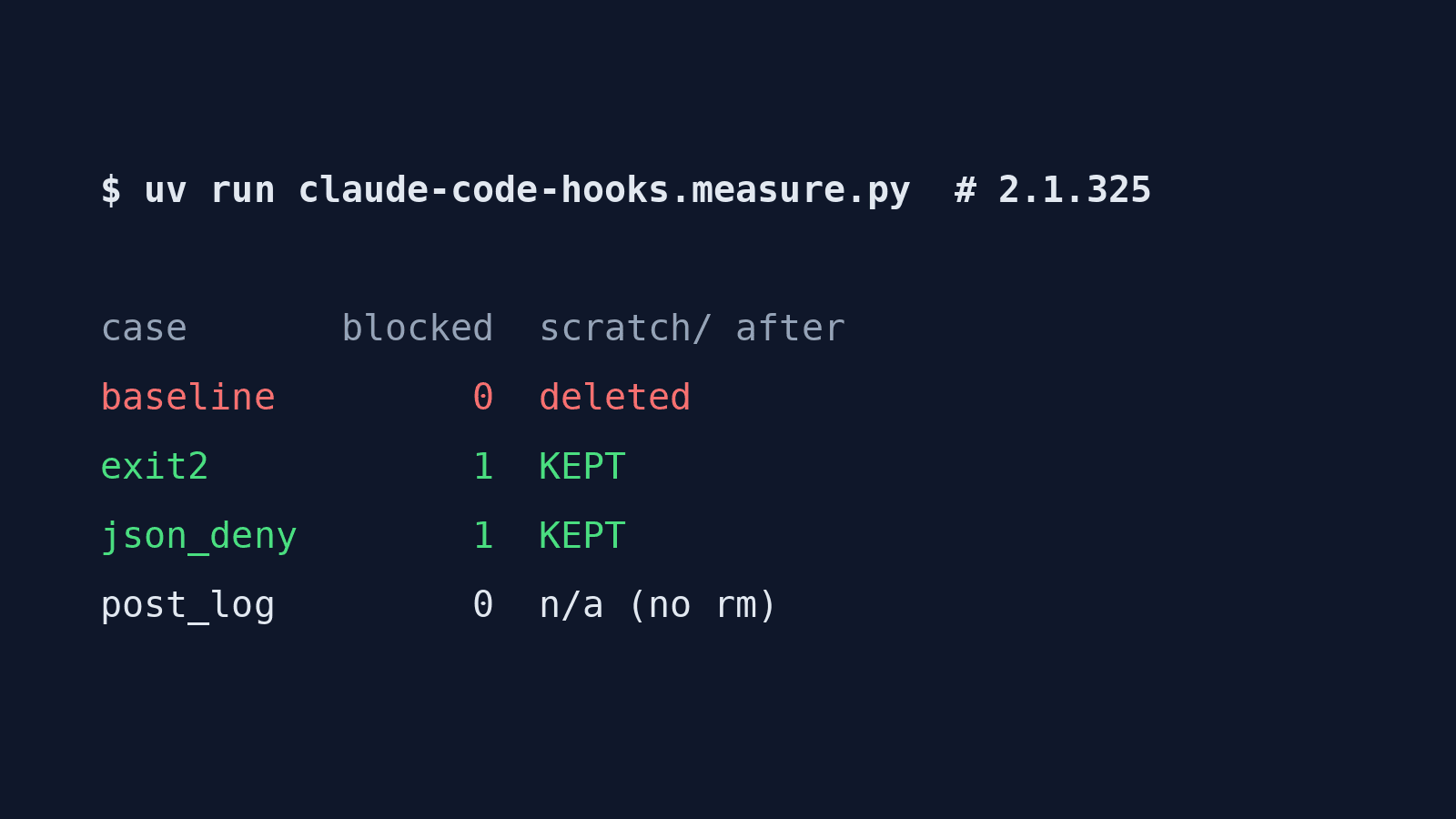
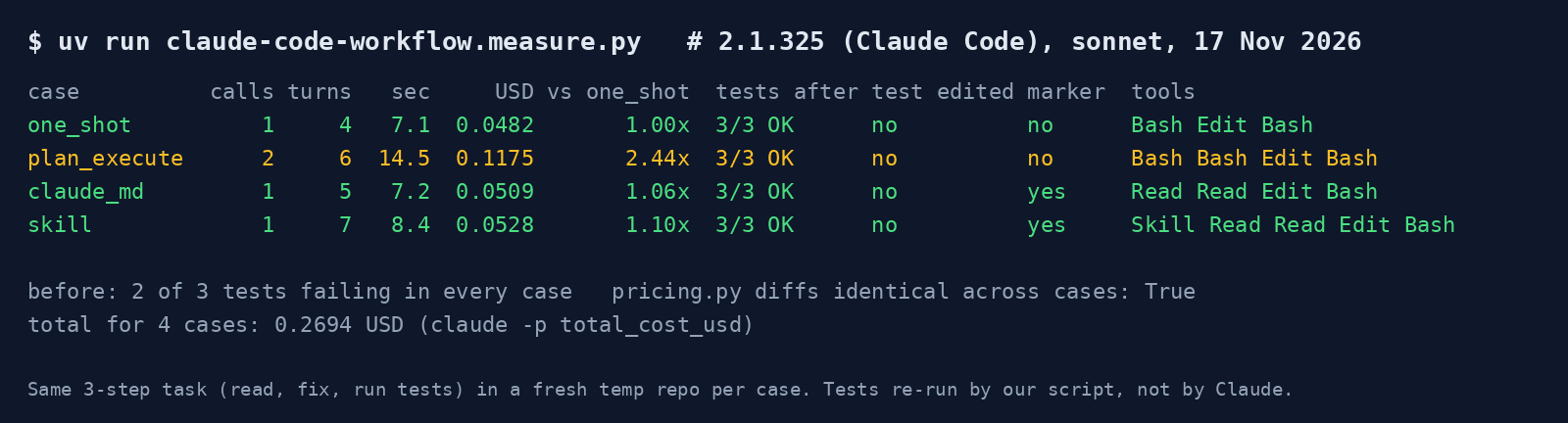
pricing.py, the diffs were identical, the 2 failing tests passed, and no case touched the test file. We re-ran the tests ourselves after each case. - Plan, then execute cost 2.4 times as much. 0.1175 USD and 14.5 seconds over 2 calls and 6 turns, against 0.0482 USD and 7.1 seconds for one prompt. The second call re-read the whole first conversation: 103,077 cached input tokens against 54,486.
- CLAUDE.md added 6% to the cost. 0.0509 USD, 7.2 seconds. Claude read both files with the
Readtool before editing, ran the tests verbosely, and ended with the check line the file asked for. - A skill added 10%. 0.0528 USD, 8.4 seconds, 7 turns. Claude loaded the skill first, then did exactly the same steps as with
CLAUDE.md. - The plan was good, but the fix did not need it. Claude's plan named the cause and the exact line before any edit. For a one-line bug, that is twice the time and money for the same result.
Hands-on test
Setup
- Claude Code: version 2.1.325, model Sonnet, run headless with
claude -pon a laptop signed in to a paid Claude plan, 17 November 2026. Costs are thetotal_cost_usdthatclaude -preports. - The repo: a two-file Python project made for the test, in a fresh temporary folder for each case.
pricing.pyhas a bug:apply_discountsubtractsprice * percentinstead ofprice * percent / 100.test_pricing.pyhas 3 unit tests; 2 fail before the fix. - Permissions:
--allowedTools Read Edit Write Bash Glob Grepand--permission-mode acceptEdits.--setting-sources project, so the folder's ownCLAUDE.mdand skill loaded but no settings from the machine did. - Checks by our script, not by Claude: tests run before and after each case, a hash of the test file, the diff of
pricing.py, and the tools Claude called, read from the stream JSON output. - Docs: the official common workflows, memory (CLAUDE.md), skills, dynamic workflows and permissions pages, read on 17 November 2026.
Claude Code workflow example: the task
The bug, as Claude saw it:
def apply_discount(price: float, percent: float) -> float:
    """Return the price after a percent discount (percent=10 means 10% off), rounded to cents."""
    return round(price - price * percent, 2)
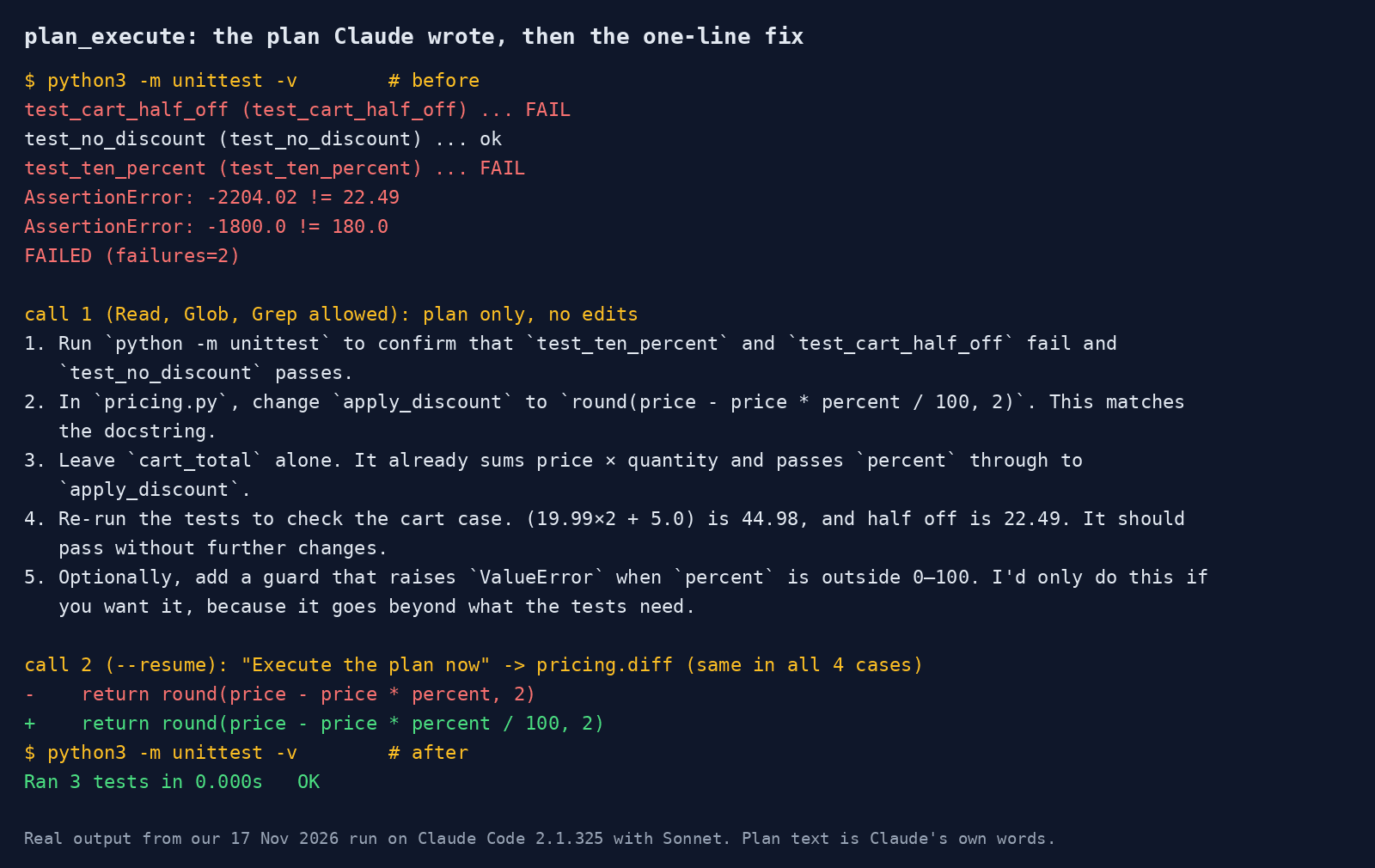
Before the fix, test_ten_percent got -1800.0 instead of 180.0 and test_cart_half_off got -2204.02 instead of 22.49. The fix every case made:
-    return round(price - price * percent, 2)
+    return round(price - price * percent / 100, 2)
The four ways we organized the same work:
Plan first, then execute
Call 1 returned a plan that started with "Nothing has been edited." It named the cause ("The code treats it as a fraction"), the exact new line, and even checked the cart test by hand: "(19.99×2 + 5.0) is 44.98, and half off is 22.49". Step 5 offered an optional range check and said it would only add it if asked. In call 2 it did not add it.
Two things we did not expect:
- The plan call ran a shell command. We allowed only
Read,GlobandGrep, yet Claude ranls -la && head -c 3000 *.py *.js *.ts 2>/dev/nullthrough Bash. Claude Code's permissions page explains it: a built-in set of read-only commands, includinglsandhead, runs "without a permission prompt in every mode". No file changed in call 1, which our script checked. - Most of the extra cost was re-reading. Call 1 cost 0.0455 USD and call 2 cost 0.0720 USD. Call 2 resumed the session, so it carried the whole first conversation as cached input.
In an interactive session, the docs offer plan mode for the same idea: "Claude reads files and proposes a plan but makes no edits until you approve." We tested the two-call headless version, not plan mode.
CLAUDE.md: steps Claude reads every session
The memory docs say Claude reads CLAUDE.md files "at the start of every session". Our file listed 4 steps and asked for a final line, WORKFLOW-CHECK: read, fixed, tests run. Claude followed all of them: it opened pricing.py and test_pricing.py with Read (the one-prompt run had used head in Bash instead), made the edit, ran python3 -m unittest -v, and ended with the check line. Cost: 0.0027 USD more than one prompt.
The same docs add a limit: Claude treats these files "as context, not enforced configuration". For a rule that must never break, they point to a hook instead.
Claude Code workflow vs skill
With the steps in a skill, Claude's first tool call was Skill, which loaded the 4 steps, and then it did the same Read, Read, Edit, Bash sequence as the CLAUDE.md run. It took 2 more turns and 0.0019 USD more than CLAUDE.md.
The difference is when the steps load. The skills docs: "Unlike CLAUDE.md content, a skill's body loads only when it's used". So:
- Put it in
CLAUDE.mdif it should apply to almost every task in the repo, like "never edit the tests". - Put it in a skill if it is a procedure you need sometimes, like a release checklist. You pay for it only when it runs.
Our guide to creating a Claude skill walks through writing one.
Claude Code workflows feature: dynamic workflows
"Workflows" is also the name of a Claude Code feature, and it is something else. The docs describe a dynamic workflow as "a JavaScript script that orchestrates many subagents at once", which Claude writes for your task and a runtime runs in the background. The docs' comparison table puts it in one line: skills are "Instructions Claude follows", workflows are "A script the runtime executes".
We did not use it in this test, because one bug in two files needs one agent, not dozens. We measured it on a 200-file audit in our Claude Code workflow with Haiku test.
Claude Code workflow cheatsheet
What worked
What worked
- Checking results with our own script. The tests, the diff and the test-file hash came from outside Claude.
CLAUDE.mdand the skill. Claude followed every step, including the check line, at a small cost.- The plan itself. It was correct, specific and kept the optional change optional.
Where it fell short
What didn't work
--allowedToolsdid not keep the plan call away from the shell. Read-only commands ran anyway. To block them, the permissions page says to add adenyoraskrule.- The task was small. On a one-line bug, planning had nothing to catch. On a change across many files, the extra 0.07 USD may pay for itself; we did not test that.
- One run per case. Costs and times will vary between runs.
Our verdict
For everyday fixes, write your workflow steps in CLAUDE.md: they cost us 6% more, and Claude followed them exactly. Use a skill for steps you need only now and then. Plan first when you need to approve the approach before the code changes, not by default; on our task it cost 2.4 times as much for the same fix. Any of these can cost more than you expect over a day, so see our Claude Code usage limits breakdown for how the costs add up.
FAQ
What is a Claude Code workflow?
It is the sequence of steps you have Claude follow, such as read, fix, run the tests. You can give it in the prompt, in CLAUDE.md, in a skill, or as separate plan and execute calls. All four worked on our test bug.
Is planning first worth it in Claude Code?
Not for small fixes. In our test it cost 2.4 times as much as one prompt for the same one-line fix. Plan first when you need to approve the approach before files change.
Should my workflow go in CLAUDE.md or a skill?
Use CLAUDE.md for steps that apply to almost every task; it added 6% to our cost. Use a skill for a procedure you need only sometimes; it added 10% when used and loads only then.
Claude, the AI assistant, wrote the test script, ran the four cases and wrote this page. Results come from the test script's own checks and the JSON output of claude -p; every Claude Code claim was checked against the Anthropic documentation linked above.