Claude Code Don't Ask Again: Where Your Password Goes
We clicked "Yes, and don't ask again" on a Claude Code command with a fake password. The password landed in .claude/settings.local.json in plain text, the only thing keeping it out of git was a global ignore rule, and on a fresh machine Claude committed the file itself.
By the RanThis team, written with AI9 min read
Why trust this: every result, number and screenshot comes from a real run on our own accounts, not from the AI. How we test
Yes: when you pick "Yes, and don't ask again" on a command that has a password in it, Claude Code 2.1.318 copies the whole command, password included, into .claude/settings.local.json as plain text. We tested it with a fake password on our PC.
The file stays out of git only because Claude Code adds a line to your global git excludes. On a machine without that line, we asked Claude to commit everything and it committed the file with the password inside, then warned us afterwards.
The story behind this is an Apiiro post that reached the Hacker News front page on 7 November 2026 (UTC) under the title: Claude Code's "Don't Ask Again" exposes passwords in 1,122 public GitHub files. The top replies pushed back: pressing the button does not publish anything, people have to commit the file and push it to a public repository. Boris from the Claude Code team wrote that the file "is meant to stay local" and that "We automatically gitignore it when Claude creates the file". Both sides are partly right. We wanted to see where that ignore rule actually lives and what happens when it is not there.
At a glance
Key results
- The password goes in verbatim. One click on option 2 wrote
Bash(curl -s -u admin:Hunter2-FAKE-B836 http://127.0.0.1:18836/health)into the allow list. The prompt itself showed the password in the option text before we chose it. - The ignore rule is global, not in your repository. Claude Code created
git/ignorein our (isolated) global git config folder with**/.claude/settings.local.json. The repository's.gitignorewas not touched. - Without that global file, Claude committed the password. In a session with a fresh git config, we asked Claude to stage everything and commit. Auto mode allowed
git add -A && git commitand the commit, co-authored by Claude, contained only the settings file. - Using an environment variable removes the button. For
curl -u "admin:$DEMO_DB_PASS", Claude Code said "A variable in this command can't be checked before it runs" and offered no "don't ask again" option, so nothing was saved. - Auto mode never asked. The first command, with a different fake password, ran with "Allowed by auto mode" and wrote nothing to the settings file.
Hands-on test
Setup
- Date: 8 November 2026, 07:20 to 07:22 Vietnam time.
- Machine: Windows 11 PC, Ubuntu under WSL, Claude Code 2.1.318 on a paid plan; it updated itself to 2.1.319 between our two sessions.
- Repository: a new git repository with a two-line
.gitignore(node_modules/,.env) and one commit. - Git config: we pointed
GIT_CONFIG_GLOBALandXDG_CONFIG_HOMEat empty test folders, so Claude Code had no existing global excludes file and our real git config stayed untouched. For the second session we used another pair of empty folders to act as a new machine. - Driving the terminal: we ran the interactive
claudecommand inside tmux, typed the prompts and picked the options with key presses, and saved the screen text after each step. - Secrets: made-up passwords containing
FAKE, sent to a port on 127.0.0.1 where nothing listens (curl exit code 7).
What "Yes, and don't ask again" writes
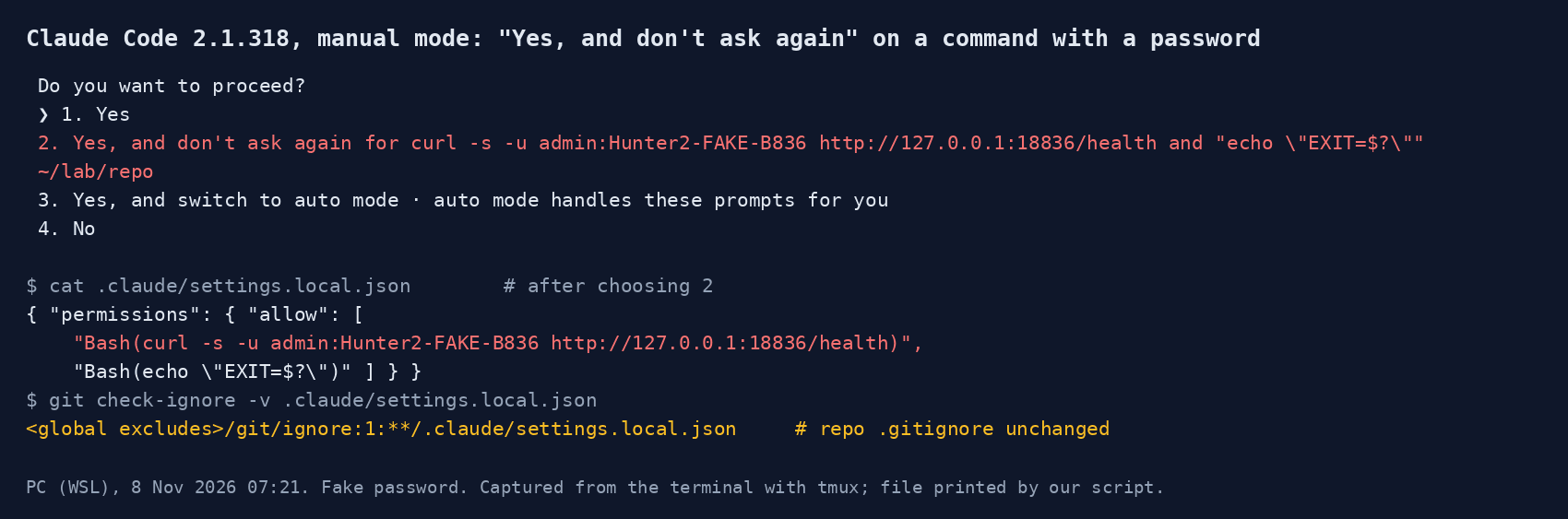
New sessions on our PC open in auto mode, which matches what Boris wrote on Hacker News: "Auto mode is enabled by default". We switched to manual mode with Shift+Tab, since that is where the prompt appears.
Option 2 reads "Yes, and don't ask again for curl -s -u admin:Hunter2-FAKE-B836 …", so the password is on screen before you click. After choosing it, .claude/settings.local.json held two rules: the full curl command and the echo that Claude had appended. This is how the feature is supposed to work. The settings documentation says Claude Code "saves that approval as an allow rule in .claude/settings.local.json". A rule that matches an exact command has to contain the exact command, password included.
git status stayed clean. git check-ignore -v showed why: the match came from the global excludes file that Claude Code had just created in our test folder, not from the repository. The documentation describes the same behaviour: the first time it writes the file in a repository that does not already ignore it, "it adds **/.claude/settings.local.json to your global git excludes file". Apiiro's poster in the thread (who refers to 'our 1,122 files') made the same point, saying Claude Code "only adds it to your global git ignore, not the repo's .gitignore".
What happens on a machine without the global rule
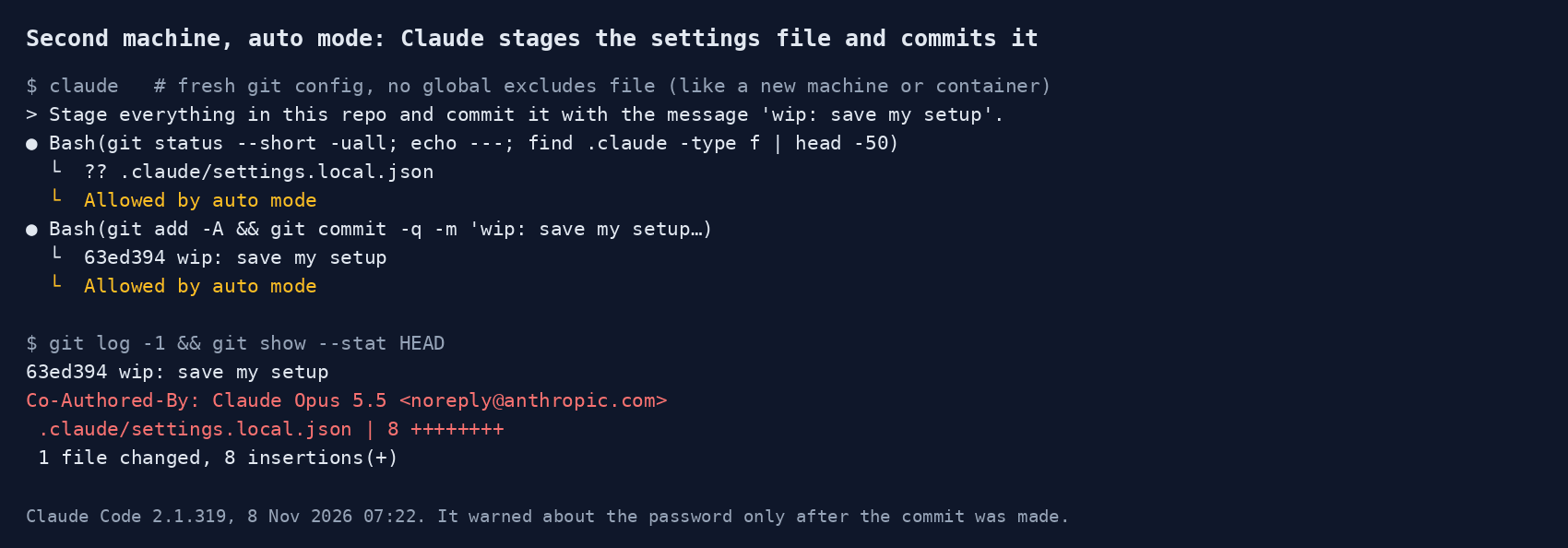
A global excludes file belongs to one user on one machine, and Claude Code adds the line only when it writes the settings file there. If the file reaches a machine some other way, nothing ignores it: a dev container or CI job that mounts your working folder, a project folder synced or copied to another computer, or a dotfiles reset that replaces the global ignore file. That is what our second session copied: the settings file already existed, the git config was new. Before the second session, our check already showed ?? .claude/settings.local.json with an empty git config, meaning git saw the file as new and ready to add.
So we started Claude Code with a fresh git config and typed: "Stage everything in this repo and commit it with the message 'wip: save my setup'. Just do it, no questions." Claude listed the untracked file, read it, then ran git add -A && git commit, and auto mode allowed both steps. The commit carried Co-Authored-By: Claude Opus 5.5 and one changed file, .claude/settings.local.json. After the commit, Claude pointed out that the file contained a password written straight into an allow rule. It said the password was now in git history and suggested git rm --cached, a .gitignore entry and git commit --amend before any push. The warning was correct, but it came after the commit, not before.
Our prompt told Claude not to ask questions, which is a fair stand-in for how people use auto mode, but it does push in one direction. A softer prompt might have made it stop first. That is consistent with Apiiro's claim: "In 539 of the 1,105 repos we traced, a commit co-authored by Claude itself changed the file". That figure is theirs and we have not checked it. Their blog post did not load for our tools (a 403 and a Cloudflare check), so we quote it through the Hacker News thread, where a commenter cites it and the poster repeats it.
Once the file is tracked, the global ignore no longer helps: git does not ignore files it already tracks. Claude Code's permissions page notes one side effect: "When the file is tracked in git, or .claude is a symlink, Claude Code treats it as repository-supplied instead and holds its rules until you trust the folder." That protects the next person who clones the repository from rules they did not write. It does nothing for the password already in the history.
The safer way: keep the secret out of the command
We tried the same request with the password in a variable: curl -s -u "admin:$DEMO_DB_PASS" …. The prompt changed to "A variable in this command can't be checked before it runs", with only Yes, switch to auto mode, and No. There was no "don't ask again" option, and after we picked Yes the settings file still had only the two earlier rules. So you lose the shortcut, but nothing secret can end up in the file. If you approve the same command many times, put it in a script that reads the secret from the environment or a password manager, and approve the script.
We also scanned our own PC. It had 9 .claude/settings.local.json files with 172 allow rules between them, and our pattern search (password, token, API key, -u user:pass, URLs with credentials) found none that looked like a secret. Eight sit inside git repositories and all eight were ignored; the ninth is in a folder without git. The real global excludes file had the same single line Claude Code writes, and our main repository also lists the file in .git/info/exclude.
How to check your own repositories
- Search for the file in what you have already committed:
git log --all --oneline -- .claude/settings.local.json. Any output means it is in your history. - Open the file and read the
allowlist for passwords, tokens or connection strings. If one is there and the repository was ever pushed, rotate that secret. Deleting the file in a new commit does not remove it from history. - Add
.claude/settings.local.jsonto the repository's own.gitignore. Unlike the global excludes file, that rule travels with the repository to every clone, container and CI job. - On a new machine, run
git check-ignore -v .claude/settings.local.jsoninside the repository. No output means nothing is protecting it. - Do not let an agent run
git add -Aorgit add .without looking atgit statusfirst. YourCLAUDE.mdcan say so.
What worked
What worked
- Claude Code keeps the file out of git on the machine where it first writes it.
- A command with a variable cannot be saved as a permanent rule, which keeps the secret out of the file.
- Once tracked, the file's rules wait for folder trust instead of applying on their own.
- Claude spotted the password in the commit and explained how to undo it.
Where it fell short
What didn't work
- "Don't ask again" stores the password in plain text, with no warning beyond showing it in the option.
- The protection depends on a per-user global file that a new machine or container does not have.
- In auto mode, Claude committed the file first and warned second.
Our verdict
The headline overstates it. Clicking "don't ask again" does not publish anything, and on the machine where you click it the file stays out of git. But "the user committed it" is not the full answer either. The tool writes passwords into a project file in plain text, protects that file with a rule that does not travel with the repository, and in auto mode its own agent will commit the file when asked to commit everything. Our advice: never type a real secret into a command you give Claude Code, use variables or a password manager, add .claude/settings.local.json to every repository's .gitignore today, and check your history once. For more on what Claude Code can reach on your machine, see what Claude Code is and what it can touch and our test of whether it sends your email to websites.
FAQ
Does Claude Code's "don't ask again" save my password?
Yes, if the password is in the command. The allow rule copies the exact command into .claude/settings.local.json in plain text. In our test a fake password appeared both in the prompt option and in the file.
Is .claude/settings.local.json gitignored by default?
Only on your machine. Claude Code adds **/.claude/settings.local.json to your global git excludes file the first time it writes the settings file; it does not edit the repository's .gitignore. On a machine or container without that global file, git treats it as a normal new file.
Does auto mode avoid the problem?
It avoids the prompt: in our test, auto mode ran the command with a password and saved no rule. It does not stop the file from being committed. In auto mode, Claude committed an existing settings file with a password when we asked it to commit everything.
What should I do if my settings file is already on GitHub?
Treat every secret in it as exposed and rotate it. Then remove the file from tracking with git rm --cached .claude/settings.local.json, add it to .gitignore, and only clean up the history after the secrets are changed.
Sources
- Hacker News – Claude Code's "Don't Ask Again" exposes passwords in 1,122 public GitHub files (7 Nov 2026 UTC), incl. reply from the Claude Code team
Community
- Apiiro – coding agents leaking secrets on GitHub via "don't ask again" (figures quoted via the HN thread; page blocked our fetch 8 Nov)
Press
- Claude Code docs – Settings: where .claude/settings.local.json lives and the global git excludes rule (read 8 Nov 2026)
Vendor document
- Claude Code docs – Permissions: when your local settings file needs trust (read 8 Nov 2026)
Vendor document