What Is Claude Code? We Counted 11,068 of Its Actions
Claude Code is Anthropic's agentic coding tool. We counted every action it took on one machine in 13 days: 11,068 tool calls, half of them shell commands, one in eight changing a file, and 15% errors, most of them blocked on purpose.
By the RanThis team, written with AI7 min read
Why trust this: every result, number and screenshot comes from a real run on our own accounts, not from the AI. How we test
Claude Code is Anthropic's agentic coding tool: you describe a task in plain language, and it reads your files, edits them and runs commands on your computer until the task is done. That is the official one-line answer. To show what it means in practice, we counted every action Claude Code took on one of our machines over 13 days: 11,068 tool calls across 486 sessions. Half of them were shell commands, and only one in eight changed a file.
Measured on 30 Oct 2026 from the session files Claude Code wrote between 17 and 29 Oct 2026 on one Windows 11 PC (WSL, Ubuntu 24.04), signed in with a $200-a-month Claude plan. Definitions and prices come from Anthropic's Claude Code docs and pricing page, read again on 3 Nov 2026.
At a glance
Key results
- Half of what Claude Code does is run shell commands. 51% of its 11,068 tool calls were Bash. Reading files was 21%, searching (Grep, Glob) 9%, editing or creating files 12%, and the web 3%.
- It reads far more than it writes. For every file it edited or created, it read almost two and ran four shell commands.
- One action in seven fails, mostly by design. 1,622 of 11,067 tool results came back as errors (15%). 59% of those were commands our permission rules blocked; Claude Code read the refusal and tried another way.
- A typical session is 13 actions; a long one is 66 or more. That was the median and the 90th percentile across 407 sessions that used tools.
- 41% of the actions were not coding at all. Our agents that write articles, plan marketing, cut videos and check finances made 4,573 of the calls, mostly by running scripts.
Hands-on test
Setup
- Machine: one Windows 11 PC with WSL (Ubuntu 24.04) that runs Claude Code most of the day: a set of agents that pick up tasks from a shared board (writing, marketing, social, finance, video, code), scheduled jobs and our own test runs.
- Plan: the $200-a-month Claude plan, called Max 20x when we measured and Ultra on today's pricing page. On a subscription nothing is billed per action.
- Data: every
.jsonlsession file under~/.claude/projects/on that PC, including subagents. Claude Code writes each message and tool use to these files. A script counted the name of each tool call once, the first word of each shell command (not its arguments), and whether each tool result was an error. It did not read or keep the conversations. - Left out: our laptop, and anything done on claude.ai.
What is Claude Code?
Anthropic describes Claude Code as "an agentic coding tool that reads your codebase, edits files, runs commands, and integrates with your development tools." The important word is agentic. A chatbot answers with text and you copy the result. Claude Code takes the actions itself, in a loop that Anthropic splits into three phases: gather context, take action, verify results. Each tool result feeds the next decision, and the loop repeats until the task is done or you stop it.
It runs in several places: a terminal app, extensions for VS Code and JetBrains, a desktop app and the web at claude.ai/code. In the terminal you install it with one command, open a project folder and type claude. Most of these need a paid Claude plan or an Anthropic Console account with API billing.
What it can touch is your project folder and your terminal. Anthropic's docs put it plainly: any command you could run from the command line, Claude can run too. That is what makes it useful, and it is why Claude Code asks for permission before risky actions unless you have allowed them.
What it actually did: 11,068 actions
Anthropic groups the built-in tools into file operations, search, execution, web and code intelligence. Here is how our 13 days split across them.
| Tool group | Tools | Calls | Share |
|---|---|---|---|
| Execution | Bash | 5,658 | 51.1% |
| Reading files | Read | 2,331 | 21.1% |
| Search | Grep, Glob | 1,006 | 9.1% |
| Changing files | Edit, Write | 1,380 | 12.5% |
| Web | WebFetch, WebSearch | 285 | 2.6% |
| Everything else | MCP servers, subagents, structured output, tool search | 408 | 3.7% |
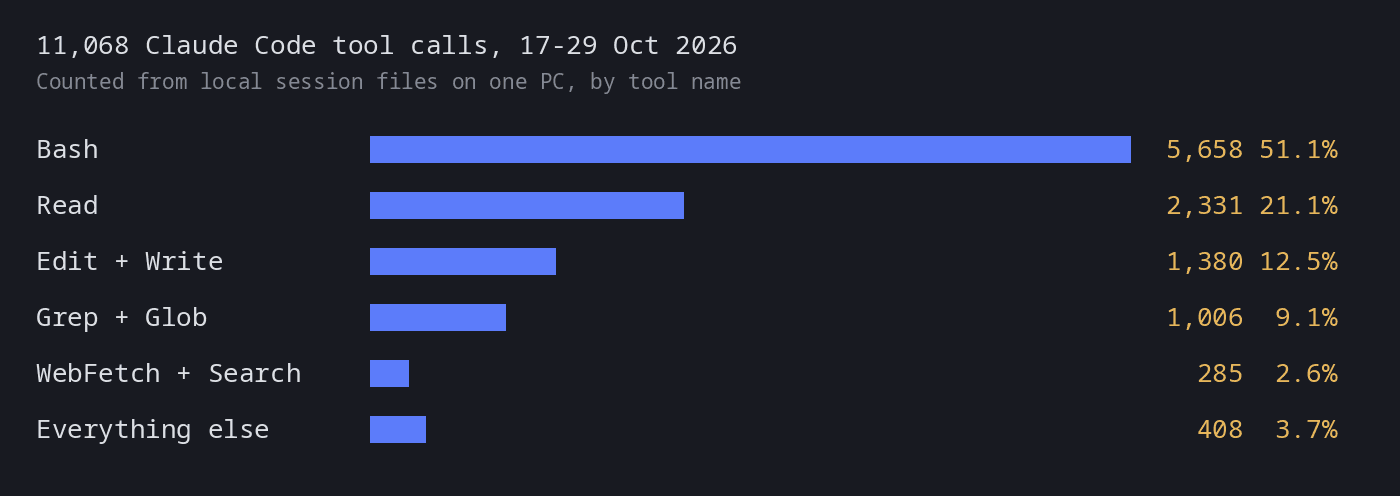
The shell commands are where the work happens. The most common first words were cd (882, usually the start of a longer command), uv run (711) and python3 (558) for our own scripts, then grep, ls, sed and cat for looking at files, and git (about 500 across add, log, show, commit and status). A further ~485 were calls to the command-line tool our agents use to take and close tasks.
The 15% error rate surprised us at first, so we sorted the 1,622 errors by the first words of each error message. 96% of them came from shell commands. The biggest group, 964 (59%), were commands our own permission rules blocked: our unattended agents may only run an approved list of commands, and Claude Code then tried an allowed route. 188 were commands that ran and failed, such as a script error or a failing check, 64 were files that were missing or had not been read yet, and 1 was stopped by a person. 405 did not match any of our keywords. Behind a typical 13-step session there are usually one or two failed attempts that you never see in the final answer.
Coding tool, office work
The name says coding, but on our machine 41% of the actions came from agents that do not write software:
| Agent | Tool calls | Share of all calls |
|---|---|---|
| Editing (articles, fact checks) | 1,617 | 14.6% |
| Video | 1,374 | 12.4% |
| Marketing | 579 | 5.2% |
| Social | 544 | 4.9% |
| Finance | 269 | 2.4% |
| Business planning | 190 | 1.7% |
They still work the same way: run a script, read the output, write a file. That is the reason Claude Code works for office tasks once someone has set up the scripts. We tested three of those directly: merging Excel files with mismatched columns, PDF invoices to Excel, and what it all costs in Claude Code cost and limits.
What it costs to use
| Way to pay | Price |
|---|---|
| Pro | $20 a month billed monthly, Claude Code included with usage limits |
| Max | $100 a month, 5x Pro usage |
| Ultra | $200 a month, 10x Pro usage every week, no 5-hour limit for verified accounts |
| API key | Pay per token, for example Sonnet 5.5 at $2 input and $10 output per million tokens |
On a subscription, Claude Code runs until you hit a session limit or a weekly limit, and switching models does not get around either. Ultra drops the 5-hour limit for verified accounts but keeps the weekly one. We measured how quickly real work uses that up in Claude Code usage limits.
What worked
What worked
- Counting from the session files was easy and private. Claude Code already logs every tool call locally, so measuring what it did needed one short script and no extra tracking.
- The tool mix is a good mental model. If you think of Claude Code as a fast colleague with a terminal, the numbers match: look around, try a command, read the result, change a file, check again.
Where it fell short
What didn't work
- One machine, our own workload. Our agents run lots of scripts, which pushes Bash up. A developer editing one app all day would likely see more Edit calls.
- An error is not always a mistake. The 15% counts every tool result marked as an error, including commands we blocked on purpose. Our keyword sort left 405 errors (25%) unclassified, and we did not read them one by one.
- No timing. The session files give counts, not how long each action took.
Our verdict
Claude Code is worth trying if you already have work that happens in files and commands and you can describe it in a sentence: fixing code, reshaping spreadsheets, running a report. Do not pick it if you want a chat window that only answers questions; the Claude app is simpler for that. Expect it to spend most of its effort looking around and running things, not typing code, and expect a few failed attempts inside every task. Start on Pro, watch the usage limits, and give it a project folder where a wrong command cannot hurt anything important.
FAQ
Is Claude Code free?
No. It needs a paid Claude plan (Pro at $20 a month, Max or Ultra) or an Anthropic Console account billed per token.
Do I need to know how to code to use Claude Code?
Not to start: you give it tasks in plain language. You do need to be comfortable opening a terminal or an editor, reading what it proposes, and approving or refusing commands.
What is the difference between Claude Code and Claude?
Claude is the model and the chat app. Claude Code is the tool around the model that lets it read files, edit them and run commands on your computer.
Where does Claude Code store my sessions?
Locally, as plain-text JSONL files under ~/.claude/projects/. That is what we counted for this article.
Sources
- Claude Code Docs – Overview: definition, surfaces, install (read 30 Oct 2026)
Vendor document
- Claude Code Docs – How Claude Code works: agentic loop, five tool categories, session files (read 30 Oct 2026)
Vendor document
- Claude Code Docs – Usage and costs: session and weekly limits on subscriptions (read 30 Oct 2026)
Vendor page
- Claude – Plans and pricing: Pro $20 monthly, Max $100, Ultra $200 (read 3 Nov 2026)
Vendor page
- Claude Docs – Pricing: Sonnet 5.5, Opus 5.5, Haiku 5.5 token prices (read 30 Oct 2026)
Vendor page