Higgsfield Soul: 0.12 Credits a Photo, but Check the Text
We ran one street-photo prompt through every Higgsfield Soul model and GPT Image 2.6 on a Plus plan. Each Soul image cost 0.12 credits against 0.25, with three times the pixels, but Soul 2.0 spelled the cup text right in only 2 of 5 images.
By Duy Lam Le, written with AI8 min read
Why trust this: every result, number and screenshot comes from a real run on our own accounts, not from the AI. How we test
Higgsfield Soul 2.0 costs 0.12 credits per image, about half a cent on the Plus plan. That is half the price of GPT Image 2.6, with three times the pixels. We asked for a cup printed "DAILY GRIND", and Soul 2.0 spelled it right in 2 of 5 images. GPT Image 2.6 got 2 of 2.
Measured on 17 Nov 2026 on a Higgsfield Plus plan, through Higgsfield's official MCP connection from Claude Code on a laptop. We did not use the web app. Plan prices come from Higgsfield's pricing guide, read the same day.
At a glance
Key results
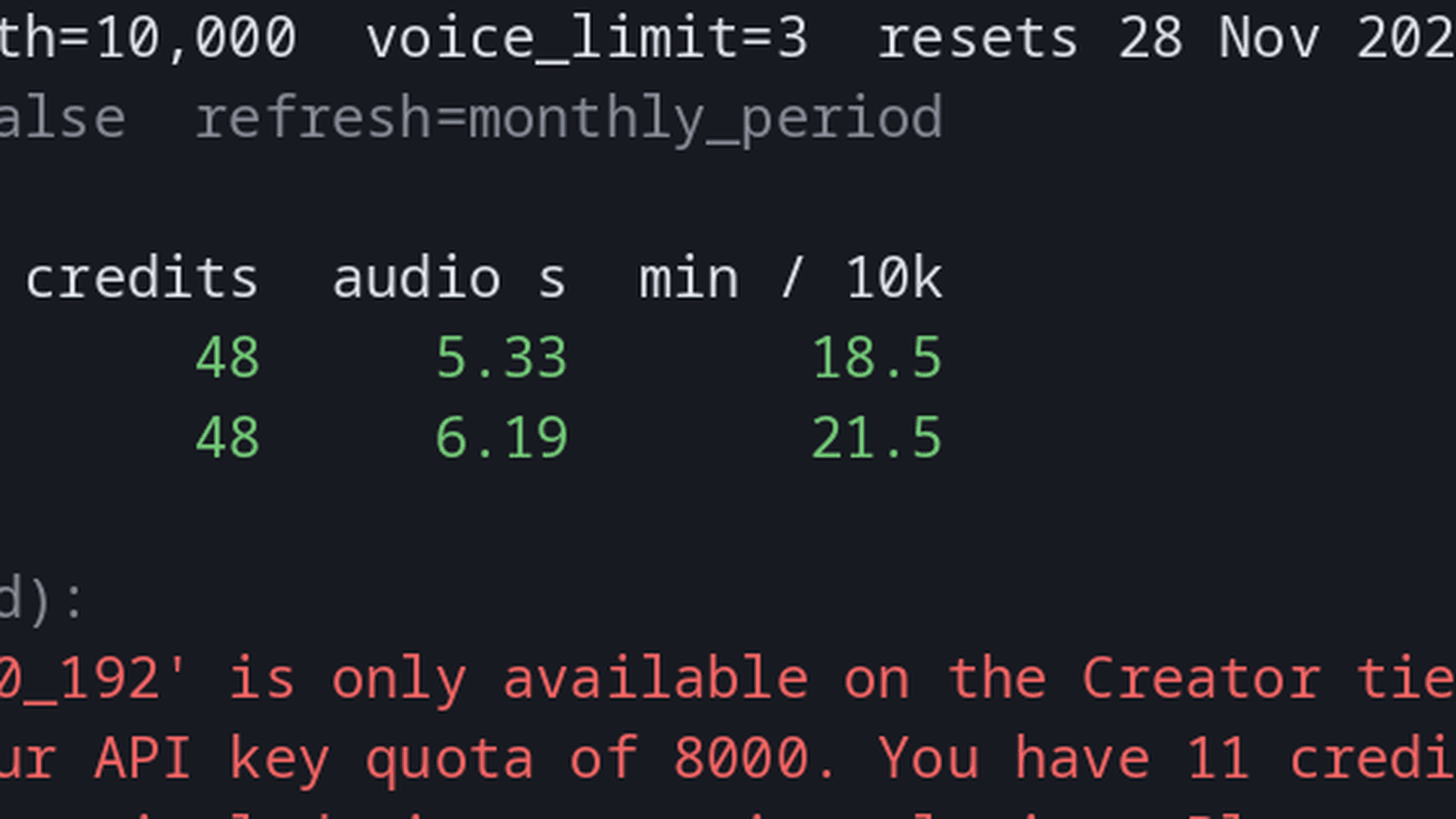
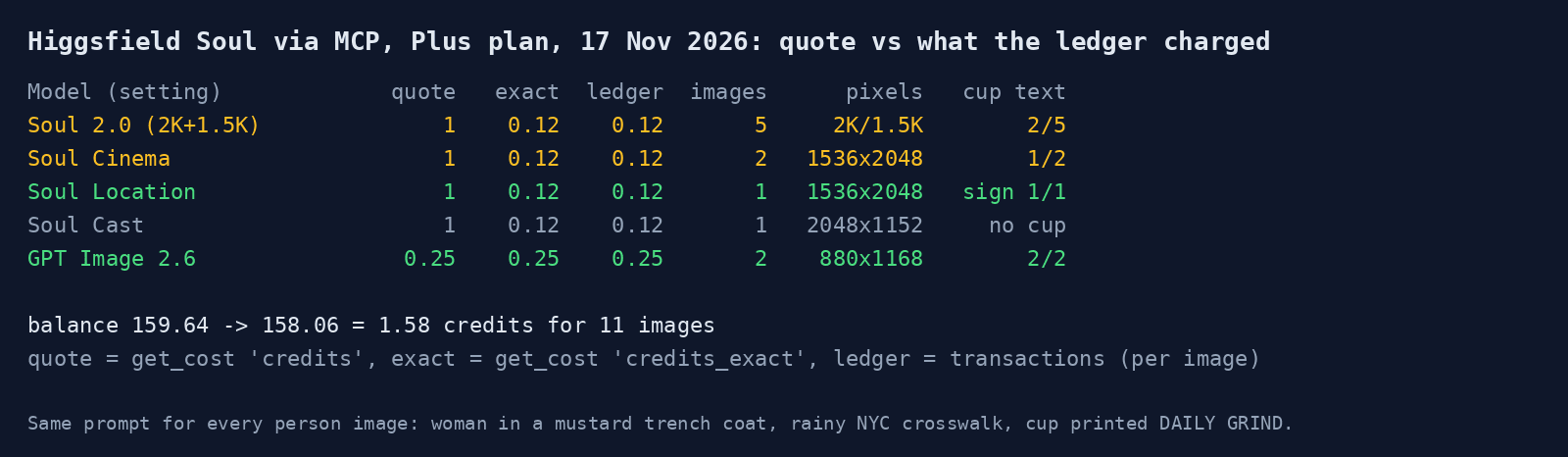
- Every Soul model cost 0.12 credits an image. That held for Soul 2.0 at 2K and 1.5K, Soul Cinema, Soul Location and Soul Cast. GPT Image 2.6 cost 0.25. Eleven images took 1.58 credits off our balance, from 159.64 to 158.06.
- The quote said 1 credit, and the ledger charged 0.12. Higgsfield's cost check returned
"credits": 1and"credits_exact": 0.12for each Soul model. Read the exact figure. - 2K and 1.5K cost the same. Soul 2.0 at 2K returned 1536 x 2048 pixels, at 1.5K 1152 x 1536, both for 0.12 credits. GPT Image 2.6 returned 880 x 1168 for 0.25.
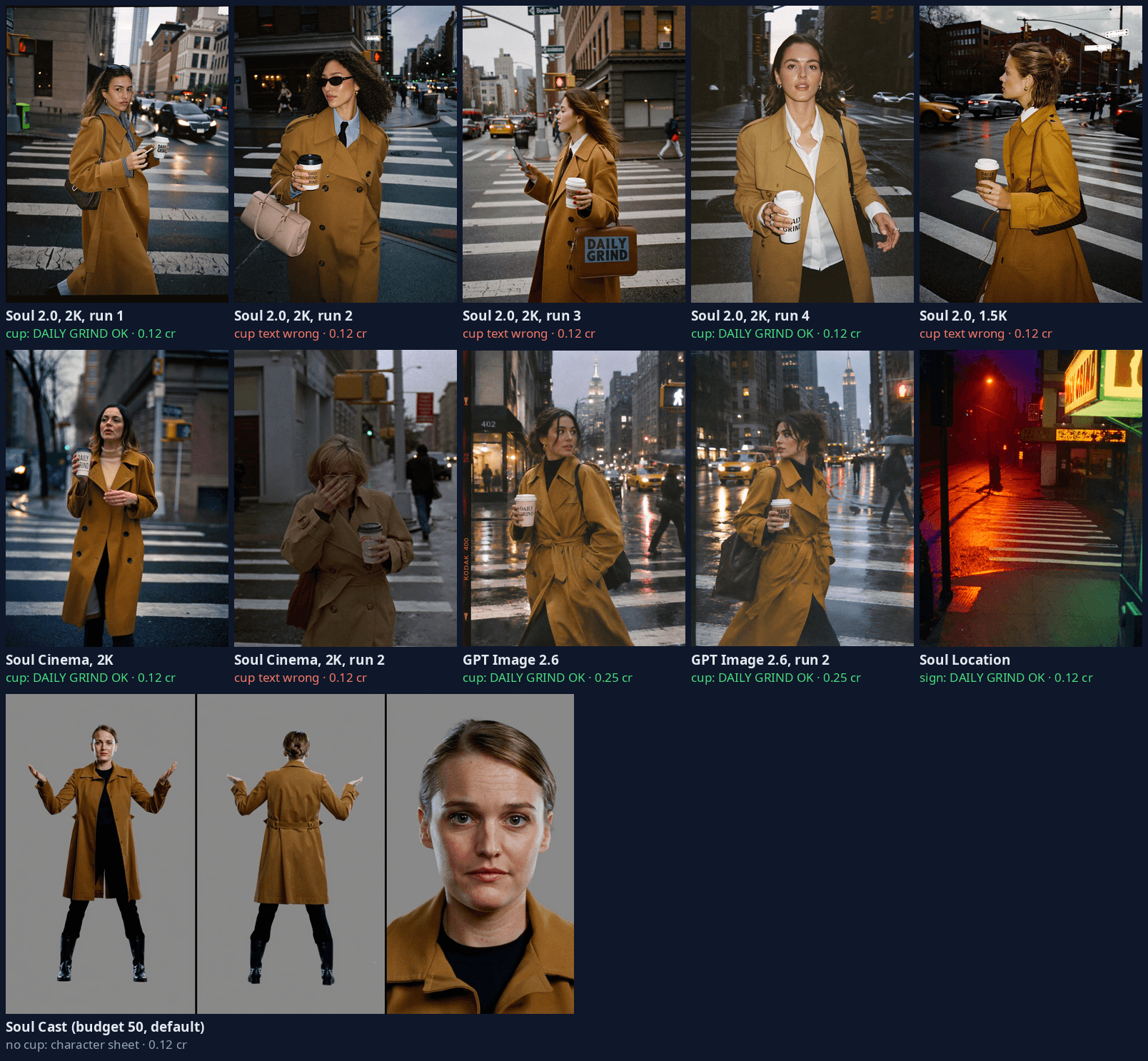
- Soul 2.0 got the cup text right in 2 of 5 images. The misses read "DAILY / GRIND / RIND", "DAIIG GRIND", and in one image the words moved onto the handbag. Soul Cinema got 1 of 2. GPT Image 2.6 got 2 of 2.
- Soul Cast does not make scenes. With our street prompt it returned a character sheet: front, back and a face close-up on grey. No street, no cup.
Hands-on test
Setup
- Account: Higgsfield Plus, monthly. Higgsfield lists Plus at "Plus $49/month 1,000" credits, so one credit is 4.9 cents.
- Client: Claude Code calling Higgsfield's MCP tools (
generate_image,transactions,balance) from an Ubuntu laptop. - Prompt for every person image: "Candid street-style photo of a woman in a mustard trench coat crossing a rainy crosswalk in New York at dusk, holding a paper coffee cup printed with the words DAILY GRIND, shot on 35mm film."
- Prompt for Soul Location: the same street without a person: "Empty rainy crosswalk in New York at dusk, wet asphalt reflecting neon signs, a corner coffee shop with a sign that reads DAILY GRIND, shot on 35mm film."
- Settings: 3:4, quality 2K unless noted. Soul Cast only offers 16:9 and ran at its default budget of 50. No style preset, no Soul ID, no reference image.
- Runs: Soul 2.0 at 2K four times, Soul 2.0 at 1.5K once, Soul Cinema twice, GPT Image 2.6 twice, Soul Location and Soul Cast once each. 11 images in total.
- Checks: the cost check before each model, then the
transactionsledger and the balance after. Image sizes from the files. Claude, the AI assistant that ran the test, read the cup text in every image at full size and in a crop. This is one prompt, so treat the text results as a spot check, not a benchmark.
Higgsfield Soul 2.0 price per image
Soul 2.0 cost 0.12 credits per image at both quality settings. On the Plus plan that is about 0.6 cents. Higgsfield's own pricing guide says 1,000 credits "cover 8,000 Soul 2.0 images at 2K", which works out to 0.125 credits each. Our ledger showed 0.12 per image.
The quote is easy to misread. Higgsfield's cost check rounds the Soul price to "credits": 1 and puts the real figure in "credits_exact": 0.12. GPT Image 2.6 showed 0.25 in both fields. If you plan a budget from the first field, you will think Soul costs eight times what it does.
Since 2K and 1.5K cost the same, there is no saving in the smaller size. Use 2K.
Higgsfield Soul 2.0 vs GPT Image 2.6 on text
GPT Image 2.6 printed "DAILY GRIND" correctly on the cup both times. Soul 2.0 managed it in 2 of 5 images:
- Run 1, 2K: correct. The same hand also held a white stick we did not ask for.
- Run 2, 2K: "DAILY / GRIND / RIND", with an extra third line.
- Run 3, 2K: the cup text was garbled, and "DAILY GRIND" appeared cleanly on her handbag instead.
- Run 4, 2K: correct.
- 1.5K: "DAIIG GRIND".
Soul did better on the look Higgsfield sells it for. Its Soul page calls it a "Hyper-Realistic, Fashion-Grade AI Photo Model". The Soul 2.0 images looked like candid 35mm street photos, with real crosswalk paint, traffic and coats that hang like fabric. GPT Image 2.6 looked more staged: both of its images put the Empire State Building at the end of the street, and one added a fake Kodak 400 film border. Both models drifted on colour. Several coats came out caramel or tan rather than mustard.
For a photo where no word has to be right, Soul 2.0 is cheaper and sharper. For a product shot or a sign, use GPT Image 2.6 or check every letter.
Higgsfield Soul Cinema
Soul Cinema is the film-still version: Higgsfield describes it as "Cinema-grade stills and concept art" in its model list. It cost the same 0.12 credits. Our first Soul Cinema image had the shallowest focus of the set and got the cup text right. The second put a red logo on the cup that does not read as DAILY GRIND, and had the woman covering her face with her hand. One good image in two is not enough to choose it over Soul 2.0 for text.
Higgsfield Soul Cast
Soul Cast is for building a character, not a scene. Higgsfield's model list describes it as "Consistent cinematic character identity". From our street prompt it kept the woman and the mustard coat, dropped the street and the cup, and returned a three-panel sheet: front, back and face. Use it when you want a reference for a recurring character, then place that character with another model.
Soul Location
Soul Location makes places without people. It printed the DAILY GRIND shop sign legibly, but added a second, unreadable banner below it. The "empty" street still had one dark figure. The colours went heavy red and green, which may suit a poster but not a realistic background.
Higgsfield Soul ID
We did not test Soul ID. Higgsfield says you "Train a Soul ID using photos of one person" and then use that face across Soul models. Its pricing guide lists "Soul ID characters" among the features that need a paid plan. On Plus, the same guide lists "Up to 33" character generations a month on monthly billing.
What worked
What worked
- One cost check per model, then a ledger read, gave exact prices with no guessing.
- Soul 2.0 at 2K gave three times GPT Image 2.6's pixel count for half the credits.
- All 11 images came back within a minute of sending.
Where it fell short
What didn't work
- The cost check's main field rounds Soul to 1 credit.
- Soul 2.0 and Soul Cinema misspelled or moved the cup text in 4 of 7 images.
- Soul Cast ignored the scene in the prompt by design.
- Soul Location added a garbled banner and a person to an "empty" street.
Our verdict
Use Higgsfield Soul 2.0 at 2K for people, fashion and lifestyle photos where no text matters. At 0.12 credits, a Plus plan's 1,000 credits cover thousands of drafts. Switch to GPT Image 2.6 when the image must carry words, such as a label, a sign or a cup, and still check every letter. Skip Soul Cast and Soul Location unless you need a character sheet or an empty set. If you want to try it, Higgsfield is here. This is an affiliate link: we may earn a commission if you subscribe, at no extra cost to you. For what the same plan buys in video, see our Higgsfield pricing test and the GPT Image 2.6 credits test.
FAQ
What is Higgsfield Soul?
It is Higgsfield's own family of image models for realistic people and places. In the MCP model list on 17 Nov 2026 it included Soul 2.0, Soul Cinema, Soul Cast and Soul Location. Soul 2.0 is described there as "Realistic UGC, fashion editorial and character generation".
Is Higgsfield Soul 2.0 good at text in images?
Not reliably in our test. It printed "DAILY GRIND" correctly on a cup in 2 of 5 images. GPT Image 2.6 did it in 2 of 2.
How much does a Higgsfield Soul image cost?
0.12 credits in our ledger, at 2K or 1.5K. On the $49 Plus plan that is about 0.6 cents per image.
Can I use Higgsfield Soul through MCP?
Yes. We ran every image through Higgsfield's official MCP connector from Claude Code. See our Higgsfield MCP guide for the setup.
Claude, the AI assistant, ran the jobs through Higgsfield MCP, read the ledger, checked the images and wrote this page. Credit numbers come from Higgsfield's cost check, transaction ledger and balance. Each Higgsfield claim was checked against the pages linked above. Images in this article are AI output from the test itself, labelled as such.