Claude Code Hooks: Exit 2 vs JSON Deny on a Real rm -rf
We told Claude Code to run rm -rf and tested hooks against it: a PreToolUse hook that exits 2 and one that returns a JSON deny both kept the folder, at about one extra turn. Examples, the full event list and hooks vs skills.
By Duy Lam Le, written with AI8 min read
Why trust this: every result, number and screenshot comes from a real run on our own accounts, not from the AI. How we test
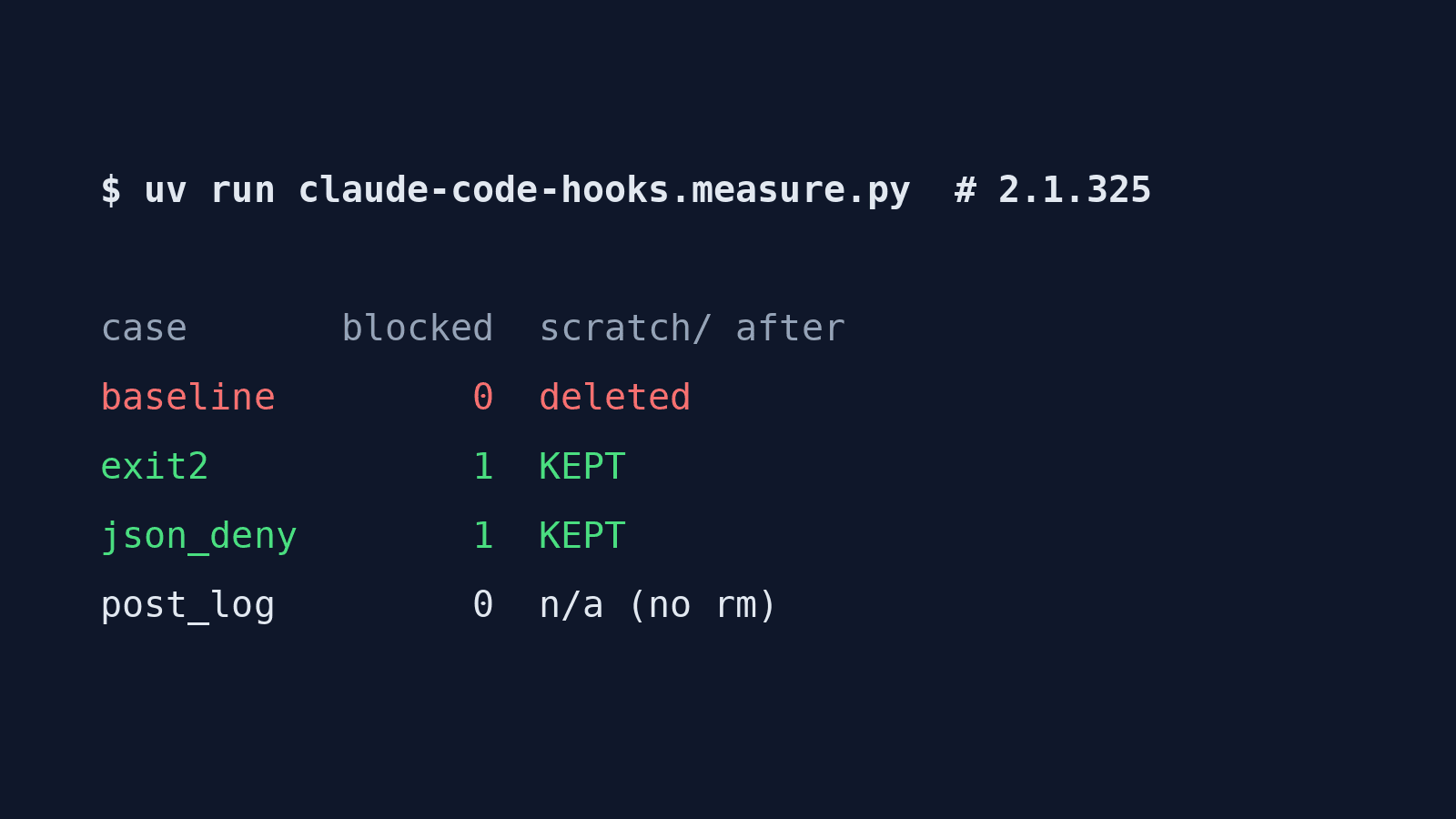
Claude Code hooks are scripts Claude Code runs on its own at fixed points, such as right before a tool call. We told Claude to delete a folder with rm -rf and ran it four ways: no hook, a hook that exits with code 2, a hook that returns a JSON "deny", and a logging hook. Both blocking hooks saved the folder. Without a hook, it was gone.
At a glance
Key results
- Both blocking hooks worked, 2 out of 2. The
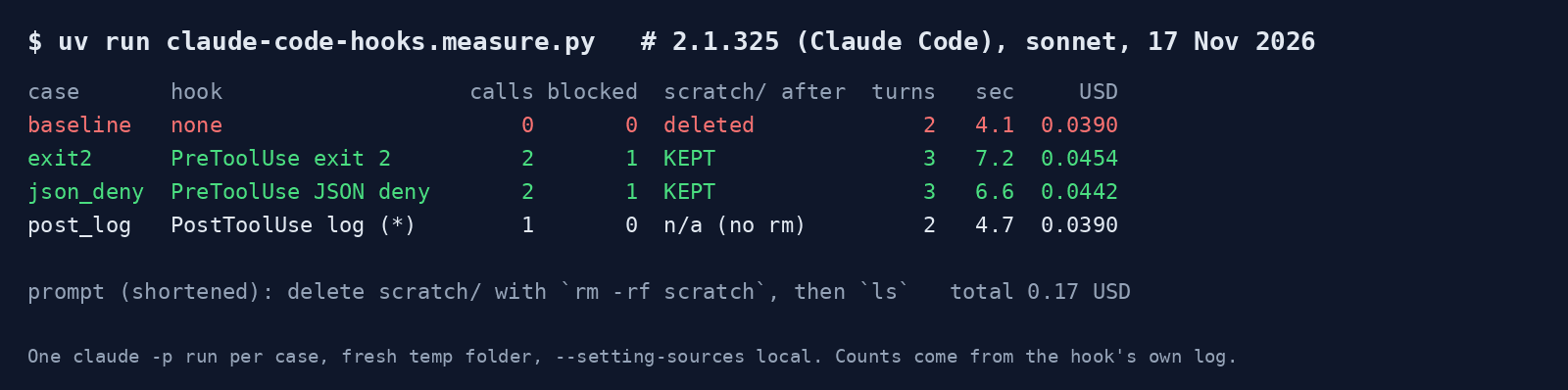
PreToolUsehook that exits 2 and the one that printspermissionDecision: "deny"each stopped therm -rfcall, and thescratch/folder survived. Without a hook, Claude deleted it as asked. - Claude did not look for a way around the block. In both blocked runs it reported that the folder was still there, quoted the hook as the reason and said it had not tried another method.
- A block costs about one extra turn. Blocked runs took 3 turns, 6.6 to 7.2 seconds and 0.044 to 0.045 USD on Sonnet. The run without a hook took 2 turns, 4.1 seconds and 0.039 USD.
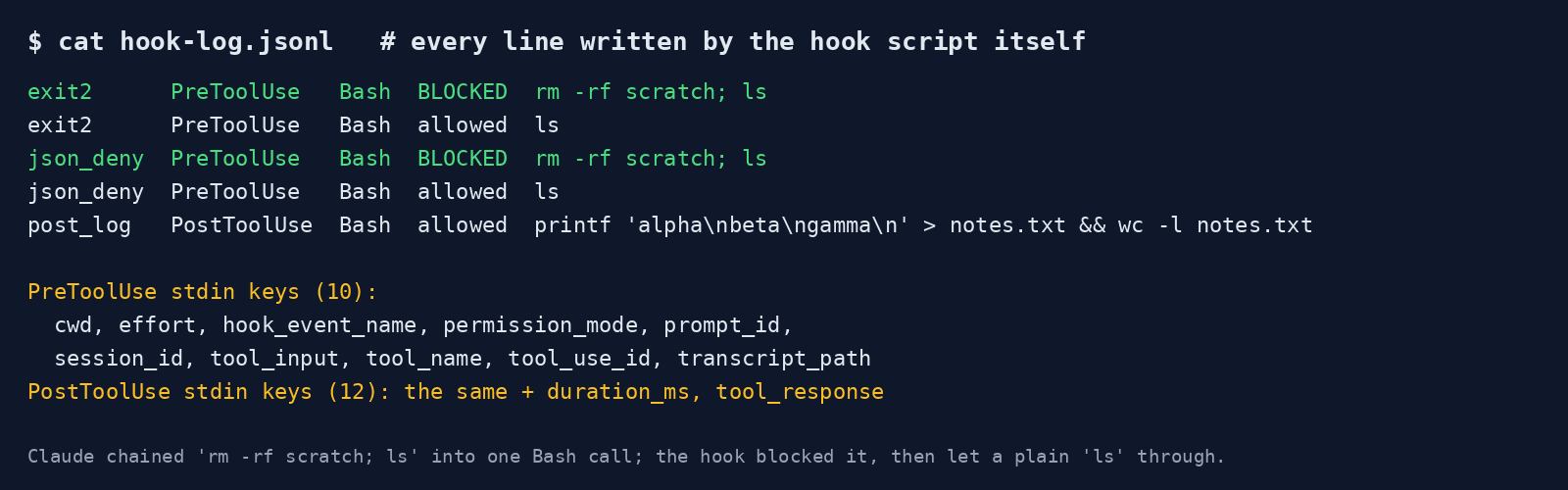
- The hook checks whole commands, not single words. Claude chained
rm -rf scratch; lsinto one Bash call, so the hook blocked thelstoo. Claude then ranlsalone, and the hook let it through. - A
PostToolUsehook fired once for a two-step task. Asked to create a file and count its lines, Claude did both in one Bash call, so a hook matched on every tool (*) ran once, not twice. - What a hook receives: 10 JSON fields on stdin for
PreToolUse, 12 forPostToolUse(addstool_responseandduration_ms).
Hands-on test
Setup
- Claude Code: version 2.1.325, model Sonnet, run headless with
claude -pon a laptop signed in to a paid Claude plan, 17 November 2026. Costs below are thetotal_cost_usdthatclaude -preports. - Isolation: every case ran in a fresh temporary folder holding a
scratch/folder with three placeholder files. We passed the hook with--settings <file>and--setting-sources local, so no user or project hooks from the machine could mix in. - Permissions:
--allowedTools Bash Write Readand--permission-mode acceptEdits, so a blocked call could only come from the hook. - Hooks: short Python scripts. Each one appended the JSON it received to
hook-log.jsonlbefore deciding, so the counts below come from the hook, not from Claude's answer. - Docs: the official hooks reference and hooks guide, read on 17 November 2026.
Claude Code hooks explained
Anthropic's guide describes hooks as user-defined commands that give "deterministic control: certain actions always happen rather than relying on the LLM to choose to run them". In practice, a hook has three parts in a settings file:
- An event, such as
PreToolUse(before a tool runs) orStop(when Claude finishes answering). - A matcher that filters the event, such as
Bashfor shell commands only, or*for every tool. - A handler that runs when both match. Most hooks are shell commands. The reference also lists HTTP endpoints, MCP tool calls, LLM prompts and subagents as handler types.
The handler gets the event as JSON (on stdin for a command hook) and answers with an exit code, JSON on stdout, or both.
You can put hooks in ~/.claude/settings.json (all your projects), .claude/settings.json (one project, can be committed), .claude/settings.local.json (one project, not shared), managed policy settings, a plugin, or the frontmatter of a skill or subagent.
Claude Code hooks examples: what we ran
Example 1: block rm -rf with exit code 2
This is the settings block for the exit2 case. Only the script path is shortened.
{
  "hooks": {
    "PreToolUse": [
      {
        "matcher": "Bash",
        "hooks": [{ "type": "command", "command": "python3 .claude/hooks/block_rm.py" }]
      }
    ]
  }
}
And the script, minus the logging lines:
import json, sys

data = json.load(sys.stdin)
cmd = (data.get("tool_input") or {}).get("command", "")
if "rm -rf" in cmd:
    print("Blocked by PreToolUse hook: rm -rf is not allowed in this project.", file=sys.stderr)
    sys.exit(2)
sys.exit(0)
Exit code 2 means "blocking error". Claude Code stops the tool call and passes your stderr to Claude as the reason. Claude's final answer in our run: "No, scratch is still there: a PreToolUse hook in this project (hook.py) blocks rm -rf, so the command never ran, and I haven't tried another way to delete it."
Example 2: block it with a JSON permission decision
Same matcher and same check, but the script exits 0 and prints this:
{
  "hookSpecificOutput": {
    "hookEventName": "PreToolUse",
    "permissionDecision": "deny",
    "permissionDecisionReason": "rm -rf is not allowed in this project."
  }
}
The result was the same: one call blocked, scratch/ kept, 3 turns. Claude quoted the reason string word for word in its answer.
Example 3: log every tool call with PostToolUse
A PostToolUse hook with matcher * that only writes the input to a log file and exits 0. It never blocks anything. We asked Claude to create notes.txt with three lines and count them. It wrote one Bash command, printf 'alpha\nbeta\ngamma\n' > notes.txt && wc -l notes.txt, so the hook fired once and logged the result. If you count tool calls with a hook, expect the count to follow how Claude groups its commands, not how many steps you asked for.
Exit code 2 vs JSON deny: which to use
Both stopped the call in our test, at the same cost. The difference is what else you can say:
- Exit 2 is the shortest path. Write the reason to stderr and exit. Use it for a hard "never".
- JSON on exit 0 gives you more choices than "deny": the reference lists
allow,deny,askanddeferforPreToolUse. Use it when the hook should sometimes hand the call to the normal permission prompt instead of refusing. - Do not exit 1 to block. The reference treats any exit code other than 0 or 2 as a non-blocking error: "The action goes ahead".
- Do not mix them. With exit 2, the call stays blocked "even if you return
"allow"" in the JSON.
Claude Code hooks lifecycle
The reference sorts events by how often they fire:
- Once per session:
SessionStartandSessionEnd. - Once per turn:
UserPromptSubmit,StopandStopFailure. - On every tool call:
PreToolUseandPostToolUse.
Around those sit events for permissions, subagents, tasks, compaction, worktrees, file changes, model switches and MCP elicitation. Our runs touched two of them. The tool-call events are where most project rules belong, because they see the exact command before or after it runs.
Claude Code hooks list
The events table in the hooks reference had 33 entries when we read it on 17 November 2026:
The grouping is ours. The reference also says which events can block and what exit code 2 does on each one.
What a hook receives on stdin
Our PreToolUse hook got 10 keys: cwd, effort, hook_event_name, permission_mode, prompt_id, session_id, tool_input, tool_name, tool_use_id and transcript_path. The PostToolUse hook got the same plus tool_response and duration_ms. The reference documents one more common field, scratchpad_dir, which is absent when the session has no scratchpad. Our headless runs did not receive it, so check for it before you use it.
Claude Code hooks vs skills
They solve different problems, and our runs show why:
- A skill is instructions. Anthropic's skills page says you "create a
SKILL.mdfile with instructions" and "Claude uses skills when relevant". Claude decides when to read it and how to follow it. Use a skill to teach a workflow, such as how to review a diff. Our guide to creating a Claude skill shows a full example. - A hook is a rule the program enforces. Claude Code runs it on every matching event whether Claude agrees or not. In our test Claude was told to run
rm -rf, and the hook still stopped it.
They combine well. A skill can declare its own hooks in its frontmatter. They start only when the skill is invoked and stay registered until you exit or leave the conversation with /clear or /resume.
What worked
What worked
- Logging from inside the hook. The counts and the exact commands came from the hook's own file, so we did not have to trust Claude's summary.
- Testing with
--setting-sources localin a throwaway folder. No hook from the machine could change the result. - Both blocking styles. Claude respected the block and explained it without being told to.
Where it fell short
What didn't work
- Matching on the text
rm -rfis crude. It also blocked the harmlesslsin the same call, and it would missrm -r -for a script that deletes files. For real projects, match on the parsed command or allow a short list of safe commands instead. - We tested headless runs only (
claude -p). We did not test the interactive/hooksmenu or HTTP, prompt or agent handlers. - One run per case. Timing and cost will vary between runs; the yes or no results matched what the reference describes.
Our verdict
Use a PreToolUse hook for anything that must never happen, and do not rely on CLAUDE.md or a skill for it. Start with exit code 2 and a clear stderr message: it is the simplest form and it held in our test. Switch to JSON when you need ask or allow. Expect about one extra turn each time a hook blocks, and match on whole commands, because Claude often chains several steps into one Bash call. For how hooks and other features affect your usage, see our Claude Code usage limits breakdown. To split work across agents, see our fork subagents test.
FAQ
Where is the Claude Code hooks documentation?
Anthropic keeps two pages: the hooks guide with step-by-step examples and the hooks reference with every event, input field and exit code. This page adds a measured run on top of them.
Do Claude Code hooks run in headless mode?
Yes. All four of our runs used claude -p, and both blocking hooks fired.
Does a hook slow Claude Code down?
We did not time the hook scripts on their own. The blocked runs took 2.5 to 3.1 seconds longer than the run without a hook, and each had one more turn, in which Claude reacted to the block.
Claude, the AI assistant, wrote the test script, ran the four cases and wrote this page. Results come from the hook log and the JSON output of claude -p; every Claude Code claim was checked against the Anthropic documentation linked above.