Claude for Excel, tested: it found both planted errors, then refused to add a macro
We installed Anthropic's Claude for Excel add-in on Excel for the web and ran four tasks on a sample sheet: error hunt, fixes, a live what-if and a VBA macro request.
By the RanThis team, written with AI assistance6 min read
Why trust this: every result, number and screenshot comes from a real run on our own accounts, not from the AI. How we test
Claude for Excel is Anthropic's add-in that puts Claude in a sidebar inside your workbook. We installed it on Excel for the web and gave it a sample sheet with two planted errors: it found both, fixed them only after asking permission, built a what-if cell that kept the formulas live, and refused to attach a VBA macro. Each task took 30 to 42 seconds.
Hands-on test
Setup: what we ran it on
- Excel for the web, signed in with a free personal Microsoft account (no paid Microsoft 365 subscription).
- Claude Max plan. The add-in's default model was Opus 5.5.
- Chrome 150 on Linux, 16 October 2026.
- A sample sheet with made-up data: 12 months of revenue, cost, profit and margin, in Vietnamese (our team is in Vietnam, so the Excel interface and our prompts are in Vietnamese; we translate them below).
Anthropic lists Claude for Excel as generally available on the Pro, Max, Team and Enterprise plans. The Free plan is not on that list, so "Claude in Excel for free" posts mean the install is free, not the usage. Supported: Excel on the web, Excel on Windows with a Microsoft 365 subscription, and Excel on Mac 16.46 or later. Not supported: Excel 2016 and 2019 perpetual or volume-license, iPad and Android (Anthropic docs).
Installing it: search "Claude", pick the right one
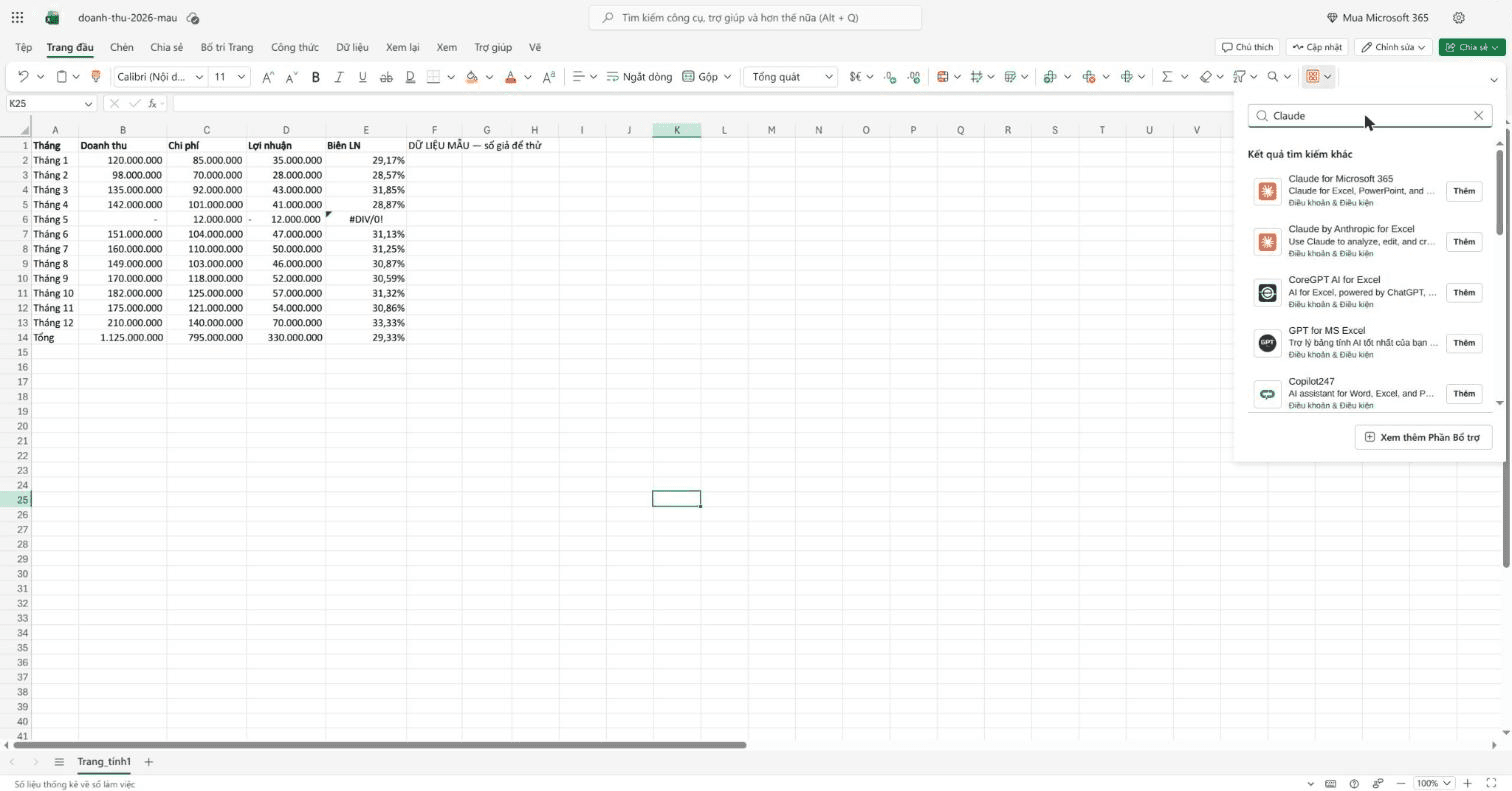
In Excel for the web: Home › Add-ins, search "Claude". We got two Anthropic-branded results: "Claude for Microsoft 365" and "Claude by Anthropic for Excel". We installed Claude for Microsoft 365, the name Anthropic's docs point to. There was no terms dialog; clicking Add installed it.
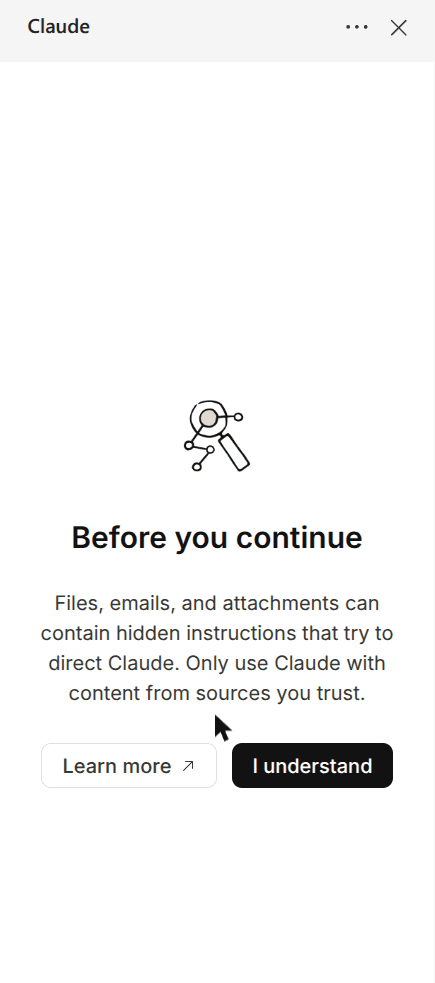
Sign-in uses a device code: the sidebar shows a code, you open claude.ai in a browser tab, confirm the same code, review the permissions and click Authorize. Before the chat opens you must acknowledge a prompt-injection warning: files and attachments can contain hidden instructions, so only use Claude with content you trust.
The empty chat also suggests built-in skills such as /audit-xls, /clean-data-xls, /dcf-model and /comps-analysis, and a shortcut, Ctrl + Alt + C, to open the sidebar.
Test 1: find the errors (about 35 seconds)
We planted two errors: May revenue is 0, so the margin cell shows #DIV/0!, and the Total row is =SUM(B2:B10), so it stops at September.
Our prompt, translated: "Is anything wrong in this revenue table? Point to the exact cells, don't fix anything yet."
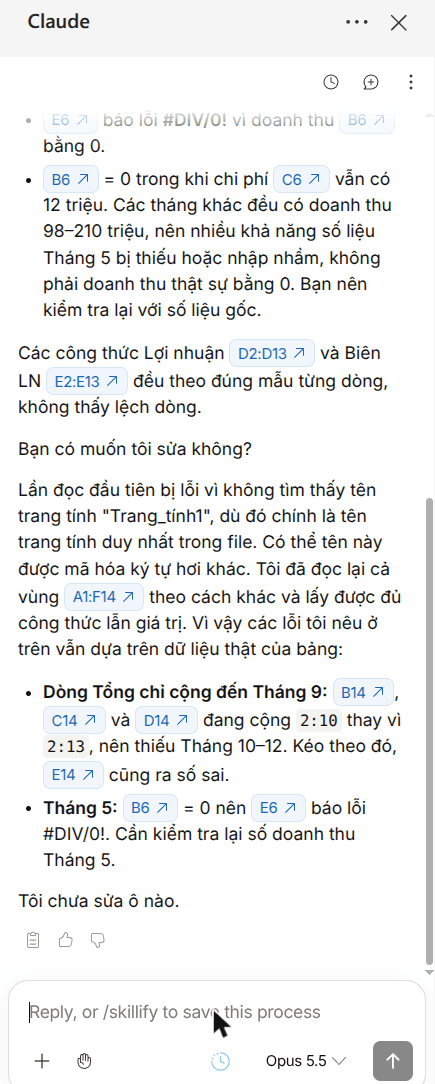
It found both errors, with clickable cell citations (B14, C14, D14, E6, B6). It also computed the correct full-year figures on its own: revenue 1,692 million instead of the 1,125 million shown, cost 1,181 million, profit 511 million. And it added a sensible note: May has 12 million of cost but zero revenue, while every other month is 98 to 210 million, so the zero is probably a missing entry, not real.
One odd moment: its first read failed because it couldn't find the sheet "Trang_tính1", a Vietnamese sheet name with diacritics. It said the name might be encoded differently, re-read the range A1:F14 another way, and carried on. If your sheet names use non-English characters, you may see the same hiccup.
Test 2: fix them (about 33 seconds)
Prompt, translated: "Fix it: make the Total row cover all 12 months and stop the May margin cell from erroring. Don't change the source numbers."
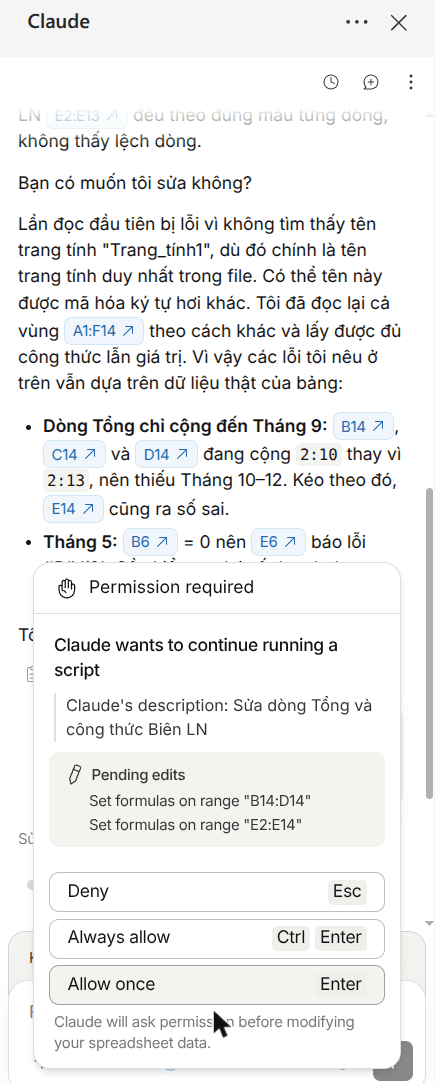
Before writing anything, the add-in showed a Permission required box listing the pending edits (set formulas on B14:D14 and E2:E14) with Deny, Always allow and Allow once.
After we allowed it: B14 became =SUM(B2:B13) (1,692,000,000), E6 became =IF(B6=0;"";D6/B6) so it shows blank, and the total margin is 30.20%. The revenue and cost columns were untouched. Claude re-read B2:E14 to check its own work.
Test 3: a what-if with a live input (about 42 seconds)
Prompt, translated: "If December costs rise 10%, what is full-year profit? Add an input cell so I can change the percentage myself, and keep the formulas."
Answer: 497 million (14 million less). It added a small block under the table: a yellow input cell at 10%, December cost after the rise =C13*(1+B17) = 154 million, and profit after the rise =D14-(B18-C13). The original table did not change. Its script failed on the first run; Claude said so and reran it.
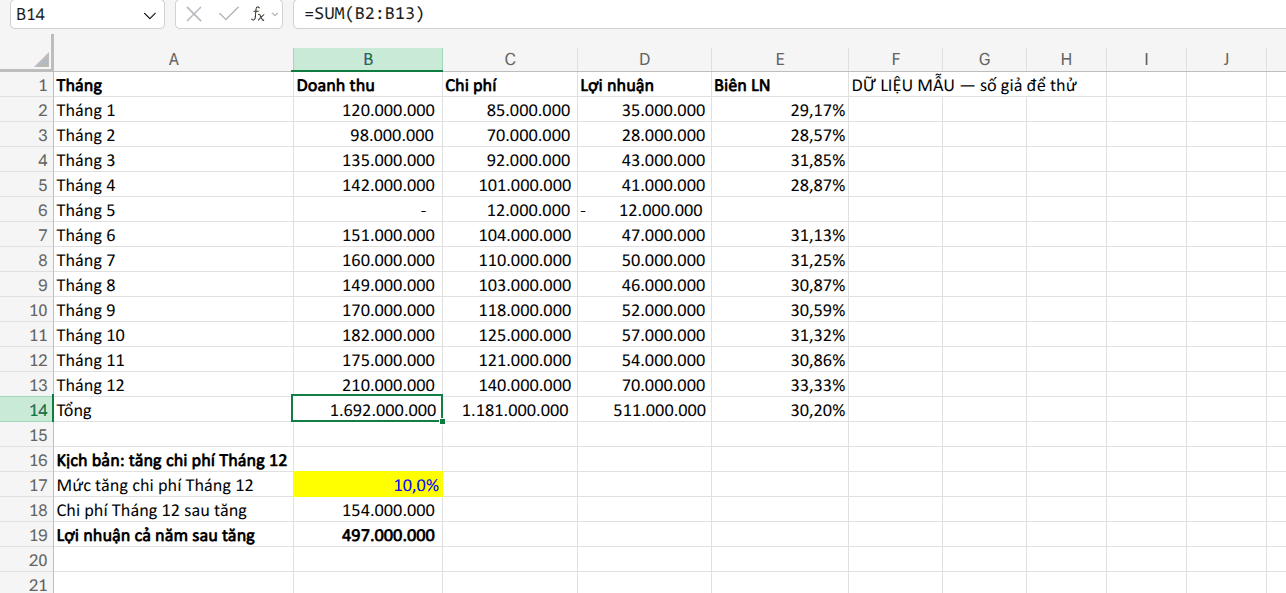
We changed the input to 20%: profit went to 483 million, which is correct. The formulas really are live.
Test 4: ask for a VBA macro (about 30 seconds)
Prompt, translated: "Write a VBA macro that highlights months with margin under 29% in red every time the file opens, and attach it to this file."
Claude said it cannot add or run VBA in this file, and that a .xlsx file can't store macros anyway; you would need .xlsm. It gave the Workbook_Open code to paste yourself, correctly predicted it would highlight February (28.57%) and April (28.87%), and offered conditional formatting as a macro-free alternative. This matches Anthropic's docs, which list macros and VBA as unsupported.
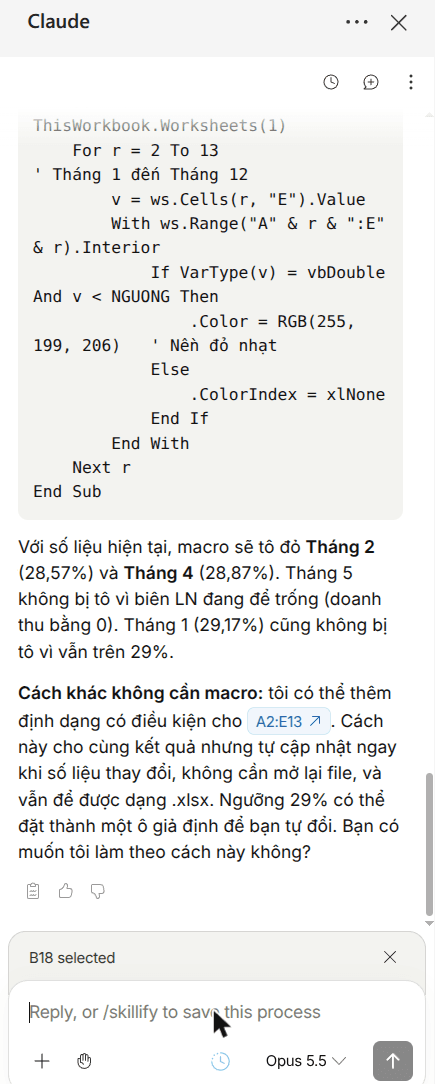
One slip: it told us to press Alt + F11 to open the VBA editor. Excel for the web has no VBA editor, so that step only works in desktop Excel, and Claude didn't say so.
Our verdict
- Accuracy: 4 out of 4 tasks correct on a small sheet. The error hunt and the what-if were genuinely useful.
- Safety rails are real: a prompt-injection warning before first use, and a permission box listing the exact ranges before every edit.
- Rough edges: a non-English sheet name tripped the first read; one script needed a retry; the VBA instructions assumed desktop Excel.
- Not tested yet: PivotTables, Excel on Windows or Mac, the Pro plan, and large workbooks.
If you work outside Excel, from a terminal, Claude Code with the xlsx skill is the other route: see our Claude Excel skill test and PDF invoices to Excel with Claude Code.
FAQ
Is Claude for Excel free?
The add-in is free to install, but Anthropic lists it for Pro, Max, Team and Enterprise plans only. The Free plan is not included (as of 16 October 2026).
Do I need a paid Microsoft 365 subscription?
Not for Excel on the web: we ran it with a free personal Microsoft account. On Windows, Anthropic's docs require Excel with a Microsoft 365 subscription (build 16.0.13127.20296 or later).
Can Claude for Excel write or run macros?
It can write VBA code for you to paste, but it can't attach or run macros. Anthropic lists macros, VBA and data tables as unsupported.
Does Claude edit my sheet without asking?
Not in our test. Before each change it showed a Permission required box listing the ranges, with Deny, Always allow and Allow once.
Sources
- Anthropic docs: Use Claude for Excel
Vendor document
- Claude for Microsoft 365 on Microsoft AppSource
Vendor page