Claude Excel Skill: Already Built In? A Real Report-and-Update Test
We asked Claude Code to build an Excel report with formulas and a chart, then add a new month, with nothing installed and with Anthropic's document-skills. The built-in xlsx skill did the job.
Yes: in our test, the Claude Excel skill was already built in. Signed in to Claude Code with a Claude account, Claude loaded Anthropic's xlsx skill on its own for a spreadsheet task, with nothing installed, and produced a report with real formulas and a chart. Installing Anthropic's document-skills plugin gave the same numbers; only the layout differed.
Tested on 12 October 2026 with Claude Code 2.1.296 (Opus 5.5, high effort) on Linux, auto mode on, signed in with a Claude Max account. The sales figures are sample data and the three branch names are fictional. Each setup ran once, so this is a hands-on observation, not a statistic. Not tested with a Free account.
The prompts, file names and sheet names in this test were in Vietnamese, so the screenshots show Vietnamese text. That makes it a test with non-English content, too.
Watch the real test run (Vietnamese narration): https://youtu.be/WMiJE17Pghs
Key results
- Nothing installed, xlsx skill used anyway: Claude loaded
anthropic-skills:xlsxright after the prompt, in both tasks, without the prompt naming it. - Under two minutes for the first report, typing included, with totals written as
SUMIFSformulas and a column chart. - October update checked out: one branch went from 664,824,000 (six months) plus 91,476,000 (October) to 756,300,000, exactly the figure in the updated report.
- document-skills made no difference to the numbers: revenue, orders, share and average per order were identical in both folders; only the layout changed.
The test: two folders, two Excel tasks
The input file, ban-hang.csv, has 18 rows: monthly revenue and order counts from 2026-04 to 2026-09 for three branches (Cầu Giấy, Hai Bà Trưng, Long Biên). Each folder ran the same two tasks:
- Build the report: create
bao-cao.xlsxwith a Data sheet holding the raw figures; a Summary sheet with total revenue and total orders per branch, each branch's share of revenue, and average revenue per order; plus a column chart of monthly revenue for the three branches. No follow-up questions. - Add October from
thang-10.csv(3 rows): append to the Data sheet, update the summary and the chart, keep all existing formatting, and save asbao-cao-t10.xlsx.
The khong-skill folder had nothing installed. The co-skill folder had the document-skills plugin, and its prompts started with "Use the xlsx skill." Every run was a fresh Claude Code session.
Is the Claude Excel skill built in to Claude Code?
In our setup, yes. The first thing Claude did in the empty folder was load a skill:
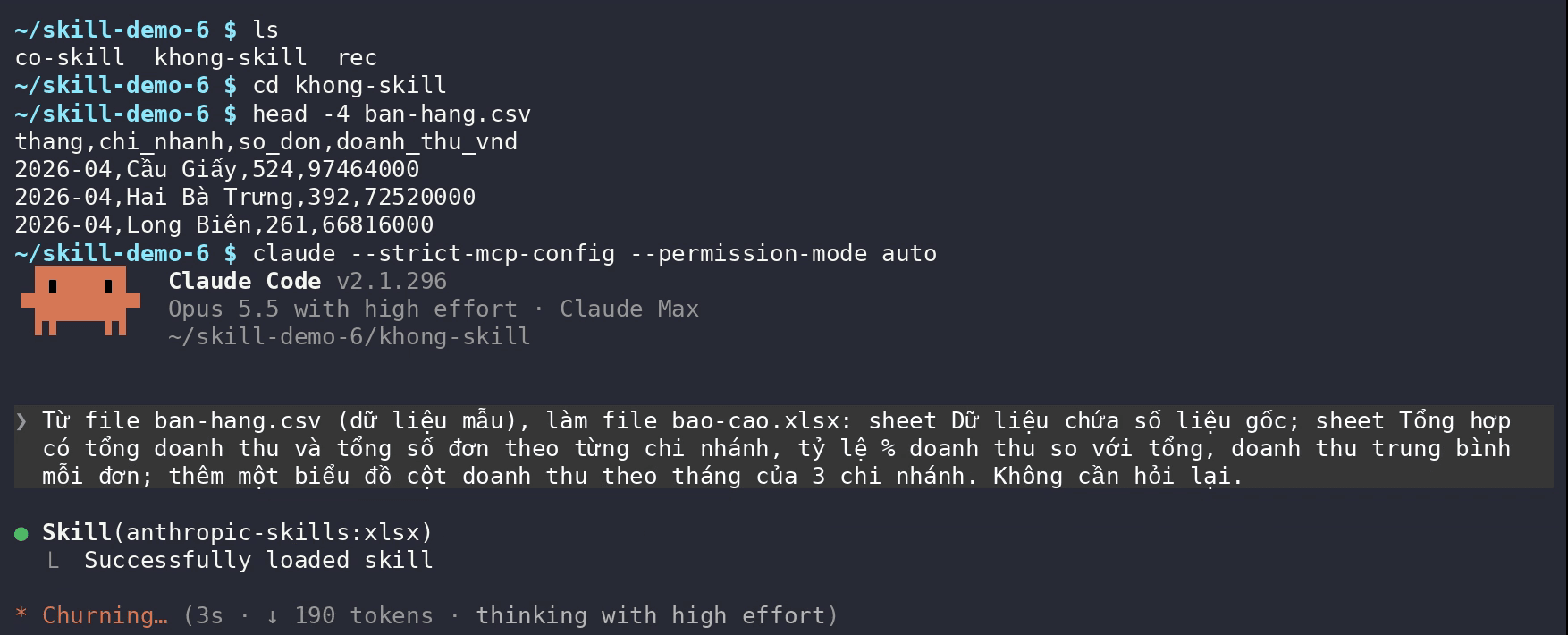
We never installed anthropic-skills:xlsx. Claude Code's config folder has ~/.claude/skills/synced/…/ with Anthropic's skills already in it: xlsx, docx, pptx, pdf, skill-creator and a few more. Claude Code syncs these to the machine after you sign in with a Claude account. The xlsx skill triggers whenever a spreadsheet is the input or output, so the prompt does not need to name it.
That is the opposite of what we saw in our frontend-design skill test, where Claude did not use the skill until the prompt named it. The built-in Claude xlsx skill was called right away, in both tasks.
Can Claude make an Excel spreadsheet with real formulas?
Yes. In under two minutes, typing included, Claude wrote bao-cao.xlsx. Before reporting back, it recalculated the formulas with LibreOffice and checked the totals against its own sums from the CSV.
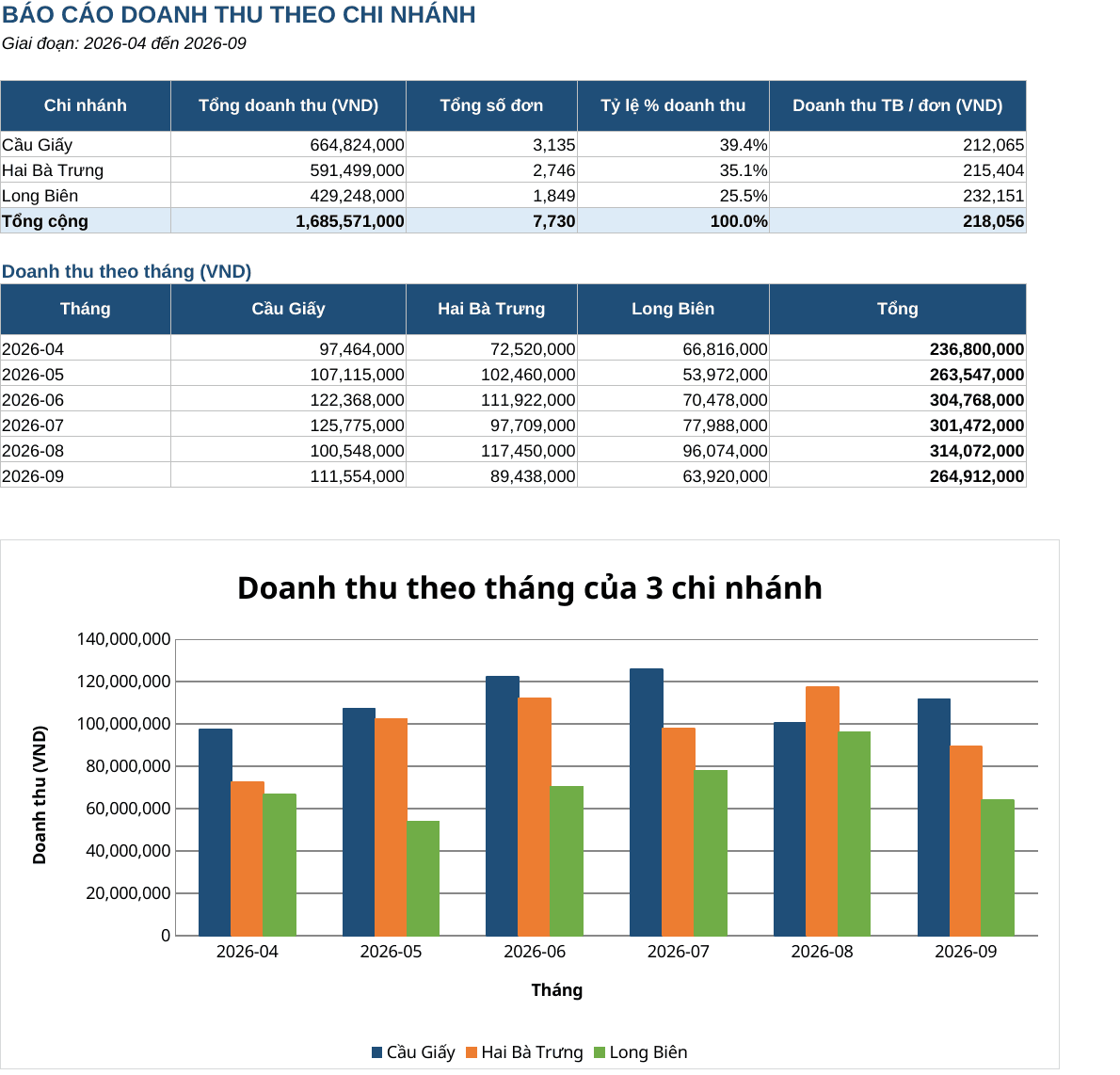
What makes the file useful is what the Claude Excel skill put inside it:
- Totals are formulas, such as
=SUMIFS('Dữ liệu'!$D$2:$D$19,'Dữ liệu'!$B$2:$B$19,$A5)(Dữ liệuis the Data sheet). Change a raw number and the summary and chart follow. - Division by zero is guarded: average revenue per order is
=IF(C5=0,0,B5/C5). - Raw inputs are in blue text and formulas in black, a common convention in financial workbooks.
- A column chart of monthly revenue, one color per branch.
This matches what the xlsx skill's SKILL.md requires: formulas instead of precomputed numbers, zero formula errors, and a full LibreOffice recalculation before handing the file over.
Updating an existing workbook: formatting kept, formulas extended
The harder task is adding rows to an existing file without breaking its formatting or chart. In the empty folder, Claude loaded anthropic-skills:xlsx again on its own.
One command failed midway; Claude read the error and carried on. It inspected the workbook's internal structure, added three October rows to the Data sheet, extended the formula ranges to row 22, changed the period line to 2026-04 to 2026-10, added October to the chart, and recalculated with LibreOffice. The original bao-cao.xlsx was left untouched.
A quick spot check: Cầu Giấy earned 664,824,000 in the first six months and 91,476,000 in October, 756,300,000 in total, exactly the figure in the new report.
Claude Excel skill vs Anthropic document-skills: any difference?
The second folder installed document-skills from the anthropics/skills repository:
claude plugin install document-skills@anthropic-agent-skills --scope project
The prompt started with "Use the xlsx skill." and the terminal showed Skill(document-skills:xlsx). Claude worked almost the same way: write the file, recalculate, and export a PDF preview to check it. After the October update, the two summaries matched:
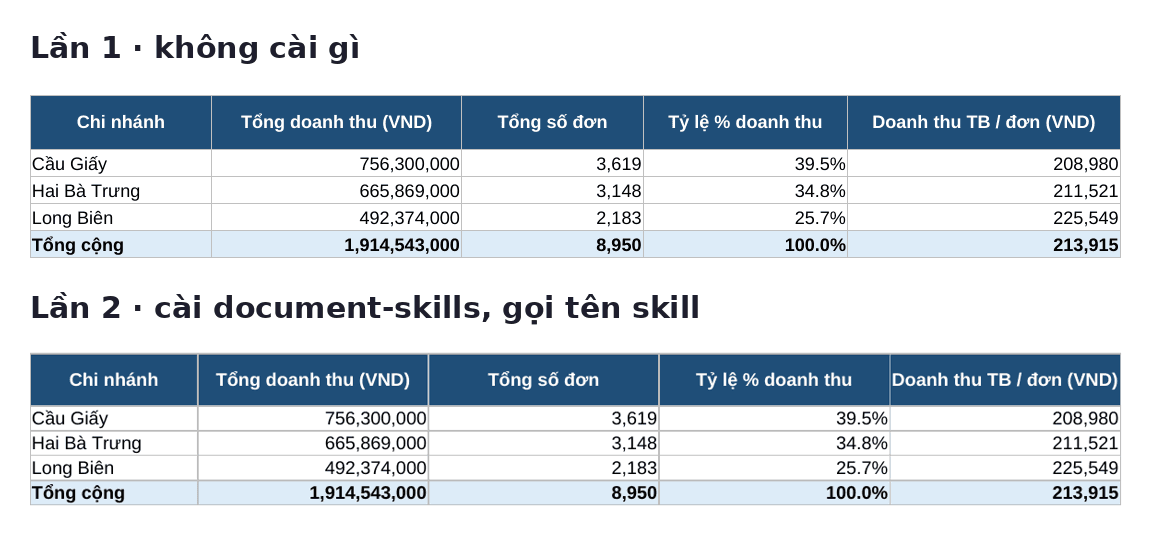
Revenue, orders, share and average per order are identical for every branch. Only the layout differs: the plugin version put the chart to the right of the tables and added a note explaining the calculations.
How to make Excel files with Claude Code: takeaways
- No extra install needed for Excel. Signing in to Claude Code with a Claude account gave us the Claude Excel skill; installing
document-skillsmade no difference in this test. - Watch for the
Skill(...)line in the terminal to see whether Claude used a skill. If it is missing and you want to be sure, name the skill in the prompt. - Spell out the structure: sheet names, columns, formulas and chart type. When updating, add "keep all existing formatting" and save to a new file so the original survives.
- Open the file and check a few numbers before sending it. The xlsx skill's own
SKILL.mdwarns that formulas without errors are not necessarily right: a range off by one row still gives wrong numbers.
New to skills? Start with What are Claude Skills? Install one from GitHub and test the PowerPoint skill. To write your own, see how to create a Claude skill with skill-creator. For the other skills we put through the same kind of test, see the best Claude skills we tested.
Frequently asked questions
Does Claude Code come with an Excel skill?
In our test, yes. Signed in with a Claude Max account, Claude Code had a ~/.claude/skills/synced/ folder with Anthropic's xlsx, docx, pptx and pdf skills, and called the xlsx skill automatically for a spreadsheet task. We have not tested a Free account.
Do I need document-skills for Claude to make Excel files?
Not for the report in this test. With and without document-skills, the numbers, formulas and chart were the same; only the layout differed. The plugin helps if your machine has no built-in xlsx skill, which you can spot when no Skill(...) line appears while you work on a spreadsheet.
Does Claude's Excel file contain formulas or just numbers?
Real formulas. Totals use SUMIFS pointing at the Data sheet, and averages guard against division by zero. Formulas instead of precomputed numbers are also a requirement in the xlsx skill's SKILL.md.
How do I install Anthropic's document-skills plugin?
We ran claude plugin install document-skills@anthropic-agent-skills --scope project in the test folder. The plugin comes from the anthropics/skills repository on GitHub, and the terminal then showed Skill(document-skills:xlsx) when it was used.
Can Claude update an existing Excel file without breaking it?
In our test, yes. Claude added three October rows, extended the formula ranges, added October to the chart, kept the formatting and saved to a new file, leaving the original untouched. The totals matched a manual check.
How can I tell whether Claude is using a skill?
Look at the terminal: a Skill(skill-name) line with "Successfully loaded skill" appears when Claude uses one. Without that line, Claude is working from general knowledge.
Sources
- SKILL.md của skill xlsx
Vendor document
- anthropics/skills — README, LICENSE
Vendor page
- Claude Code docs — Agent Skills
Vendor document