Claude Frontend Design Skill: Does It Run Once Installed? A Three-Run Test
We gave Claude Code the same café landing-page prompt three times. With the frontend-design skill installed, Claude ignored it; only naming the skill changed the design.
The Claude frontend design skill (frontend-design) is Anthropic's official skill for making Claude design web pages deliberately instead of falling back on the look that reads as AI-generated. In our three-run test, installing the skill was not enough: Claude Code did not use it on its own. Only when the prompt named the skill did Claude load it, and the landing page changed completely.
Tested on 10 October 2026 with Claude Code 2.1.294 (Opus 5.5, high effort) on Linux, auto mode on. "Hiên Nhà" is a fictional café; prices, address and phone numbers on the pages were made up by the AI. Each setup ran only once or twice, so this is a hands-on observation, not a statistic.
The test was run with non-English content: the prompt and the generated pages are in Vietnamese, so the screenshots below show Vietnamese text, and the video has Vietnamese narration.
Watch the real test run (Vietnamese narration): https://youtu.be/9_nXl0opjzw
Key results
- Run 1, no skill: a 442-line
index.htmlafter about 1 minute 46 seconds of thinking. It looked good but matched most of the AI-default traits the skill itself lists. - Run 2, skill installed, same prompt: Claude never loaded frontend-design. The page followed the same template as run 1. A separate earlier session gave the same result.
- Run 3, skill named in the prompt: the terminal showed
Skill(example-skills:frontend-design)loading, Claude planned a design direction first, and the result was a 555-line page with no cream background, no italic accent phrase and no all-caps eyebrow label. - Still needs a human check: in run 3 the café wordmark was partly covered by a shutter element.
The test: one landing page prompt, three runs
The prompt (in Vietnamese) asked Claude for a landing page for "Hiên Nhà", a fictional café in Hanoi: an introduction, a six-item menu with prices, opening hours, address and a booking button, in a single index.html with HTML and CSS only, and no follow-up questions.
- Run 1, no skill: an empty folder, nothing installed.
- Run 2, skill installed, same prompt.
- Run 3, skill named: the prompt starts with "Use the frontend-design skill."
Each run used its own folder and a fresh Claude Code session.
How to install the frontend-design skill
The Claude frontend design skill ships in the example-skills plugin of the anthropics/skills repository. Install it at project scope with:
claude plugin install example-skills@anthropic-agent-skills --scope project
If the marketplace is not added yet, run claude plugin marketplace add anthropics/skills first. New to Claude Code skills? Start with What Are Claude Skills? Install One From GitHub, which walks through installing a skill and testing the PowerPoint skill.
Run 1: no skill, a nice page with the usual AI look
Claude thought for about 1 minute 46 seconds and wrote a 442-line index.html: navigation, introduction, a six-item menu with prices, hours, address, a booking button and a coffee cup drawn in CSS. At a glance it looks good.
But the skill's own SKILL.md lists the traits AI-generated pages tend to share, and run 1 hits most of them:
- Warm cream background, serif display, terracotta accent: the skill names a background near
#F4F1EA; run 1 used#F7F1E8, a Lora serif headline and terracotta buttons. - One phrase in the headline set in italic or a different color: "một tách cà phê" in italic terracotta.
- A small all-caps label above the headline, joined with a middle dot: "CÀ PHÊ PHỐ CỔ · HÀ NỘI".
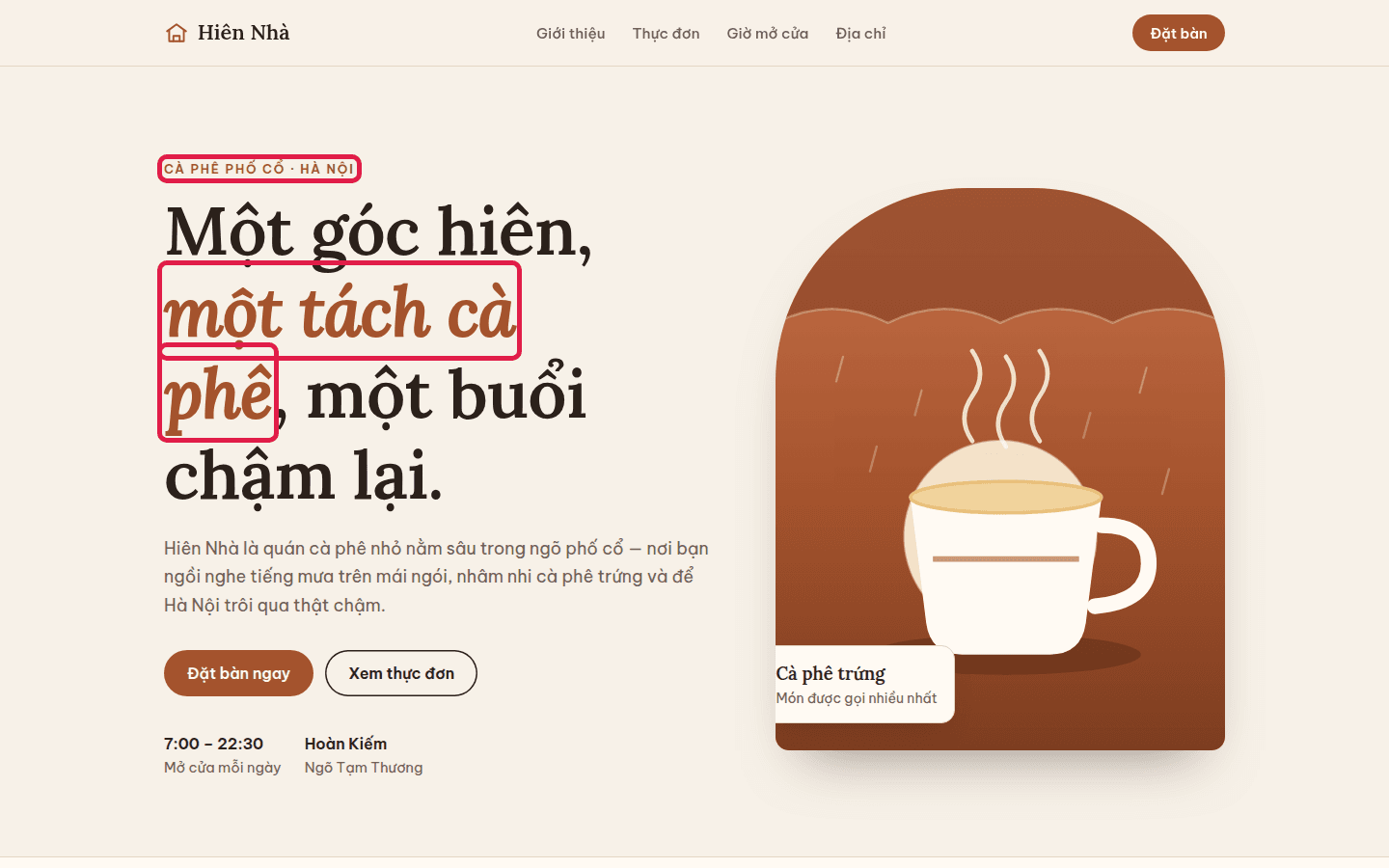
The red boxes were not drawn by hand: their positions come from the page's own elements (italic or differently colored text inside the headline, small uppercase text above the fold).
Run 2: Claude skill not triggering after install
In a new folder, example-skills was installed, then the same prompt was typed. Claude even opened Chrome to screenshot the page at 1280 and 390 pixels wide and reduced the headline size. But the session never loaded frontend-design.
The result follows the same template as run 1: background #F6EFE3, a Lora headline, the phrase "nghe phố chậm lại." in italic terracotta, and an all-caps label joined with a middle dot.
An earlier, separate session gave the same result: the skill was installed and listed, but not called. Claude decides on its own whether to use a skill, so installing one does not guarantee it runs. If you write your own skills, the same applies to them; see how to create a Claude skill.
Run 3: name the skill, get a different page
With "Use the frontend-design skill." at the start of the prompt, the terminal shows:
Skill(example-skills:frontend-design)
  ⎿  Successfully loaded skill
Claude then spent about a minute and a half thinking and settled a design direction before writing code, as the skill requires: an old-quarter Hanoi look with ochre walls, green shutters, bougainvillea pink, Barlow Condensed and Literata, and a single shutter-opening animation on load. The final file has 555 lines.
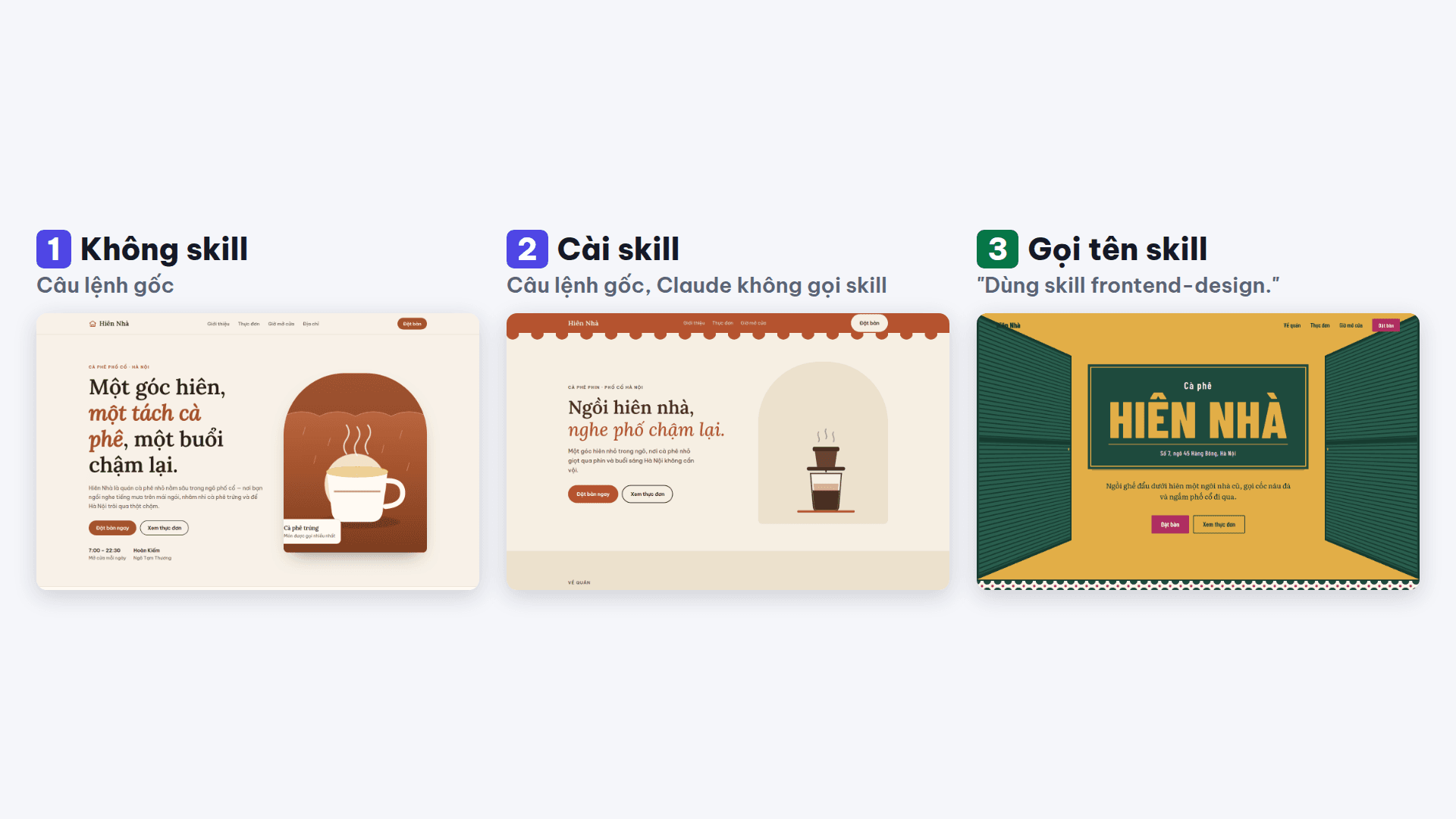
Run 3 shows the café name like a shop sign on green, a shutter on each side, the menu on deep green and a booking form with date and time fields. No cream background, no italic accent phrase, no all-caps eyebrow label.
Not perfect: you still need to look at the page
The "Hiên Nhà" wordmark in the top-left corner is covered by a shutter and hard to read. Claude was about to take screenshots to check its work when the test session ended, so the flaw remains.

The Claude frontend design skill steers away from defaults, but it does not replace opening the page yourself, especially on a phone.
What is inside the Claude frontend design skill
The SKILL.md file is 71 lines, written like a brief for the design lead of a studio. Key points:
- It names the AI defaults: cream with serif and terracotta; near-black with one acid accent; broadsheet layouts; the identical rounded-card SaaS kit; all-caps eyebrows, middle-dot meta strings and "→" on buttons. They are legitimate for some briefs, but they are defaults, not choices.
- Two passes: first a plan with 4–6 named colors, typefaces and roles, a layout sketched in ASCII and the principles for this page; review the plan against generic output, revise, then code.
- "Spend your boldness in one place": one memorable element, everything else quiet.
- A quality floor: responsive to mobile, visible keyboard focus, reduced motion respected.
- Copy: written from the user's side; buttons say exactly what happens.
How to get better web design from Claude Code with this skill
- Name the skill in the prompt: "Use the frontend-design skill. …". Claude Code's command menu also lists
/example-skills:frontend-design. - Give real subject detail: the skill draws colors and type from the subject, so the more specific the brief, the more distinct the page.
- Check the page yourself on desktop and phone before using it.
For the other skills we ran the same way, see the Claude skills we tested, ranked.
Frequently asked questions
What is the Claude frontend design skill?
It is an official Anthropic skill in the anthropics/skills repository that guides Claude to design interfaces deliberately: color, type and layout chosen for the subject instead of defaults, with a design plan before any code. Install it with claude plugin install example-skills@anthropic-agent-skills.
Why didn't Claude use the skill after I installed it?
Claude decides whether to use a skill based on your request and the skill's description. In two separate sessions with a plain "make a landing page" prompt, Claude did not call frontend-design either time. To be sure it runs, name the skill in the prompt.
How do I make Claude Code use the frontend-design skill?
Start the prompt with "Use the frontend-design skill." or pick /example-skills:frontend-design from Claude Code's command menu. In our test, naming the skill made the terminal show Skill(example-skills:frontend-design) loading.
Is Claude's web design bad without the skill?
No. In this test the no-skill landing page was complete and looked good. The difference is that it landed on the same defaults many AI-made pages share, so it is easy to recognize and hard to remember.
Does the skill produce a flawless page?
No. In run 3 the café wordmark in the top-left corner was covered by a shutter and hard to read. You still need to check the page yourself on desktop and phone.
Sources
- SKILL.md của skill frontend-design
Vendor document
- anthropics/skills — README, LICENSE
Vendor page
- Claude Code docs — Agent Skills
Vendor document