Turn Off AI Training in ChatGPT, Claude, Gemini: 3 Traps
Where the training switch sits in ChatGPT, Claude and Gemini, read from each vendor's help pages on 8 Nov 2026, plus our own Claude screenshots. Off still leaves feedback, voice and Codex settings, and 72-hour to 5-year retention.
By the RanThis team, written with AI8 min read
Why trust this: every result, number and screenshot comes from a real run on our own accounts, not from the AI. How we test
To stop ChatGPT, Claude and Gemini training on your chats, turn off one switch in each: Improve the model for everyone, Help improve our AI models and Keep Activity. On personal ChatGPT and Gemini accounts it starts on. Reading all three vendors' help pages on 8 November 2026, we found three things it misses: the feedback buttons, separate voice and Codex settings, and retention from 72 hours to five years.
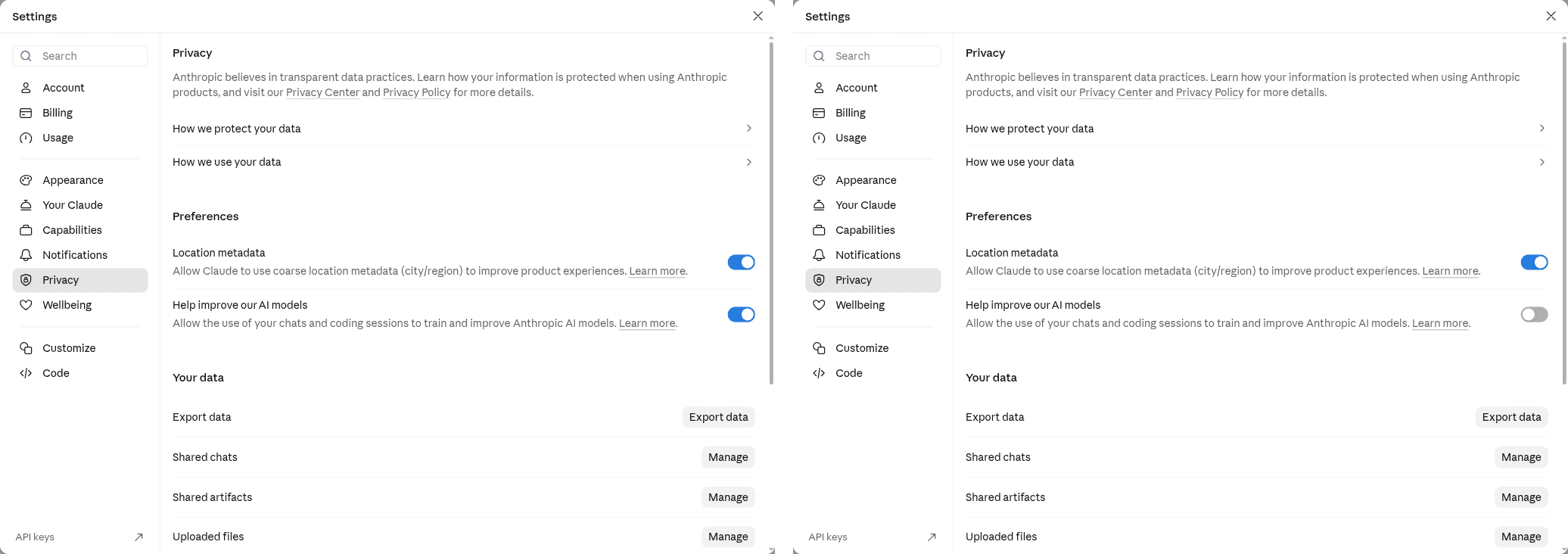
We also flipped the Claude switch on our own free account and kept the screenshots. We did not script anything on chatgpt.com or gemini.google.com: the ChatGPT screenshot below is OpenAI's own, and the Gemini steps are quoted from Google's help page.
At a glance
Key results
- Where the switch is. ChatGPT: Settings › Data controls › Improve the model for everyone. Claude: Settings › Privacy › Help improve our AI models. Gemini: Settings & help › Activity › Keep Activity (Google calls the switch "On", you pick "Turn off" or "Turn off and delete activity").
- Default on personal plans: on. OpenAI says data sharing "is enabled by default" on Free, Plus and Pro. Google says Keep Activity "is on by default" for users 18 and over. Anthropic's two help pages we read do not state a default, so check yours rather than assume.
- Off is not "never stored". Gemini still keeps chats with your account for up to 72 hours. ChatGPT temporary chats can stay up to 30 days for safety. Chats Google's reviewers already read stay up to three years, even after you delete them.
- Trap 1, the thumbs. OpenAI and Google both say that if you rate a reply after opting out, the conversation tied to that feedback can still be used. Anthropic keeps feedback data for five years.
- Trap 2, the other switches. ChatGPT voice recordings and Codex environments have their own settings; turning off the main one does not change them.
- Trap 3, the past. All three only promise to stop future use. Anthropic says training runs already in progress and models already trained keep your data.
Hands-on test
Setup
- Date: 8 November 2026, Vietnam time. Help pages fetched the same morning; the "updated" date each page showed is in the sources list.
- Claude: our project's Claude Free account on claude.ai in a desktop browser, screenshots taken on 3 November 2026 with email and name cropped out.
- ChatGPT and Gemini: no screenshots of our own. Our project has no ChatGPT account, and we do not drive chatgpt.com or gemini.google.com with scripts. Menu paths below are copied from each vendor's help page, word for word, and nothing else.
- Scope: personal accounts only (ChatGPT Free, Plus, Pro; Claude Free, Pro, Max; Gemini with a personal Google account). OpenAI says ChatGPT Business, Enterprise, Edu and its API are not used for training by default; Anthropic's consumer pages send Claude for Work and API users to a separate commercial policy. Work and API accounts are out of scope here.
ChatGPT: Improve the model for everyone
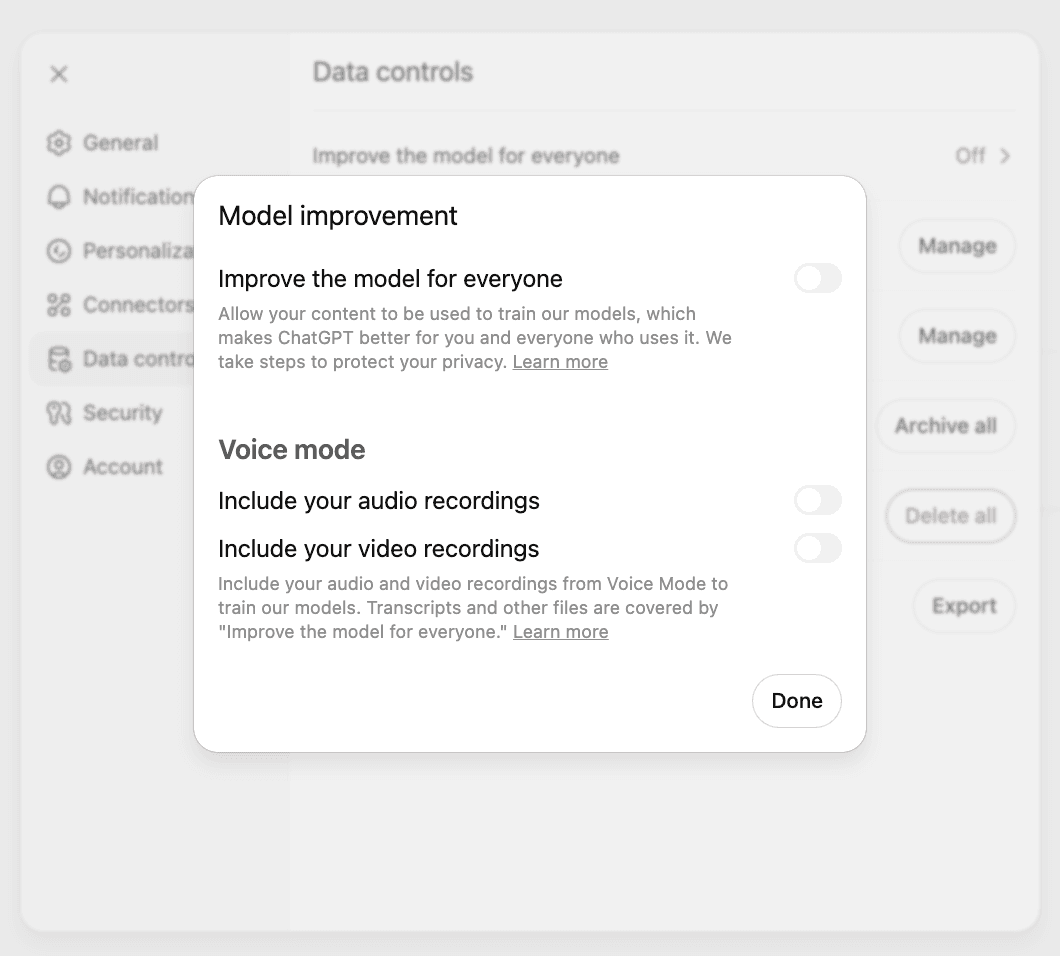
On the web, OpenAI's steps are: open your account menu, choose Settings, then Data controls, select Improve the model for everyone, turn it off and press Done. On iOS and Android it is the sidebar, your profile icon, Data controls. Once you are signed in, the choice follows your account to every device. If you use ChatGPT signed out, the same switch exists but is saved only in that browser.
Three details on OpenAI's pages are easy to miss:
- The Privacy Portal option Do not train on my content does the same job. OpenAI says either one is enough and you do not need both.
- Voice mode has its own pair of switches for audio and video recordings (visible in OpenAI's screenshot above). Transcripts follow the main switch; the recordings do not.
- Codex has a separate Include environments setting. OpenAI states that changing the ChatGPT switch or opting out in the Privacy Portal does not change it.
Turning the switch off does not delete or hide anything in your history. For a single sensitive chat there is Temporary chat: it stays out of history and memory and is not used to improve models, but OpenAI may keep it for up to 30 days for safety. If you save it, it becomes a regular chat under your normal settings.
Claude: Help improve our AI models
Anthropic's path on desktop or browser: click your name, choose Settings, then Privacy, and flip the switch under Help improve our AI models. The mobile app has the same three steps. The page covers Claude Free, Pro and Max, and also Claude Code when you sign in with one of those plans, so the same switch decides what happens to your coding sessions.
What off means, per Anthropic: new chats and coding sessions are not used for future training, and previously stored ones are dropped from future training runs too. So it is not "new chats only", which some guides still say. What off does not undo: runs that have already started and models already trained. Chats flagged by Anthropic's safety classifiers may still be used for its trust and safety work.
What on means: Anthropic may keep your chats in de-identified form for up to five years in its training pipelines, counting chats that are new or resumed after you switch it on. Incognito chats are excluded even when the switch is on. Deleted chats leave your history at once and Anthropic's back-end within 30 days; that 30-day figure is about deletion, not about the switch.
Gemini: Keep Activity
Gemini's switch is broader than the other two, because it also controls whether your chats are saved in your history at all. Google's steps on a computer: go to gemini.google.com, click Settings & help, then Activity, and near the top click "On" and pick "Turn off" or "Turn off and delete activity". You can reach the same page at myactivity.google.com/product/gemini.
With Keep Activity off, Google says your future chats will not appear in Activity and will not train its models unless you send feedback. They are still kept with your account for up to 72 hours, so Gemini can answer and Google can check for abuse. Some connected apps such as Google Workspace stop working while it is off, and the Gems you create are still saved, but chats with them are not.
The part that matters most for work data: a subset of chats is read by human reviewers, including trained staff at outside service providers. Google disconnects those chats from your account first, then keeps them for up to three years, and deleting your activity does not remove them. Google's own advice on the same page is not to type anything confidential you would not want a reviewer to see. Gemini's temporary chats are not used to train its models.
What worked
What worked
- On Claude, Anthropic's three steps (name, Settings, Privacy) led straight to the switch on our free account, and it flipped both ways at once.
- Each vendor offers a one-chat escape hatch: ChatGPT Temporary chat, Claude Incognito, Gemini temporary chat.
- Anthropic's page is the most explicit about old chats: off covers stored chats for future runs, not just new ones.
Where it fell short
What didn't work
- None of the switches reaches feedback. A thumbs-down on one bad answer can send that conversation back into training at OpenAI and Google, after you opted out.
- ChatGPT's main switch leaves voice recordings and Codex environments alone, so a "fully off" account needs two or three settings.
- Gemini ties training to history: turning training off also turns off your saved chats and some connected apps, which pushes people to leave it on.
- We could only screenshot one of the three apps ourselves. The ChatGPT image is OpenAI's, and the Gemini path is from Google's text.
Our verdict
If you paste contracts, payslips or client data into any of these apps on a personal account, turn the switch off today: it costs nothing on ChatGPT and Claude, and on Gemini it costs your chat history, which is a fair trade for work data. Then add two habits the switch does not cover: do not rate answers in chats that hold anything sensitive, and use the temporary or incognito mode for one-off private questions. If you need a guarantee rather than a setting, look at the vendor's business plan or API terms instead; OpenAI, for one, says it does not train on ChatGPT Business, Enterprise, Edu or API data by default. Claude users on Claude Code should know the same Privacy switch covers their coding sessions; see what Claude Code is and what it can touch.
FAQ
Does ChatGPT train on my chats if I pay for Plus?
Yes, unless you turn it off. OpenAI's help page says data sharing is on by default for Free, Plus and Pro personal workspaces. Business, Enterprise and Edu are not used for training by default.
If I turn off Claude's switch, are my old chats removed from training?
They are left out of future training runs, according to Anthropic's privacy pages, along with new chats. They are not pulled out of runs already in progress or models already trained.
Does turning off Keep Activity stop Google from storing my Gemini chats?
No. Google keeps them with your account for up to 72 hours, and any chat a human reviewer already read is kept for up to three years, disconnected from your account.
Can feedback buttons undo my opt-out?
On ChatGPT and Gemini, yes for that conversation: both say the chat linked to your feedback may be used even after you opt out. Anthropic says it keeps feedback data for five years.
Sources
- OpenAI Help – Data controls in ChatGPT: menu path, on by default for Free/Plus/Pro, Voice and Codex separate, Temporary chat up to 30 days (read 8 Nov 2026)
Vendor document
- OpenAI Help – How your data is used to improve model performance: Privacy Portal opt-out, feedback after opting out (read 8 Nov 2026)
Vendor document
- Anthropic Privacy Center – How do I change my model improvement privacy settings? (updated 3 Aug 2026)
Vendor document
- Anthropic Privacy Center – How long do you store my data? 5-year training retention, Incognito, feedback (updated 1 Jul 2026)
Vendor document
- Google – Gemini Apps Privacy Hub: Keep Activity, 72-hour retention, human review, reviewed chats kept up to 3 years (read 8 Nov 2026)
Vendor document
- Google – Manage & delete your Gemini Apps activity: steps to turn off Keep Activity, on by default 18+ (read 8 Nov 2026)
Vendor document
- OpenAI Help – Data controls in ChatGPT, Vietnamese edition: Vietnamese menu names (read 8 Nov 2026)
Vendor document
- Google – Gemini Apps Privacy Hub, Vietnamese edition: Vietnamese menu names (read 8 Nov 2026)
Vendor document
- Google – Manage & delete your Gemini Apps activity, Vietnamese edition: steps in Vietnamese (read 8 Nov 2026)
Vendor document