Higgsfield Image to Video: 6 Models, One Rewrote the Label
We animated one product photo with six image-to-video models on Higgsfield's Plus plan and read the label in 12 frames of every clip. Clips cost 5 to 12.5 credits; Seedance 2.0 Fast changed a letter on one of two runs and Kling 4.0 reshaped the bag.
By the RanThis team, written with AI8 min read
Why trust this: every result, number and screenshot comes from a real run on our own accounts, not from the AI. How we test
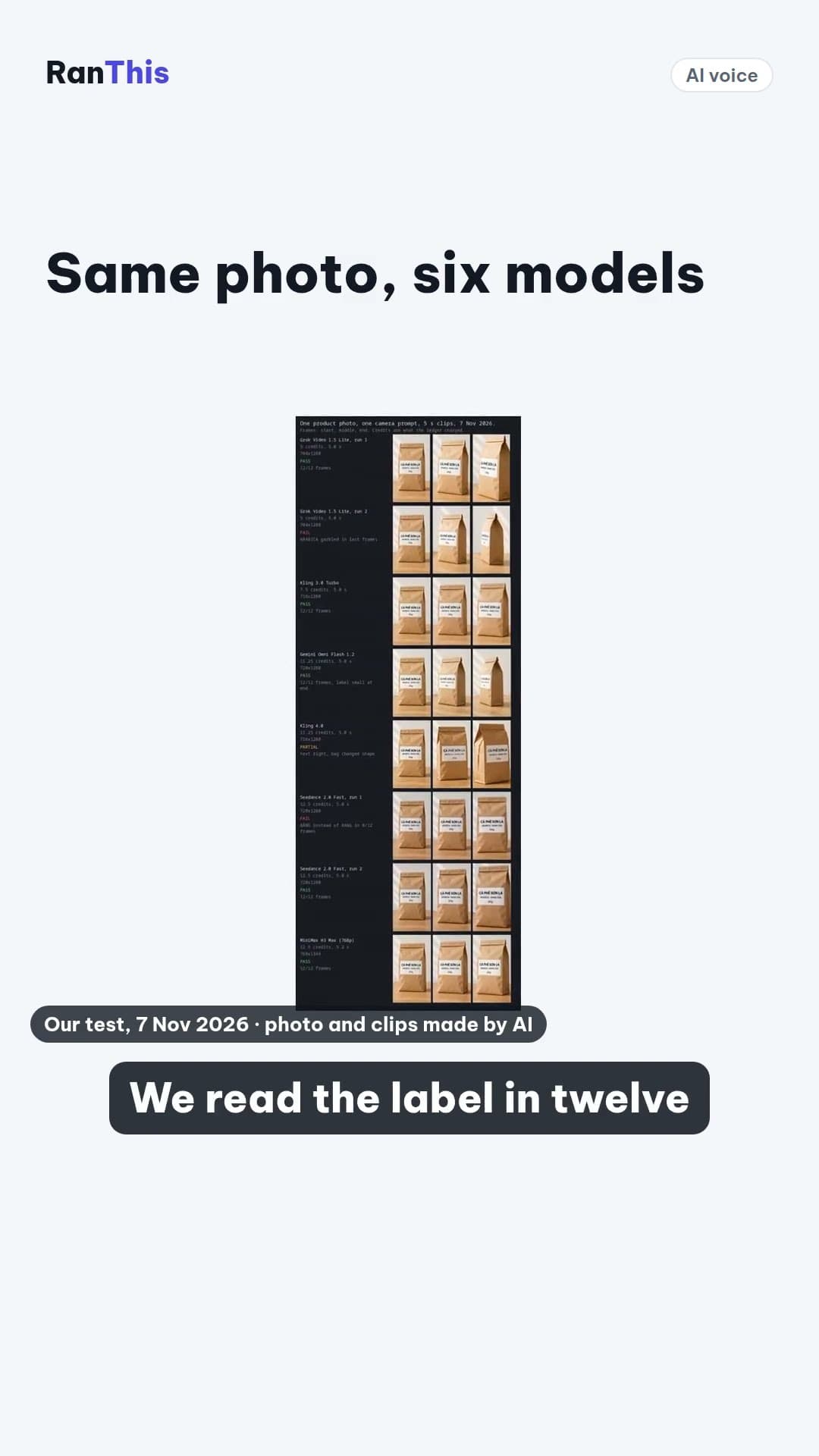
Higgsfield image to video costs 5 to 12.5 credits for a 5-second clip, and the label on your product is the real risk. We gave one coffee-bag photo to six models on our paid Plus plan and read the label in 12 frames of every clip. Two clips rewrote it, both from models that got it right on another run.
Measured on 7 Nov 2026 on a Higgsfield Plus plan (49 USD a month for 1,000 credits), through Higgsfield's official MCP connection from Claude Code. Plan price from Higgsfield's pricing guide, read the same day; the terms were last updated 23 Oct 2026.
At a glance
Key results
- A 5-second clip from a photo cost 5 to 12.5 credits (0.25 to 0.61 USD at the Plus monthly rate). Every charge matched the quote we read before submitting.
- Starting from a photo cost nothing extra on two models. Grok Video 1.5 Lite (5 credits) and Kling 3.0 Turbo (7.5) charged exactly what the same clip cost from text in our Higgsfield pricing test on 2 Nov.
- One run is not proof. Seedance 2.0 Fast changed "RANG" to "RÁNG" on the label for most of one clip, then got it right on the second run. Grok Lite kept the label on run one and garbled "ARABICA" in the last frames of run two.
- The label survived 12 of 12 frames on Kling 3.0 Turbo, Gemini Omni Flash 1.2 and MiniMax H3 Max, each in one run.
- Kling 4.0 kept the words and changed the product. By the last second the bag was wider, had grown an extra side panel and the label had slid off-centre. It also took about 14 minutes to render; the other clips took about 1.5 to 6.
- Not every model moved the camera as asked. Seedance 2.0 Fast pushed in but did not orbit, in both runs. Kling 4.0 turned the other way. Gemini Omni turned the furthest.
Hands-on test
Setup
- Account: Higgsfield Plus, monthly. Credits from the current period, granted on 3 Nov 2026.
- Client: Claude Code calling Higgsfield's MCP tools from a Windows 11 PC (WSL). We did not use the web app, so we did not test whether its prices differ.
- Start image: one 9:16 product photo we made first with GPT Image 2.6 on Higgsfield (0.25 credits): a kraft coffee bag with a white label reading "CÀ PHÊ SƠN LA", "ARABICA · RANG VỪA" and "250g". Vietnamese words with stacked accents are a hard test for text, which is the point.
- Motion prompt, same for every model: "Slow camera orbit about 30 degrees to the right around the coffee bag while gently pushing in. The bag stays still on the table; the label text stays sharp and unchanged. Soft daylight. No people, no new objects, no new text."
- Settings: 5 seconds, 720p (Higgsfield's model list offers MiniMax H3 Max at 480p or 768p only, so 768p), 9:16, each model's defaults otherwise. Seedance 2.0 ran in its Fast mode with audio off; the other five returned an audio track we did not ask for.
- Checks: credits from the quote before each run, then the
transactionsledger. Length and size fromffprobe. For the label, we cut 12 evenly spaced frames from every clip and Claude, the AI assistant that ran this test, read the label in each one at full size. That is a check of one label and one prompt, not a quality ranking. - Repeat runs: after Seedance 2.0 Fast changed a letter, we ran it and Grok Lite once more (17.5 credits) to see whether the fault repeats.
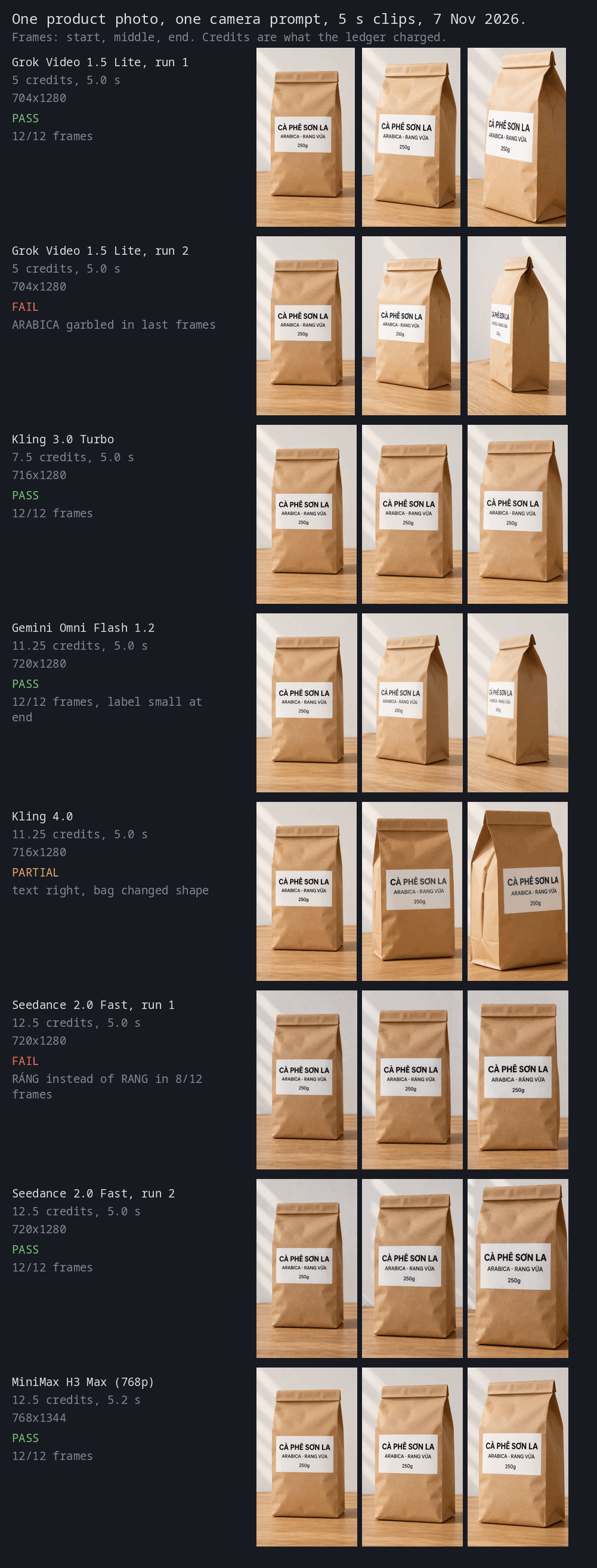
Credits per clip, model by model
Dollar figures use Plus monthly: 49 USD for 1,000 credits, before any tax.
The whole test cost 77.75 credits, about 3.81 USD at the Plus rate: 0.25 for the photo, 60 for the first six clips and 17.5 for the two repeats.
The label is where image-to-video breaks
A shop owner animating a product shot cares less about cinematic motion than about whether the name on the pack is still the name on the pack. Two failures showed up, and they look different.
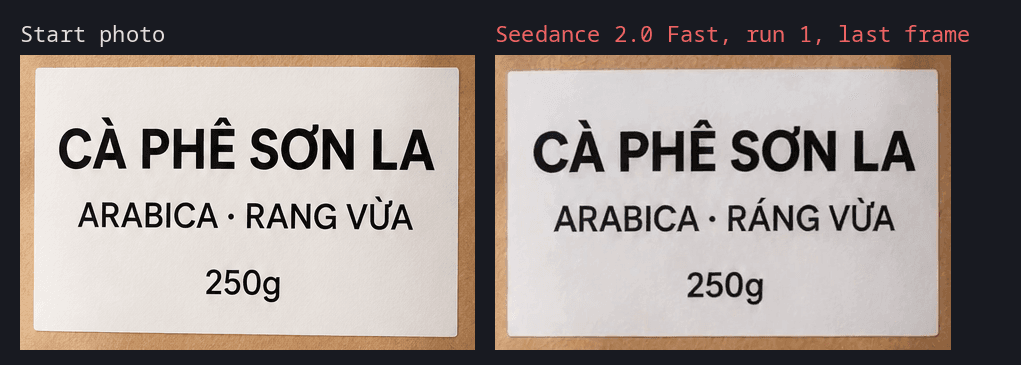
Seedance 2.0 Fast added an accent. From roughly the second second of run one, "RANG VỪA" (medium roast) became "RÁNG VỪA", a different word, and it stayed that way to the end. The letters stayed crisp, which makes it easy to miss: nothing looks broken unless you read the label.
Grok Lite bent the letters. On its second run it swung the camera further around the bag than on the first, and as the label turned away, "ARABICA" lost the shape of its B and the line squeezed together. The first run, with a gentler turn, kept every letter.
The pattern across the clips: the further the camera turned, the softer the label got. Gemini Omni turned furthest and still kept every letter, but the label ended small and slightly soft. If the label must stay legible, ask for a push-in or a small turn, not an orbit. That lowers the risk without removing it: Seedance's wrong accent appeared in a clip where the camera did not turn at all.
What it costs in practice
At one clip per try, the cheapest model here is Grok Lite at 5 credits. But "per try" is the wrong unit. If you must check every frame and redo one clip in two, a 5-credit model costs about 10 per usable clip, and a 12.5-credit model that keeps the label first time is not much worse.
Higgsfield's own guide to turning a photo into video prices a Seedance 2.0 clip of 8 seconds at 720p at 36 credits. Our 5-second Seedance 2.0 clip in Fast mode cost 12.5; the modes and lengths differ, so the two numbers are not a contradiction.
Credits on Higgsfield plans do not carry over to the next billing period, according to the terms. Spending leftover credits on test clips before renewal costs nothing extra.
What worked
What worked
- Quotes before submitting matched the ledger exactly on all eight clips.
- Kling 3.0 Turbo was the cheapest model that kept the label and did a visible turn in its one run, at 7.5 credits.
- The terms say the company "does not claim ownership of any of your Inputs or Outputs, nor does it restrict your commercial use of Outputs", which matters if the clip goes into an ad.
Where it fell short
What didn't work
- Seedance 2.0 Fast ignored the orbit in both runs and changed a letter in one.
- Grok Lite's wider turn in run two broke the label at the end of the clip.
- Kling 4.0 kept the text but reshaped the bag, turned the wrong way and took about 14 minutes.
- Five of six models returned an audio track we did not request. Mute it or strip it before you post.
- We ran most models once. Two repeats both turned up a difference, so treat single-run results, ours included, as a hint.
Our verdict
For product clips where the label matters, start with Kling 3.0 Turbo at 7.5 credits and a small camera move, and read the label in the last frames before you post. Use Gemini Omni Flash 1.2 when you want a bigger turn. Do not trust any model, cheap or not, on one run: in our test the same model passed and failed on the same prompt. If you want to try it, Higgsfield is here. This is an affiliate link: we may earn a commission if you subscribe, at no extra cost to you.
Frequently asked questions
How much does Higgsfield image to video cost?
In our test on the Plus plan, a 5-second 720p clip from one photo cost 5 credits on Grok Video 1.5 Lite, 7.5 on Kling 3.0 Turbo, 11.25 on Gemini Omni Flash 1.2 and Kling 4.0, and 12.5 on Seedance 2.0 Fast and MiniMax H3 Max. At 49 USD for 1,000 credits, that is 0.25 to 0.61 USD a clip.
Does image to video cost more than text to video on Higgsfield?
Not on the two models we could compare. Grok Video 1.5 Lite and Kling 3.0 Turbo charged 5 and 7.5 credits for a 5-second 720p clip from a photo, the same as from text in our 2 Nov test.
Will the text on my product stay readable?
Usually, not always. Six of our eight clips kept every letter in all 12 checked frames. One clip changed a Vietnamese word and one garbled a line as the camera turned; both came from models that got it right on another run. Check the product's shape too: Kling 4.0 kept the words and reshaped the bag. Check the last second of every clip.
Which Higgsfield model is best for animating a product photo?
In our one-label test, Kling 3.0 Turbo was the best value: 7.5 credits, a visible turn and a clean label. Gemini Omni Flash 1.2 turned furthest and kept the label for 11.25 credits.
Can I use Higgsfield clips in ads?
Higgsfield's terms say it does not claim ownership of outputs and does not restrict commercial use of them. Check the rights to the photo you upload yourself.
How this was made: Claude ran the test through Higgsfield's MCP tools, read the ledger, checked the frames and drafted this article; facts were checked against the linked Higgsfield pages with Gemini and by matching quotes in code. Sources are listed below the article.
Sources
- Higgsfield – Pricing explained: Plus $49 a month for 1,000 credits (read 7 Nov 2026)
Vendor page
- Higgsfield – Turning a photo into video: Seedance 2.0, 8 sec, 720p priced at 36 credits; credits confirmed on-screen before each generation
Vendor page
- Higgsfield – Terms of Use (last updated 23 Oct 2026): no restriction on commercial use of Outputs; subscription credits do not roll over
Vendor document