Gmail Send As Ends in January 2027: Who Is Affected
From January 2027 Gmail stops sending as addresses Google does not host and stops fetching other mailboxes over POP. Gmail aliases and Workspace addresses keep working. Which setups break, the case Google leaves open, and what to check now.
Gmail "Send as" stops working for addresses Google does not host in January 2027. If you read a Yahoo, Outlook, or company-hosting mailbox inside Gmail and reply from that address, both halves of that setup are going away: Gmail will stop sending as the address and will stop pulling its mail in over POP. Gmail aliases and Google Workspace addresses keep working.
Google announced the change on a Gmail Help page about third-party email account support, and the main Send as help page now opens with the same warning. It drew new attention this week after a developer who runs more than twenty domains wrote up, on 27 November, what it means for custom domains forwarded through Cloudflare (he also sells a paid replacement, so we use his piece only for the reading of Google's wording). This piece sorts the common setups into "affected" and "not affected", flags the one case Google's wording leaves open, and lists what to check before January.
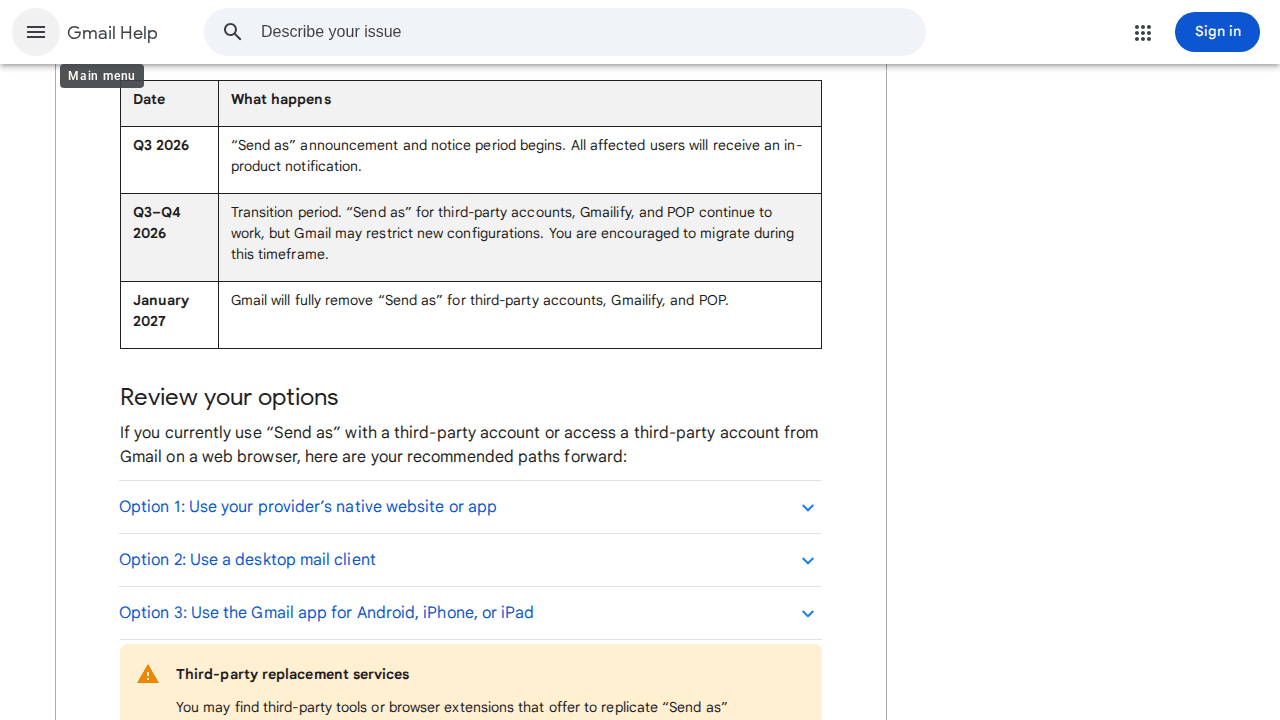
Image: screenshot of Gmail Help, support.google.com, credit Google.
What Gmail removes in January 2027
Three features end at the same time, according to Google's page:
- "Send as" for third-party addresses. Google describes it as sending "from a third-party address, such as @hotmail.com, @yahoo.com, and others, using your primary Gmail account". After January you can no longer do this in Gmail on the web or in the Gmail mobile apps.
- Gmailify, which applied Gmail's spam filtering and inbox organization to another provider's account.
- "Check mail from other accounts", the POP fetch that copies another mailbox into Gmail.
Google gives its reason in one line: these are features "that require disproportionate maintenance resources". The timeline has three steps. The notice period began in Q3 2026, with an in-product notification for affected users. Q3–Q4 2026 is a transition in which existing setups still work "but Gmail may restrict new configurations". In January 2027 Gmail will "fully remove" all three.
That middle step matters now. If you were planning to add a new Send as address in December, Google says it may already refuse.
Is your setup affected?
A Gmail send as alias survives only if Google hosts the mailbox behind it; what the address looks like does not matter. Google keeps Send as "for any Google-hosted identities, including other Gmail addresses or aliases associated with your Google Workspace account".
Mail you already imported stays in your inbox. Google's FAQ says "Any messages you've already imported from a third-party account into Gmail will remain in your mailbox."
The last row is easy to misread. The Gmail mobile app keeps letting you add a non-Google account and use it as its own inbox. What ends is sending as that address from your Gmail account, in the app as well as on the web.
The open case: your own domain, sent through smtp.gmail.com
A popular free setup for a personal domain works like this: a forwarding service such as Cloudflare Email Routing sends mail for [email protected] to Gmail, and Send as replies through Gmail's own SMTP server, smtp.gmail.com, so no other mail host is involved.
Gmail send as with a custom domain set up this way is the case Google's page does not mention. The developer who wrote it up concludes it is affected, because the address "is not hosted by Google, even if you set it up to send through smtp.gmail.com." That matches Google's wording, which keeps Send as only for "Google-hosted identities" and calls Workspace the option for custom domains. Our reading is the same: plan as if this setup breaks in January, and treat it as a bonus if it survives.
What to check before January
- In Gmail on a computer, open Settings, then "See all settings", then the "Accounts and import" tab.
- Under "Send mail as", list every address that is not @gmail.com. Any address whose mailbox is not hosted by Google (Gmail or Google Workspace) is on the removal list.
- Under "Check mail from other accounts", list every mailbox Gmail fetches. Each one stops in January.
- For each fetched mailbox, set up forwarding to Gmail at the original provider instead. Google confirms in its FAQ that auto-forwarding "is independent of Gmail's 'Send as' feature and does not affect it."
- Pick how you will reply from each address. Google suggests three paths: the provider's own website or app, a desktop mail client with IMAP/SMTP, or the Gmail mobile app with the account added. For a business domain, Google also points to Google Workspace.
- Be wary of browser extensions or services that promise to bring Send as back. Google warns they "often require access to your email credentials or OAuth tokens".
If you only read forwarded mail and never reply as the other address, step 4 is enough. If you reply often, a desktop client such as Thunderbird or Apple Mail connected to the domain's SMTP server does what Send as did, outside Gmail.
What is still unclear
Google has not given an exact day in January 2027, and it has not said whether a domain forwarded to Gmail and sent through smtp.gmail.com counts as third-party. It has also not published how many users rely on these features. We will update this article if Google adds detail to its help pages.
How this was made: an AI (Claude) read Google's two Gmail Help pages and the EmailFast write-up, and wrote this summary; the setup table and the reading of the smtp.gmail.com case are our own. Quotes from Google were checked word for word against its pages on 29 November 2026.